PPV loading size (15)
Hey Jordan
Great to see the forum going live!
I have accounts at all the major PPV networks. I have a question about PPV page loading times. Do you have a rule of thumb for maximum size of PPV pages?
My own split test results haven't shown loading time as a significant variable, but Im pretty sure some other variable(s) must have caused this.
Thanks in advance!
Cheers
Durden
I'm not sure about the other networks, but TrafficVance pops' overall size is 800x600, with the inside window size ~770x450 or so. The usable size varies from user to user, though.
I design my pages w/ a width of 750px and keep anything I want above the fold to 400px.
If you're really curious what you have to work with, it's relatively easy to write some javascript/php to fire a pixel w/ the inside window res and log it. I'll see if I can dig up my script and post it.
here are a couple of links with the detail you need:
http://blog.clickbooth.com/2010/07/2...age-ppv-ready/
http://insideaffiliate.net/size-matt...ge-dimensions/
Here's a somewhat related tip: If you use Firefox, get Firesizer; you can instantly resize your browser window to any size you specify with a click to preview your landing page.
 Originally Posted by kyleirwin

Thanks guys! Appreciate it.
Found this:
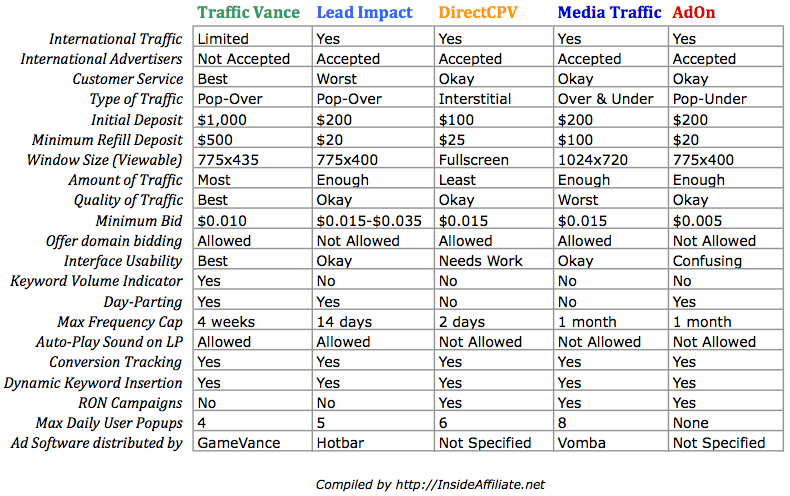
Source: http://insideaffiliate.net/the-big-5...-a-comparison/
Hey Durden,
I've never split tested loading times, but the smaller your landing page is in filesize the better! I just looked at some of my landing page sizes and the images are usually 60-75kb. If your filesize is to big, it could really mess with your conversion rates... viewers close those popups FAST. You need to have it load before they even think about closing it.
As for size, i'd say the best reference is http://insideaffiliate.net/size-matt...ge-dimensions/.
To keep it simple though, make sure your most important stuff is above the 400px vertical line most importantly your headline & call to action!
Another huge thing to improve load times is to put all your static content on a CDN, such as Amazon CloudFront. It will serve the file from the server location physically closest to the user for the lowest latency possible. Most people don't realize it, but latency is usually more time consuming that the actual file transfer time. Using a CDN also has the side benefit of taking the load of serving the files off your server, which is a great benefit to have for ppv.
Good tip kyleirwin. Seems Amazon's prices are fair:
Data Transfer
* $0.150 per GB - first 10 TB / month data transfer out
* $0.100 per GB - next 40 TB / month data transfer out
* $0.080 per GB - next 100 TB / month data transfer out
* $0.070 per GB - next 100 TB / month data transfer out
* $0.060 per GB - next 250 TB / month data transfer out
* $0.050 per GB - next 250 TB / month data transfer out
* $0.040 per GB - next 250 TB / month data transfer out
* $0.030 per GB - data transfer out / month over 1,000 TB
Requests
* $0.0075 per 10,000 HTTP requests
* $0.0100 per 10,000 HTTPS requests
Yeah, it's very affordable. The cost is a non issue relative to traffic costs.
Originally Posted by Durden
What does "offer domain bidding not allowed" mean ?
It means you can't pop the same offer on the offer's domain.
For example you can't pop a true.com offer on the true.com url.
Originally Posted by stackman
what is the ideal load time? Under 1 second on http://gtmetrix.com/ or http://tools.pingdom.com/ or http://whichloadsfaster.com/?
Is 1 second too long for ppv specific?
as fast as possible. i use 50kb as the cutoff myself, and try and use plain text rather then graphics whenever I can.
the faster you can grab the users attention the better!!
Home > Paid Traffic Sources > POP / PPV / Redirect