Day 9: b)Verifying Tracking Etc. (22)
***********************************
ACTION & EXPLANATION
This will be a short lesson. The aim is to verify that all our tracking links are working correctly.
In the previous lesson, we've set up our first campaign on PropellerAds. Then we need to wait for the campaign to be approved by reviewers. This can take anywhere from a couple of minutes to a few hours.
I would urge you to check every 15 minutes to half an hour (if possible) to see whether the campaign has been approved and you've started receiving traffic. This is how you know if your campaign is approved:
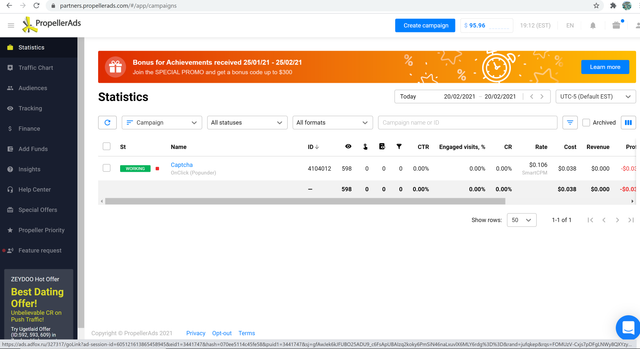
Log into PropellerAds > click on "Statistics" in the left menu > find your campaign > look at the "St" column. If you see "working" then it means your campaign has been approved and that traffic is flowing (or is about to):

When you see this, you're ready to proceed to the rest of this lesson.
*****
 Verify Traffic is Going to the Right Offer(s)
First, we need to verify that the traffic is going to the intended offers! You'd be surprised at how many new affiliates (and even some veteran affiliates occasionally) would mess up tracking - and have all the traffic end up in lala land.
You're not required to do this verification for every single campaign you run, but doing this before you're 100% confident in your ability to set up tracking correctly can save you money and grief.
There are two ways to perform this verification.
1)Check Affiliate Network Dashboard Stats
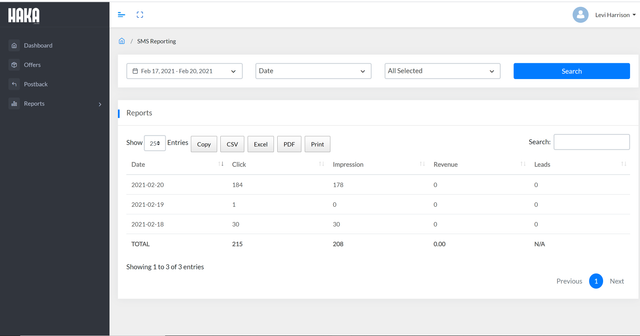
-Log into Haka > "Reports" in the left side menu > "SMS Stats".

(Note: The type of offers we're running is called "Click2SMS". Therefore stats for this offer type would be listed under "SMS Stats".)
-Define a date range to include the days you've been running traffic (a bigger date range than necessary is OK). Make sure all the data headings are selected (Click, Impression, Leads, Revenue) and click "Search".

-You should see one or more entries in the "Impressions" column.

This is the number of times the Haka offers have been viewed by visitors from your PropellerAds campaign. And this means the traffic is reaching the actual Haka offers.
Haka's reporting is actually pretty primitive - it doesn't show you how much traffic was received by each individual offer like most other affiliate networks do. For other networks, you should verify that ALL of the offers you're sending traffic to, are actually receiving the traffic, i.e. they should all be showing up on the affiliate network dashboard with corresponding number of impressions/clicks.
Note that by checking Haka's dashboard stats in this way, we'd only be verifying that SOME of the traffic has made its way to one or more Haka offers. Meaning, we could have set up one of more of the Haka offers incorrectly, but as long as we've set up at least one of the offers correctly in the tracker, we'd still see a number in the "Impressions" column.
To be safe, do the following checks:
a)Go to the PropellerAds dashboard ("Dashboard" from left menu), specify the appropriate date range, select the "Campaign" tab and look at the number of impressions your campaign has received. Compare this to the number of impressions logged in Haka. The number from PropellerAds will likely be higher than the one from Haka due to clickloss (we'll cover that topic later), but if Haka's number is 70% of PropellerAds' number or higher, then all is probably well.
b)Remember how you added the Haka offers to your tracker? Go back into the offer settings in the tracker to check the offer link for ALL the Haka offers, to ensure you've copied and pasted the affiliate links from Haka correctly, AND appended the correct tracking tokens to each. You already verified that Haka has been receiving impressions, so you know that at least one of the tracker offer links was set up correctly. So just make sure you haven't set up one or more offer links incorrectly (e.g. by forgetting to append the tracking tokens like you did for the other offers).
2)Manual Verification of Tracker Campaign Link:
Here is yet another check you can do. Actually, you can perform this check even BEFORE actually running traffic - you can do this as soon as you've created a campaign in your tracker.
And since Haka doesn't tell you which much traffic each offer is receiving, this manual verification method is the only way to tell whether traffic is being directed to all the offers you're rotating in the campaign.
The check is simple: Just take your tracker campaign url, load it up in your phone's browser, and repeat maybe 3 times as many times as the number of Haka offers you're testing in the campaign. So if you're testing 7 Haka offers, then load the campaign url 21 times to make sure you're seeing each offer at least once or twice.
Why check in a phone browser and not on desktop? Because these Haka offers only allow mobile traffic. When checking offers manually in this manner, you need to be mindful of what type of traffic the offer will accept. We're fortunate that these Haka offers accept world-wide traffic. Most offers only accept traffic from a certain geo, in which case we would need to install a VPN (I use HMA and this thread contains more recommendations from members) and use it to change our IP to "fool" the affiliate network into thinking we're surfing from the allowed target geo, so that we'd be allowed to access the offer page. Otherwise, most affiliate networks have what's called "geo-redirection", which is a feature of their system that will automatically identify if a visitor is not accepted by the offer and redirect them to another offer - one that DOES accept the visitor (their geo, device, browser, mobile carrier etc.)
Another quick note about manually testing either the campaign url or the offer link to access an offer page: For offers that only accept carrier traffic and NOT wifi traffic, even by using a VPN you may not be able to access the offer - you may get redirected by the network's geo-redirection function. This is because VPNs typically use wifi IPs, not mobile carrier IPs. To mask yourself with mobile carrier IPs, you would need to use a service like Adplexity Carrier. Or, you could pay someone on Fiverr who actually lives in that country AND has a data plan with the mobile carrier to test the link for you and send you screenshots of the offer page. But I wouldn't go either of these routes unless I have a really profitable campaign on my hands, and I absolutely need to see what the offer page looks like so I could create customized landing pages for it or something.
Another good check you can do: Thanks to @jeremie who figured this out - Haka has a postback testing tool in their postback section that you can use to verify all the tracking links are working correctly (including your offer and postback links). Please follow the instructions in this post:
https://stmforum.com/forum/showthrea...l=1#post407120
*****
Verify Your Tracker Conversion Postback Was Set Up Correctly
Above, we went to Haka to check their stats. Go back to those stats to check the "Revenue" and "Leads" columns to see whether you've made at least one conversion.
At the time you're reading this, your campaign may or may not have made it's first conversion. If it hasn't, then just keep checking Haka stats periodically until you do see a conversion, and then do the check described below.
Once you do see at least one conversion, check your tracker stats to confirm that you're seeing the same number of conversion(s) show up there too (in the column "Conversions" or "Leads" or "CONV" depending on the tracker).
If so, it means your postback url was set up correctly. Congratulations!
But if you're seeing at least one conversion in the Haka dashboard stats, and no conversions in the tracker, it means you've set up the postback incorrectly - either your postback url at the aff network is wrong, or you've appended the wrong tokens to the end of your offer link before adding it to the tracker.
If you're seeing conversions in BOTH the Haka stats AND the tracker, but the numbers are different, then there's either a delay in the aff network posting back to the tracker, or there are other issues at the aff network. Wait an hour for the update to catch up. If the problem persists, checking with your AM may be a good idea.
*****
Verify Your PropellerAds Conversion Postback Was Set Up Correctly
Only do this check if you see at least one conversion in the Haka dashboard, AND the conversions are also showing up in your tracker - because the tracker can only post conversions back to the traffic source AFTER the affiliate network posts conversions to the tracker successfully.
And when you see conversions appear both in Haka and in your tracker, log into PropellerAds > go to Dashboard from the left menu > specify an appropriate date range and click "Set" > select the "Campaign" tab > look at the "Conversions" column. If you see the same number of conversions there, then your PropellerAds postback was set up correctly as well. Again, congratulations!
But if you're seeing at least one conversion in the Haka dashboard stats, and no conversions at PropellerAds, it means you've set up the postback incorrectly at the tracker.
If you're seeing conversions in BOTH tracker stats AND PropellerAds' stats, but the numbers are different, then there may be issues with your tracker. Trackers typically post conversions to traffic networks pretty quickly, but wait 15 minutes just in case. If the issue persists, check with tracker support.
*****
Start a Campaign Journal
It's important to develop good habits early on - and one of the best habits you can have, is to keep a Campaign Journal.
I must be one of the laziest people, so I don't like doing anything that's not absolutely necessary, but I keep campaign journals. Why? Because when I'm running lots of campaigns, after a few days I wouldn't remember when I made which changes to which campaign.
As a result, I would repeat certain tasks several times or forget to do others. You probably have a much better memory than I do, but trust me, once you have more than a few camps running at the same time, it WILL get confusing - and frustrating to keep track of everything in your head.
Here is an example of a campaign journal spreadsheet you can download. Feel free to edit it to suit your needs:
https://www.dropbox.com/s/tnye3khi7a...rnal.xlsx?dl=0

You can start one of these files per month, and start one tab per traffic source.
What you can do is start a row for each campaign you create, then insert a new column to the right of the "Campaign name" column for every day you check your stats. If you check and optimize your campaign multiple times a day, you can either create multiple columns for the day and include the time of day in the column heading along with the date, or just write several entries within the same cell, for example:
2pm - Cut offer 2468 - reached stat sig [note: = statistical significance]
9pm - Cut placement 54321, >2x payment in loss.
*****
That's all for now! In the next couple of days, we'll go into detail all the campaign options on PropellerAds for pop traffic, as well as learn the basics of campaign optimization. Exciting and practical stuff!
Amy
Linked to @jeremie's post with instructions on how to use Haka's postback test function.
Amy
@vortex - First I would just like to thank Amy for her detailed posts, amazing information. I have loaded my offers into propeller ads and running for about 24 hours. Getting a lot of impressions but no clicks or conversions and figured I should test to make sure my links are working.. When trying to test the links on my mobile phone this is the Error I am getting.. Any advice would be helpful as I can't seem to find the error.
invalid_host: the domain used for this link does not belong to the owner of this funnel, there may be a mismatch, otherwise check your domain settings
 Originally Posted by jemehl


I have some questions for you:
1)Are you sending traffic directly to the offers (i.e. direct-linking) or using landing pages?
2)Which tracker are you using?
3)When you said you were testing the links did you mean the offer links? Or the tracker campaign links? If offer links, were they the original links from the affiliate network, or the modified links you've put into the tracker?
4)Do the offers allow mobile traffic? If so, wifi or carrier?
Amy
Originally Posted by vortex
1) Direct-Linking
2) FunnelFlux
3) I was trying to test the tracker campaign links from funnelflux.. The link I got after creating the flow on funnelflux and selecting Propellerads as my traffic source.
4) The offer is worldwide and allows mobile traffic.. I tested on my phone with wifi on and off.
I also wanted to ask if the difference in impressions is a big deal? I'm noticing that propeller ads have significantly more impressions than Haka.
Originally Posted by cookiemonsta
https://stmforum.com/forum/showthrea...finitive-guide
Amy
Cool thank you!
Originally Posted by jemehl

Can you please PM me the offer link and the funnelflux campaign url?
Also: You can try to browse directly to your offer link from your phone. If that works and the funnelflux url doesn't, that means something's wrong with your tracker setup.
If that's the case, we can do some troubleshooting - please post screenshots of the following:
-Funnelflux > Affiliate Networks > your affiliate network's settings.
-Funnelflux > Offers > your offer settings
-Funnelflux > Traffic Source > propellerads settings
-Funnelflux > the actual funnel (the graphical one with the icons) including funnel settings
This post describes how to embed images in posts:
https://stmforum.com/forum/showthrea...-In-Your-Posts
Amy
@vortex
First, thanks for the comprehensive tutorial. I have a lot to learn, but I feel like once it "clicks" I'll be able to test my own strategies. Thanks for approaching the tutorial that way.
Question...I am running PropellerAds pop traffic to a single click offer from Mobipium. I have around 18k impressions so far (as I can see from PropellerAds, but I can't see anything on Mobipiums side. *I do not have any conversions at this point. Should Mobipium be showing the impressions or will they only show conversions? Where should I begin to troubleshoot?
I am using FunnelFlux, Direct-linking, PK is the GEO, Carrier-billing, 1 Click
Originally Posted by dobberz82
Were you able to get this resolved?
If visitors were sent to the Mobipium, you should see them show up as "clicks" on the "Stats" page (Mobipium left menu) within Mobipium.

If you're direct-linking, the amount of "clicks" in Mobipium should be similar to your 18k impressions (but less due to clickloss). If you're using landing pages, the "clicks" on Mobipium should correspond to the number of clicks through the lander (again, after clickloss).
Please let me know if you're experiencing further issues!
Amy
Can you inform me, which url do i need to put in "choose your landing page URL " while setting up campaigns in popads?
I think I had setup wrong url or other mistakes have been done, because after spending 1.5 $ on a campaign I have no impression in haka SMS stats.
Originally Posted by abitaach
Originally Posted by abitaach
Did you follow all the lessons?
https://stmforum.com/forum/showthrea...s-(Funnelflux)
https://stmforum.com/forum/showthrea...nelflux)-Index
Amy
Originally Posted by kaizen502
It was in this lesson that I instructed to use the PropellerAds template, when adding this traffic source in Funnelflux:
https://stmforum.com/forum/showthrea...s-(Funnelflux)
Let me know if it doesn't work and we'll do some troubleshooting!
Amy
@vortex
thank you. I already updated my campaign on PropellerAds with a new campaign URL from FunnelFlux.
I am missing some of the costs in FunnelFlux for yesterday now, but I might try to update the costs manually to see how that works in case I make that stupid mistake again
Originally Posted by kaizen502
Amy
@vortex
no it does not persist after updating the campaign link. I refered to the missing costs before updating the link with the cost parameter. I updated the costs manually in FunnelFlux and it worked.
Thank you for your help Amy!
Originally Posted by kaizen502
Amy
Originally Posted by darkeye
Let's do some troubleshooting:
1)Did any conversions register in Haka's stats (i.e. when you log into Haka's interface) while you were running on PopAds?
2)Can you please show me the following urls (if you don't want to post them here in public, please PM them to me and update this post letting me know to check for your PM):
-Global postback url from funnelflux
-The "edited" funnelflux postback you added to Haka
-The original affiliate offer link from Haka
-The "edited" offer link you saved into Funnelflux as a new offer
-The postback url you got from PopAds, and the "edited" PopAds postback you saved in Funnelflux
-Screenshots of all traffic source settings for PopAds within Funnelflux (General Settings, Tracking Fields, and Conversion Tracking)
-Screenshots of offer sources settings for Haka within Funnelflux (General Settings, Configure Data Passing)
-A screenshot of the specific Haka offer in Funnelflux, but only the "Configure Data Passing" section (if you want to hide the "Resulting Offer URL" from public, just don't include it in the screenshot, and send it to me via PM)
-The destination url you put into PopAds
Thank you!
Amy
Hi @vortex, thanks for the kind reply. I will shoot it here directly, it may possibly help the others
Originally Posted by vortex
2.)
a) Global postback url from funnelflux
b) The "edited" funnelflux postback you added to Haka)
https://vortex-stm.com/pb/?hit={keyword}&rev={payout}
http://offers-haka.com/click?hash=31861&pid=2479&aid={your_source_id}&keyword={your_click_id}&keyword2={app_name/site_name}&keyword3={your_session_id}
http://offers-haka.com/click?hash=31861&pid=2479&keyword={hit}&aid={trafficsource-id}
- PopAds postback
- edited" PopAds postback you saved in Funnelflux
http://serve.popads.net/cpixel.php?s2s=1&aid=a1969549de9d5b4fa85270231f1cdd39&id={external}&value={payout}
the postback url you got from PopAds, and the "edited" PopAds postback you saved in Funnelflux
https://vortex-stm.com/fts/16WJvxmS2...W4Qu?campaign=[CAMPAIGNNAME]&external=[IMPRESSIONID]&screen_res=[SCREENRESOLUTION]&country=[COUNTRY]&category_id=[CATEGORYID]&formfactor=[FORMFACTORNAME]&quality_score=[QUALITY]&isp=[ISPNAME]&adblock=[ADBLOCK]&device=[DEVICENAME]&category=[CATEGORYNAME]&ispid=[ISPID]&publisher=[WEBSITEID]&bid=[BID]
h)
The destination url you put into PopAds
https://vortex-stm.com/fts/16WJvxmS2...W4Qu?campaign=[CAMPAIGNNAME]&external=[IMPRESSIONID]&category=[CATEGORYNAME]&publisher=[WEBSITEID]&formfactor=[FORMFACTORNAME]&quality_score=[QUALITY]&country=[COUNTRY]&isp=[ISPNAME]&screen_res=[SCREENRESOLUTION]&adblock=[ADBLOCK]&ispid=[ISPID]&device=[DEVICENAME]&bid=[BID]&category_id=[CATEGORYID]
Apologies for the late reply - missed this somehow!
Thank you for providing all the details in such an organized manner!
2 things:
1)There's an inconsistency in which Haka variable you're associating with the Funnelflux's {hit} parameter. In the links you inserted into the post above, you used {keyword}, but in the screenshots you were using {keyword3}. It's OK to use either - as long as the variable is the same in a)Funnelflux's offer source data configuration, b)Funnelflux's offer data configuration, and c)the Funnelflux postback you inserted into Haka.
2)If no conversion data registered in Haka's dashboard, then you won't see any conversion data in Funnelflux either - because there'd be no conversions for Haka to post back to Funnelflux. Perhaps you need to run a bit more traffic to get your first conversion - only after that will we know whether the postbacks (from Haka to Funnelflux, and optionally from Funnelflux to PopAds) are working correctly.
Hope that helps! Please let me know if you have further questions.
Amy
Home > >