Setting up SSL/HTTPS domains in Binom automated and for free (2)
Setting up SSL/HTTPS domains in Binom automated and for free
Recently it became more important to use secure links (HTTPS) for your campaigns.
You can read more about it in this THREAD
HERE matuloo already shows how to setup SSL/HTTPS in
Unluckily it costs $49/month additional to the tracker costs.
HERE erikgyepes shows how to setup SSL/HTTPS on Cloudflare and ServerPilot.
I will not go deep into details about SSL/HTTPS because you can read about it in the other threads already.
But I will show you how to set up SSL/HTTPS in
Binom uses LetsEncrypt for the SSL certificates, it´s free for as many domains as you want to and you don´t have any additional work with it.
A few information about Binom so that you understand the process better.
Binom is a self-hosted tracker and to get the automated SSL/HTTPS setup running you need to install Binom from the 1-Click Installer.
To run the 1-Click Installer just connect to the server through Putty/console, it´s really easy and only takes few minutes to get the whole server installed automatically.
To get the automated SSL setup running it´s important that the DNS propagation is finished and the domain is already connected to your server.
To add domains to Binom you connect to the server with Putty/console, the process for landing page domains and tracking domains is pretty similar.
Let´s start with tracking domains:
When you are connected to the server as Root you execute command
bash binom_install.sh trackdomain
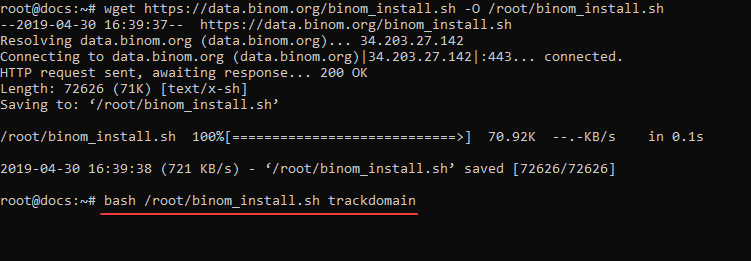
Then you choose option 1 to add a new domain.
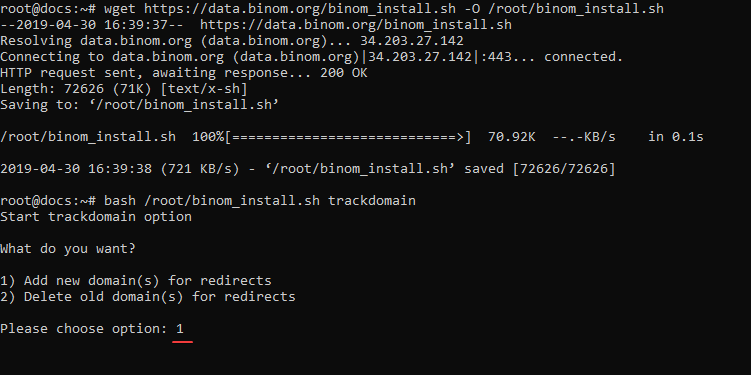
Enter your email for SSL notofications, then you enter the domain name and that´s all.
You now have added a SSL/HTTPS domain to Binom and it all takes only about a minute.
But it gets even better, you can also add more than one domain at once, just enter the domains space separated and add several domains with SSL/HTTPS without any additional work.
When the SSL setup is not working because DNS propagation is not finished yet or when you want to add SSL to an already existing domain in Binom just enter command
bash binom_install.sh trackdomain
And instead of option 1 to add a domain choose option 2 to delete a domain.
Then just follow the steps above and your SSL is added.
Now let´s go to landing page domains.
To get the automated SSL setup running you need to have the landing pages saved on the same server.
Then the process is the same as for tracking domains, only the command to add the domains is little bit different.
Enter command
bash binom_install.sh lpdomain
Then choose option 1 to add a new domain, enter your email for SSL notifications, enter your domain name (or domain names when you want to add more) and that´s all.
When you have added your domains go to your tracker and click the domain tab.
Then you see your custom domains, activate the SSL switch and you use your domains with secure connection.

I can imagine that the work with console can be little bit daunting for people who never worked with it before.
But it´s really easy, if you have any questions about it just ask.
One more thing, on the screenshot with the custom domains you see the "Check ban" button.
With that button you can check if your domains are flagged or not.
One click to check all your domains at once.
Thanks for great review, Twinaxe!
Also I would like to note that in case of any difficulties (or if you simply have no time for all the technical stuff in console) you can always write to
Home > Tracking Campaigns > Binom