2 Dead Simple Ways How to Setup 🔒 SSL/HTTPS for FREE with CloudFlare/ServerPilot (8)
2 Dead Simple Ways How to Setup 🔒 SSL/HTTPS for FREE with CloudFlare/ServerPilot
2 Dead Simple Ways How to Setup 🔒 SSL/HTTPS for FREE with CloudFlare/ServerPilot

I would like to extend on Matej's tutorial on How to enable SSL/HTTPS for your campaigns with VOLUUM
.
Both our posts are reaction to Amy's (@vortex) post https://stmforum.com/forum/showthread.php?40839-2-lessons-learned-by-advertizercom-pay-special-attentiom-to-tip-2.
TIP #2 was about: How enabling HTTPS/SSL could improve performance, especially on iOS devices.
Whether it's fact or not you will have to test yourself.
What is fact though is that Chrome and other browsers are coming out with updates where they show red Not secure warnings if you are not using HTTPS.
It's already out on Safari.
Google Chrome is rolling it out next month.
And as we affiliates care about every % of ROI we can squeeze and hate all kind of flags, bans and other limitations, I think it's good reason to figuring this out.
In this part I would like to talk about 2 easy ways you can get "FREE" SSL for your domains without any special technical skills.
The setup I'm going to describe can be done in a couple of minutes just by clicking a few buttons.
CLOUDFLARE
You probably know it already.
CloudFlare is one to go place for setting up a domain's DNS and getting CDN like caching features and some DDOS attack protection.
The great thing about CloudFlare is that you can get free SSL for your domain.
All you have to do is enable the ORANGE CLOUD and your domain will be working with https:// in a moment.
Be cautious though, by enabling the orange cloud you are also routing all your traffic through CloudFlare and therefore getting full arsenal of their caching services, so there are few changes that have to be done.
But let's get to it step by step:
- Login to your CloudFlare account
- Setup a new domain like usually (don't forget pointing your NS (nameserver) records to CloudFlare
- Once you get to the DNS create a new A record for your domain
- Set name to your domain name and value to your server's IP address.
- Make sure to click the orange cloud (otherwise you will be just using their DNS service without the ability to have free SSL, this can be turned on/off anytime though)

Once you are done with these steps, let's get to the special setup part (I borrowed this setup from @zeno, who is using successfully the exact same settings for FunnelFlux tracker):
- Go to the Page Rules Section
- Click on Create Page Rule and add the following rule:
- URL match: *mydomain.com/*
- Browser integrity check: Off
- Cache Level: Bypass
- Security Level: Essentially Off
You are done!

The above setup is quite important as by enabling the orange cloud you are proxying your traffic through CloudFlare.
What that means is they enable full arsenal of their caching and protection services.
Potential risk could be for example if you are sending ton of pop traffic to your domain and CloudFlare will detect this as DDOS attack, which wouldn't be a nice thing.
So keep this in mind and do your own testing if this particular setup works for you.
If anyone have better setup configuration, please let us know below!
OK, this would be the first way.
Let's checkout the second way to get free SSL.
SERVERPILOT
Okay, this is not really free as you have to pay for ServerPilot.
It's free though if you are already using ServerPilot and you need quick and easy SSL.
What is ServerPilot?
It's basically a minimalistic control panel for your VPS.
Let's say you create a VPS with DigitalOcean, but you know nothing about managing servers, SSH/shell and linux commands.
No problem! Just connect your VPS to ServerPilot and it will take care of installing PHP, MySQL databases, setting up your domains, SFTP accounts, server updates .... and free SSL certificate!
They call it AutoSSL, and all you have to do is just enable it and ServerPilot will take care of the rest.
I fell in love with this service, since I could fire up servers wherever around the world and have them automatically setup in couple of minutes.
Let's see what would be the setup:
- Login to you account
- Choose connect a server (if you are connecting new VPS server)
- Or just click on any of your servers and navigate to Apps -> Select your app (domain) -> Navigate to SSL
- Click on Enable AutoSSL
- Additionally you can also enable Redirect to https, which will redirect all your traffic to https version of your site.
- Wait a moment and you are DONE.
Easy as that.

So now you have 2 easy ways how to get SSL certificate for your domain, without big hassle and even for FREE!
It's up to you which way you will go, ServerPilot is convenient if you are already using their service for your VPS servers, CloudFlare on the otherwise is no-brainer if you use them for your domains already.
There are many more ways of course, if you use managed hosting, they will probably help you out with their solution.
Also don't forget to read Matej's post on how to setup SSL in Voluum.
If anyone have any recommendations feel free to post under, also if you use another tracker or setup, feel free to post a short guide how you did it.
It will be very beneficial for all our STM members!
Thanks and stay secure!

Erik
Very nice - thanks Erik!
Amy
Great stuff Erik, gonna post a link to this thread from my SSL/
Thanks for writing this additional tutorial Erik!
Would it be correct to say you wrote this specifically with tracking in mind?
I noticed in the Cloudflare section that caching is turned off (i.e. Cache Level: Bypass). If you were enabling HTTPS for *landers* you would probably want to leave that turned on?
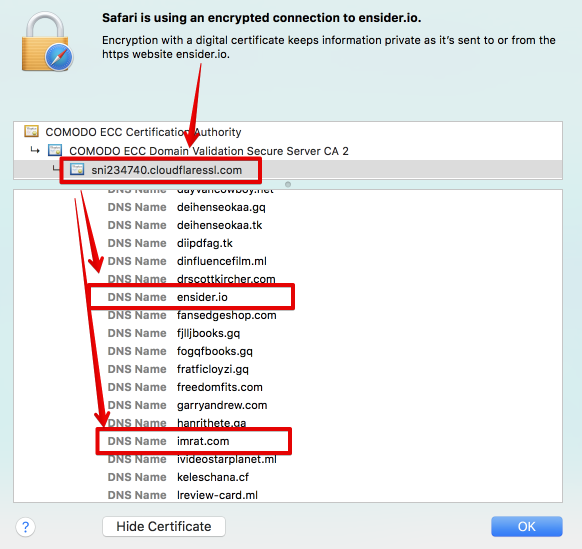
One thing to watch out for with CF is that the SSL cert can link the domains hosted within the account. So it may leak your other domains if someone is spying on you.
Basically SSL certs on CF are multi domain and shared across several domains assigned to the same CF SSL subdomain.
For example - two of my domains show up with the same cert:
Sent from my iPhone using STM Forums mobile app
 Originally Posted by realtalk

Caching is OK with static things like simple landing pages, but when it goes to some dynamic scripts, there may be potential problems.
Originally Posted by tijn
When I was messing up with the setup I used http://whynopadlock.com/ and there I could see those domains.
Not sure if this is something to worry about though? Your domain hiiden with a bunch of random domains on the list?
Hey erikgyepes,
thanks for the tutorial. Just to be sure, are you hosting your landers on Rackspace CDN, using Cloudfare for dns+ssl and cname them to rackspace url? Does that solve the connection is not secure error?
Thanks,
Ivan
Originally Posted by tijn
Home > General > Affiliate Marketing Forum