Facebook's in-house spy tool (aka View Ads) (37)
Facebook is testing a new "spy" tool for you -> View Ads.
It shows you most ads run by any facebook page.
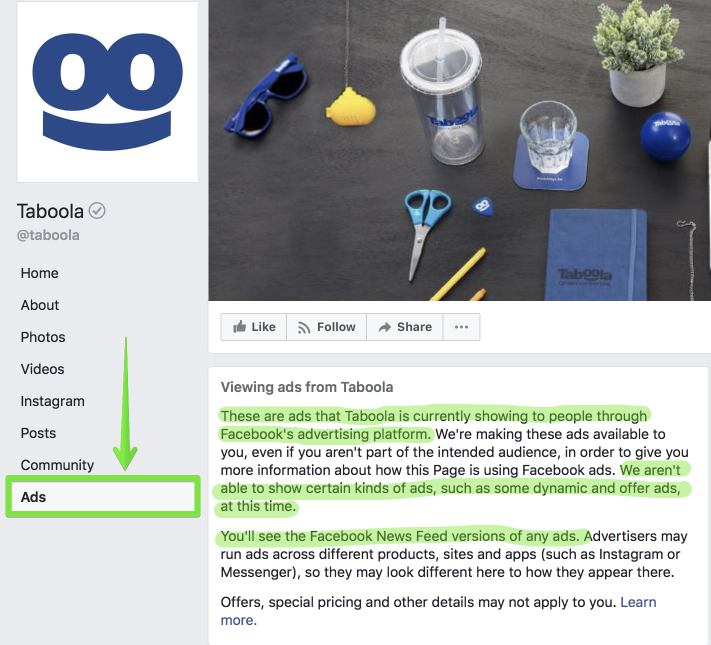
You dont need to wait till the feature is enabled for you - you can see it now. Anywhere.
This post shows you how you can see it.
ps. If you have a page you want me to check out - just post it here in a reply and ill post some screenshots.
First some background
The "view ads" tool is part of Facebooks effort to be transparent about who is running ads on the platform. It follows the Trump election challenges, and the Cambridge Analytica blow out.
@s0mekind posted about it last year - when it was tested in Canada.
It will be live in the US later this year.
https://newsroom.fb.com/news/2017/10...icity-efforts/
Where is "view ads" live?
Facebook have enabled the "View Ads" feature in Ireland because of the referendum on the 25th of May
They are under a lot of pressure due to some of the ad campaigns. So much that they as of today they wont be accepting referendum related ads from advertisers based outside of Ireland.
How to see it?
It is only available in Ireland as far as I know.
Here's how you can test it.
1 - make sure you're on a Irish IP - if you're not local - boot up your preferred VPN supporting Irish Geo
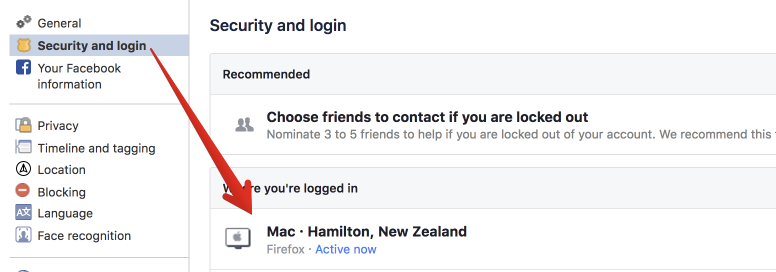
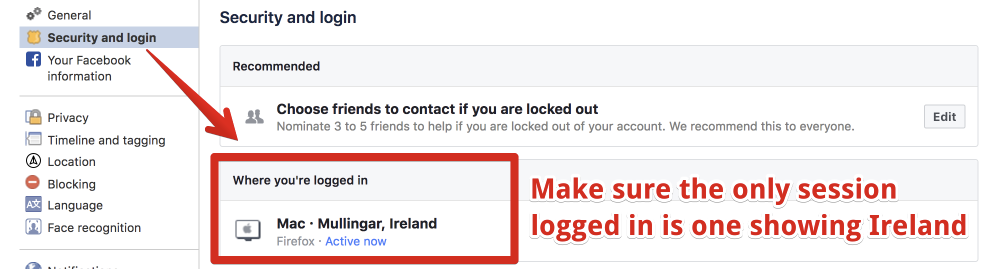
Note Facebook is pretty good at "remembering" your locations and open sessions. For example - with my mobile still logged into facebook via Dublin IP - even if I was on a New Zeland IP on my desktop - the "View Ads" option would still show. To properly clear your "Location" history - make sure your other sessions are logged out and cleared and the only session is one in Ireland. You may need to clear all browser data for facebook.com to achieve this. See the example in my reply below.
2 - Look for a sponsored ad in your feed that is from a facebook page
3 - Click on the page link (the one at the top above Sponsored)
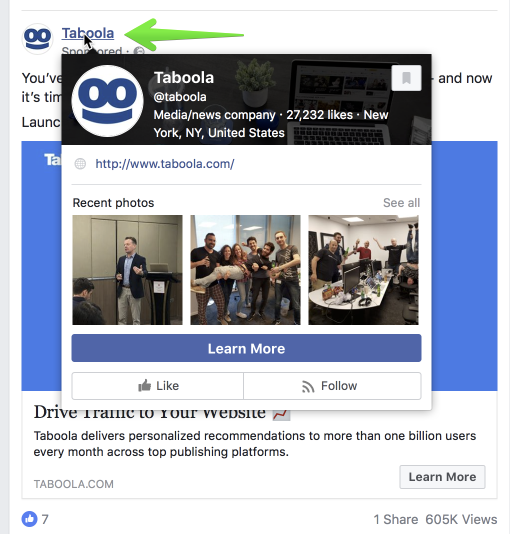
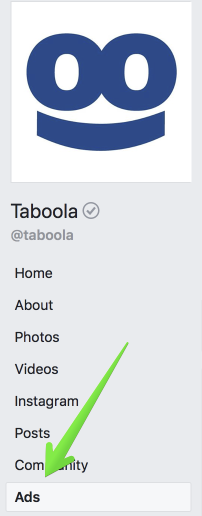
4 - Click on the "View ads" menu option on the bottom left sidebar
If your on mobile browser, the Ads option is on the right of the horizontal menu bar - all the way at the end.
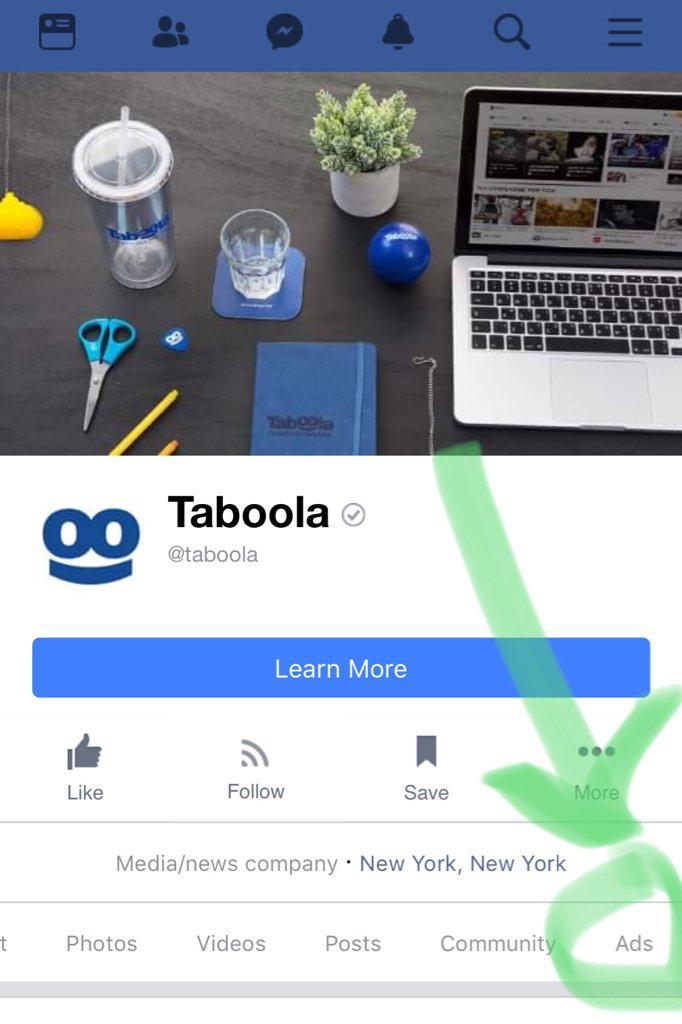
Ive not tried on the FB App as I dont have it installed.
ps if that link is not showing you should be able to append "/ads/" to the page URL to still see the page. Here are some examples:
https://www.facebook.com/pg/hubspot/ads/
https://www.facebook.com/pg/wpengine/ads/
https://www.facebook.com/pg/wpengine/ads/
NOTE You need a Irish IP to see these pages.
View ad engagement
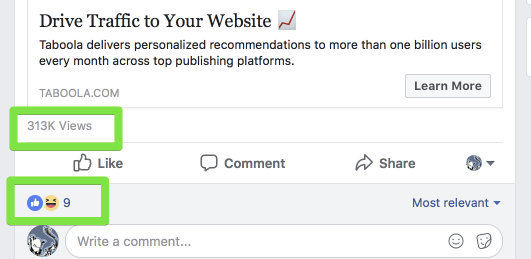
You may have noticed that the ads in the view ads list do not show the engagement on the ad.
But there is a hack for that.
To view the engagement of a sponsored post - you need to get hold of the post ID and then load it in this URL:
https://www.facebook.com/{PAGE}/posts/{POSTID}
In safari, press CMD+Shift+C - this enables the "select element" mode - then hover to the right of the "Sponsored" Line
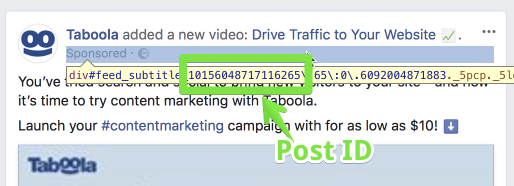
The highlighted section is the post ID - so just click the highlighted frame, then right click the code in the Dev tools - and you can copy it from dev tools like this:
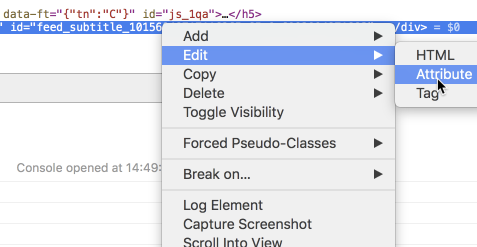
Then just copy the highlighted Number

Go to the FB page of the advertiser and add /post/{POSTID} to the URL
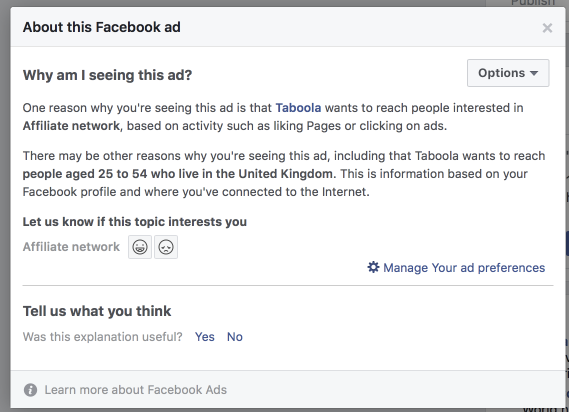
How to view Ad Targeting
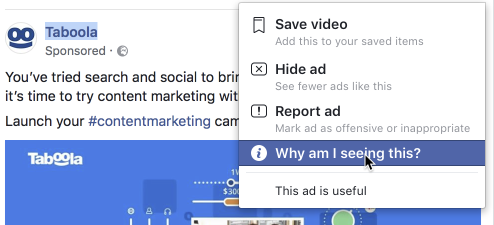
The View Ads page currently does not show you where the ad was targeted.
This option is only available for ads actually showing in your feed, by clicking the ... and selecting "Why am I seeing this ad".
Thats it for now. If anything changes Ill update this post, so make sure you subscribe to it.
Ps - anyone that knows how to code a decent browser extension? Create one that overlays engagement stats on the ads shown in the View ads page.
Slick, cheers Tijn!
Sent from my iPhone using STM Forums mobile app
Although I don´t run Facebook myself I think I am able to spot a valuable post.
Kudos
Very nice one, thanks!
thanks Tijn! Sick post!!
Great share Tijn!
Thanks tijn! Very cool share!
Sent from my iPhone using STM Forums mobile app
nice nice! I dont see it tho on my side currently. slowly deplying maybe?
 Originally Posted by ianternet

Pure gold, thanks!
Not been able to get this to work personally, even on residential Irish IP's, anyone else?

Updated - ok on desktop now - managed to see your screenshot.
Im using a VPN with AWS Ireland IP - 34.252.43.37

And here is wp engine.
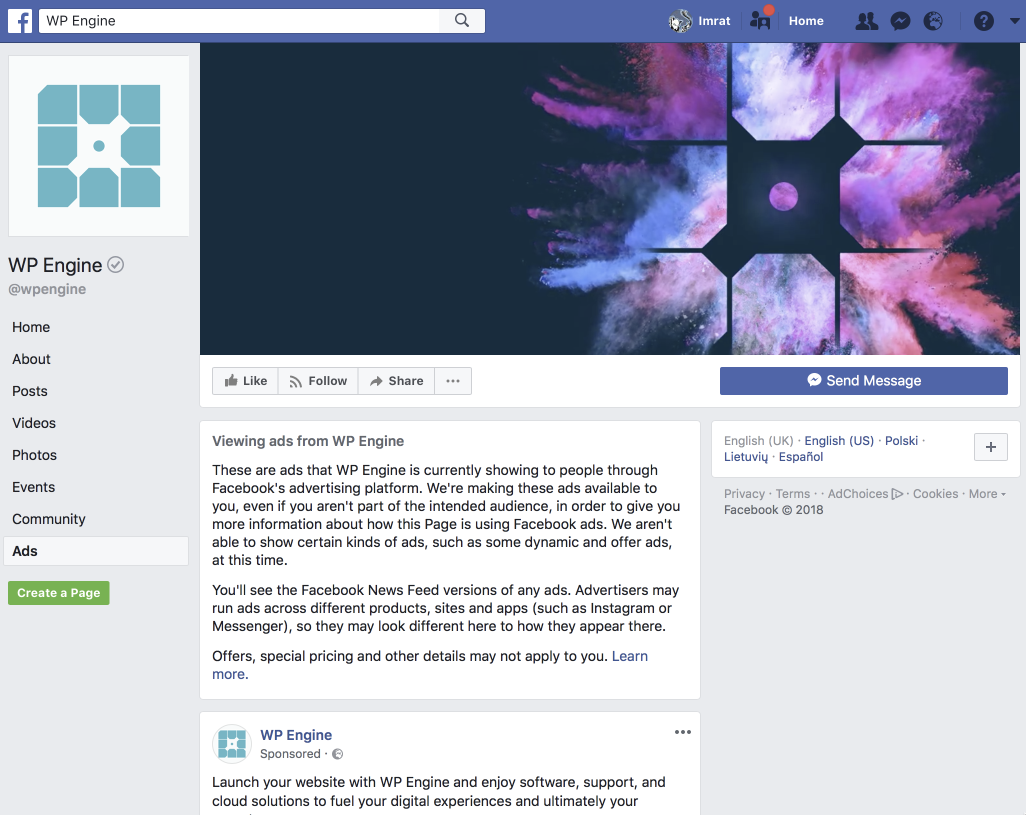
Interesting that it does not work for you.
Did you try appending /ads/ to the page url or use the ones I clicked from?
Boom 
Amazing mate, thank you so much!
*** I do see the Ads part but not manage to add the reach, with safari.
example: https://www.facebook.com/boredpanda/...56593107024252
Awesome!!!
This is really genious!
Unfortunately it didn't work for me either.
Tested it with VyprVPN and HMA.
Are you sure it's just matter of the IP?
Pretty sure as I cant see it without enabling the IE vpn.
Ill try with Vyper later see it i can still see it
Without VPN no Ads

With IE vpn seconds later

And some of the ads showing in Ads tab

Tested it again, this time on mobile. Still same results, strange.
Originally Posted by erikgyepes
Could you check your security settings?
Update
I then tried changing back to Ireland. This was not working initially even with login logout - still showing me in New Zealand. Facebook stores your current session location in a cookie / local storage - so I had to clear browser data. Once that was done and I logged in while on Ireland IP - Ads option showed up again
Oh facebook your making life so much fun
Now showing where pages are managed from, and other historic data.
Read the full twitter thread below for details.
It disabled again right now - but will probably launched in US in about a months time. With it they also disabled the View Ads test. (Update Looks like View Ads is back, but Page History still gone)
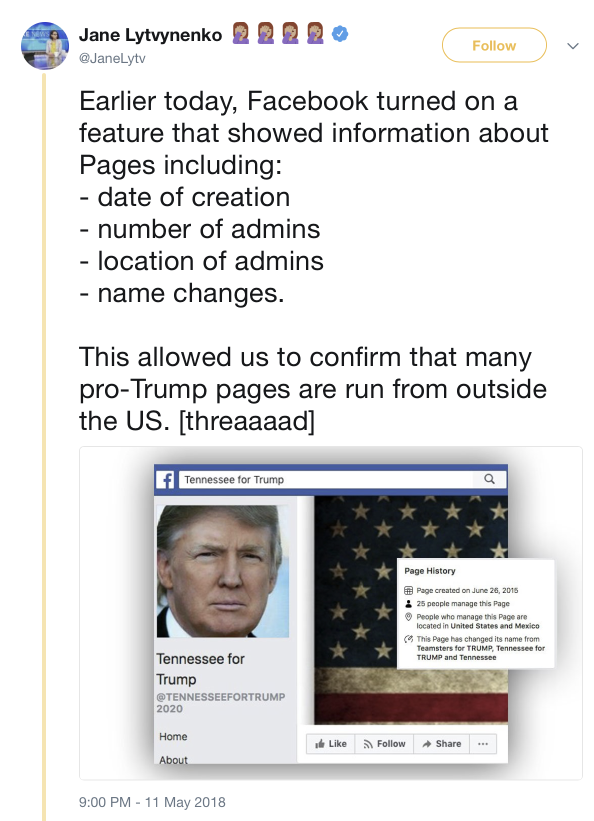
https://twitter.com/JaneLytv/status/995031028753313792
Full story here
https://www.buzzfeed.com/janelytvyne...trump-overseas
Sent from my iPhone using STM Forums mobile app
Hahaha inspector Tijn getting the goods!
Sent from my iPhone using STM Forums mobile app
Hi
Does it still work?
I have the option to click on "Ads" but when I click there never any ad is shown.
I always find the message: No Ads Available to View, There are no ads currently available
please can you help me
thanks Andreas
Originally Posted by advalue3
Ouch! Gold! Tijn this is awesome, so glad to see you're still around good sir!
The tool is live for everyone now
Nice touch that you can change countries


Sent from my iPhone using STM Forums mobile app
Amazing! Works well now!
I was afraid that it will be geo restricted for months, but it works in Norther Europe as well 
Does anyone wanna share their fanpage with me? 
Armageddon for those who are running dropshipping 100%...
Originally Posted by kokofai
BTW looks like this is available even without login, so looks like easy job to parse and make it even more accessible and searchable..
I already found some free coupons etc.

Awesome 
Now just scrape the post id and engagement metrics and you would have a decent spy tool
Sent from my iPhone using STM Forums mobile app
Has this stopped working, was working last week fine, now I am getting content not available
I don't think you can grab the post ID to get the engagement anymore.
If you want to spy on ads both on Facebook and Instagram, you should try using AdSpy, the latest effective ad spy tool for social media with the largest searchable database of social media ads today.
Originally Posted by jake232
https://www.facebook.com/taboola/pos...56048717116265

Amy
lol @ Jakes comment
Originally Posted by vortex
Originally Posted by AdzMed
Amy
Sent from my SM-G930W8 using STM Forums mobile app
yea same,
inspector method no longer works for me, either.
Originally Posted by expadz
Amy
Home > Paid Traffic Sources > Facebook & Instagram