Mobile Tracking on Jumptap (US Traffic) (28)
Here's a quick tip on tracking when you run mobile CPA campaigns in the US.
(NOTE: this is not web-based mobile offers like ringtones or pin submits...I'm talking about actual mobile traffic).
Jumptap (jumptap.com) has a good amount of traffic in the US...and they are the only mobile ad network (I know of at this point) that actually gives you a whole slew of parameters to help you can track your conversions in DETAIL (without having to set up an IO or rely on an ad rep).
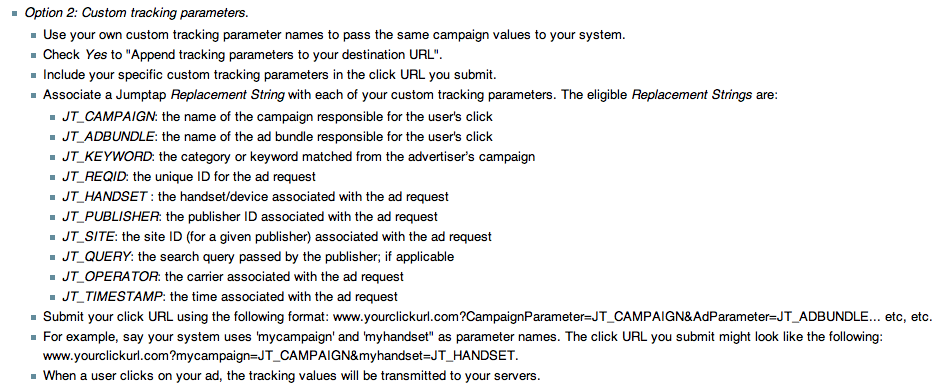
Here's where this comes from: https://support.jumptap.com/index.php/CreatingAd_en_3.1
(see Option 2: Custom tracking parameters).
And here's how it works:
When you set up your affiliate link, place the parameters in the SubID field. You can separate them with a comma, or semi-colon.
Example of a SubID:
&SubID=jumptap,JT_OPERATOR,JT_HANDSET,JT_KEYWORD,J T_PUBLISHER,JT_SITE
This would give you back the operator/carrier (i.e., AT&T or Sprint), the device (i.e., iPhone, Samsung SCH9000), the keyword/category you bid on, the publisher ID, and the publisher's site ID.
(You can also split these up like they show in the graphic above...using subID1, subID2, etc. depending on your affiliate network or tracking software).
Notice these are in all caps. That's important - if you misspell something or put it in lower case, that's how it'll come out.
Here's what this might look like in my subID when I review my clicks:
jumptap,ATT,iPhone,Automotive,JI123AWEF1234-123fasDF,QWceKSsk23SDkdsV
(those last 2 are made up...but that's pretty much what they'll look like)
You may also want to include your ad bundle (JT_ADBUNDLE) so you can see which of your ads are doing better.
Now...here's why all those parameters are important...
Keyword - this is actually a category. Jumptap lets you bid on keywords, but you probably won't get any traffic from them (at least not right now). You want this because you want to know which categories are converting.
Publisher & Publisher Site - you probably won't know what these are. Jumptap considers itself to be a "blind" network, so you don't get to see the actual websites you're advertising on. But you do get to see a really wacky-looking string of characters that "stand" for the publisher and the site.
Now, here's where it gets crazy.
You don't want to optimize by keyword and publisher site.
At least not initially.
The first thing you want to do is to optimize your campaigns by CARRIER and HANDSET.
Each carrier / handset combination will:
-convert on different publisher sites and keywords
-do better on either text or banner ads
Some carriers won't convert, ever.
Some carriers will only convert on certain handsets.
Some carriers will only convert on certain handsets on certain publisher sites...
Get the idea?
So a good way to start a mobile campaign for US traffic (on ANY ad network) is to split carriers right from the get-go.
You'll end up having to do it later anyway when you optimize.
Anyway...here's the thing about publisher sites...
You'll have to have your ad rep block the crappy ones for you - OR - to whitelist the good ones.
Everything else, you'll have access to yourself (carriers, handsets, keywords).
Questions?
Thanks, i was searching for this a while ago. i am using the c1-c4 variables to track handset-carrier-adbundle and site id - which works really well because i can sort thing out really easily.
I do have a question. Have you ran RON? how do you optimise your campaigns? I let the campaign run and at the end of the day i will look which site ids i need to block (this is for an iphone only campaing). Now i am doing this for a week or longer, I do have some really profitable site ids running, but ofcourse also really unprofitable ones that i block. now after blocking bad site ids, there keeps coming new site ids that are replacing the blocking ones. Now at this stage, would you white list the good profitable ones and only run those, or keep repeating the process of letting the campaign run and filter out the bad site ids (which can take weeks..) ?
 Originally Posted by marcovandaar

At this point, I'd copy the campaign and have a second campaign for my whitelisted sites...That one you can set to as high of a budget as you want (assuming all those placements are profitable). Keep the other campaign running to help you find new sites to add to your whitelisted campaign. Keep that one on your "testing" budget, whatever that may be.
You didn't exactly say it, but I'm assuming traffic is not coming as fast as you want it to...so here are a few more tricks to try:
1) copy the whitelisted campaign over a few times
2) how's your CTR? Make sure you're keeping it above .5%, higher if you can.
3) block the whitelisted sites on the "testing" campaign so you give room for new sites to show up. You'll lose profitability on it, but you'll be able to test much faster.
Hope that helps!
Liane, thanks for your response.
I actualy did copy the campaign so i have one for the white listed and one for the new sites to test (with the white listes blocked)!
Now i did not copy the campaigns a few times, will do it for sure, thanks for that tip!
yeah and CTR is around 0.7 and 1.1 
I signed up with Jumptap and deposited funds there last month, but have yet to get around to running anything...
What kind of stuff generally works well there? I'd assume mobile optimized ringtone offers/games, etc?
Have you had any luck promoting anything else?
Please excuse my ignorance, part of the reason I haven't run any campaigns there yet is because I feel like need to look into the answers to that question more first
Originally Posted by duballa
So if you have offers in the US, Jumptap is a GREAT place to test because they have lots of traffic in the US.
Regarding offers...each offer is going to convert differently depending on what you target - targeting, again, being the CARRIER, DEVICE, and the publisher site.
Regarding ring tones and games specifically...personally I haven't seen a lot of success with these types of campaigns on mobile...the most success I've seen is in niches like dating, edu and finance. Simple 1 and 2-field offers work best.
liane, when tracking the carrier and device, once you got something that works well, can you port that to other networks with the same data?
Originally Posted by numerouno
Liane,
i always optimise by tracking on SITE_ID. but i see there is a "JT_PUBLISHER" parameter to. When do you use that?
Originally Posted by marcovandaar
Sometimes you'll find that a particular publisher never converts, on any page. That's when it's good to just block the publisher, and not worry about specific site IDs.
could somebody help me out here, testing out jumptap and created a campaign but the data is not being passed into my prosper. I created a link like this, i entered the variables within prosper in the c1, c2, and c3 then i went to get my link and the link looks like this
http://xxx.com/tracking202/redirect/...LISHER&t202kw=
i have the pass variables checked in jump tap also but im just not seeing any data in my prosper.
thanks guys
Originally Posted by shoent
Try turning off Jumptap's "pass variables." If your link is set up right it should start passing what you need.
ya i was following angry russians tip on this but i dont know were i screwed up .
Originally Posted by shoent
ok will do .
can somebody refer me to a good rep at jumptap, the guy i spoke to last week kind of sounded out of it and is very unresponsive.
Originally Posted by shoent
Might want to reach out to him and ask him.
ok liane i unmarked it but still not seeing the variables in 202.
Originally Posted by shoent
you do know when you work with "c1-c4" you only see it in "group overview" - than under "group buy" drop menu you need to choose what variables you wanna view (c1, c2 ..etc)
oh ya there we go !
Am I setting this up right with CPVlab??
For extra tokens I set up the following

Next my aff link is appended like this:

Now my stats are displayed like this:

I know I'm not setting it up properly for CPVlab to place the parameters under their proper field in the report. I have no idea how to set that up.
Why use CPV labs for this?
202 does the job pretty well I'd say.
Buy anyway in Jumptap did you set to append tracking paramaters right below your link?
CPVlab is fast as hell for me. I know I'm just not appending something right in the parameters so I was wondering if anyone was using cpvlab for mobile stuff. I'd hate to have to go back through and change every link with a 202 one.
Yes I appended the tracking parameters in jumptap. Andrew was very helpful in getting the campaigns cloned for the different devices.
Btw, you were right about that BB inventory - holy shit.
Originally Posted by groomez
&campaign=JT_CAMPAIGN&carrier=JT_OPERATOR&publishe r=JT_PUBLISHER&ad=JT_ADBUNDLE
But, if you want them to be passed into your affiliate link's subid, you should include them in your offer link like this:
afflink.com?sid=JT_CAMPAIGN,JT_OPERATOR,JT_PUBLISH ER,JT_ADBUNDLE
Perfect, exactly what I needed
Your url append should be &campaign=JT_CAMPAIGN for campaign, not just the token. This will tag it all in there automatically.
yeah I was confused there for a sec. I think I got it all set now
Home > Mobile >