[30% Off] CrazyCTR - generate hundreds of eye-catching ad variations in no-time (46)
[30% Off] CrazyCTR - generate hundreds of eye-catching ad variations in no-time
Hey guys,
This will be the thread where I'll be answering all of your question about CrazyCTR.
For the ones who don't know what CrazyCTR is:
CrazyCTR is a web-based tool that automates the tweaking of your ad images(much faster than Photoshop) for higher CTRs. It saves you a lot (I mean A LOT) of time collecting, preparing and editing your images for your Facebook/Pof campaigns.
Some features:
- it generates 145 variations to split test from just 1 image in a few clicks
- works in batch mode, so you can generate 5800 variations from 40 images as fast as you generate 145 from 1 image(so you have a lot of options to choose from)
- all images can be packed and saved to your computer in a zip file
- batch mode uploading images to your private account(up to 1000 images). The images are automatically resized to Facebook/Pof ad image size when uploading. You can also organize your images in campaigns for easy browsing.
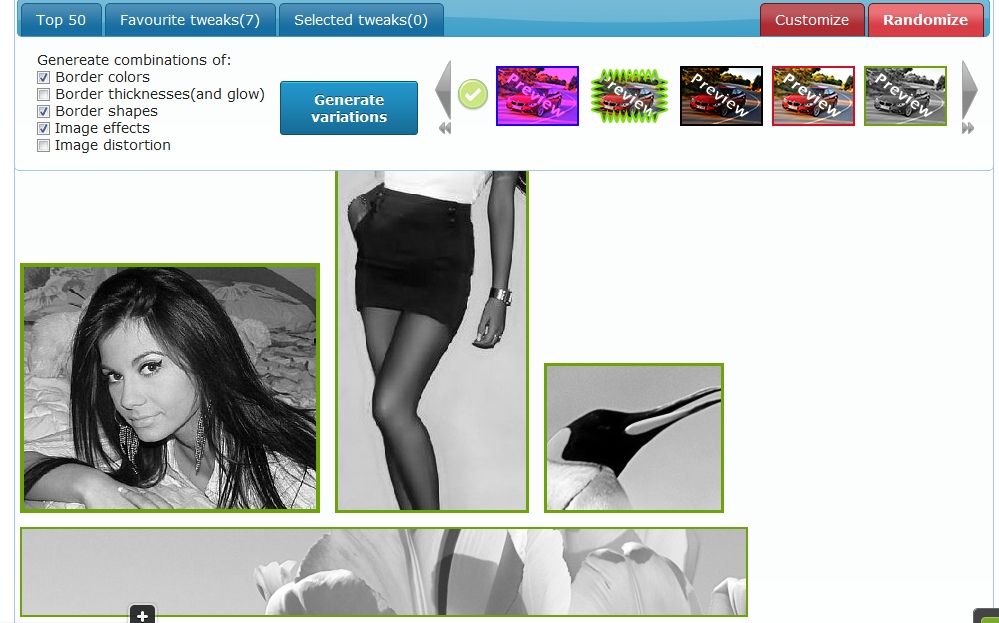
- random tweaks(or variations) generator - that's a pretty cool function my users love - it combines border colors, sizes, shapes, image effects, image distortions with random parameters and applies them to your images...the resulted variations are pretty awesome. Since is random, you can generate hundreds of these, until you get bored
- [full featured batch image editor] - edit your images in real time and apply a combination of 25 effects like custom border colors/sizes/shapes, image effects(like contrast, saturation, hue, sepia, etc), image distortion effects or add badges, signs and marks over images to create attractive images that fit to your offers.
- [browser extension] that helps you collect and prepare images much faster. You can crop,resize and collect images directly from any webpage (including google images, deviant art, flickr, etc) without leaving the browser or using an external image editor(see screenshot below).

Here are a few of variations that can be generated:
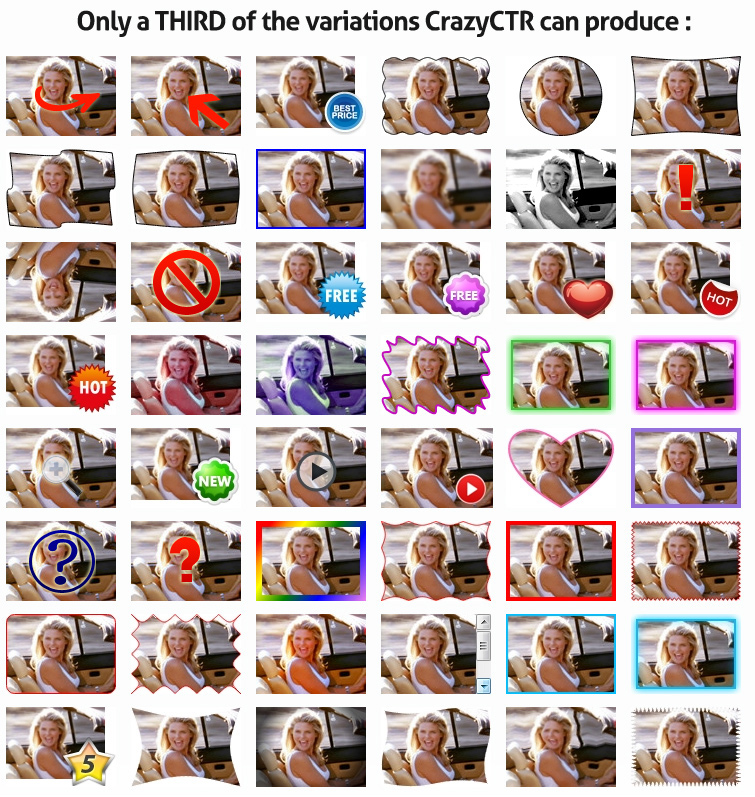
The variations below are generated by the random tweaks generator, you can generate hundreds of combinations like these :

The STM special 30% LIFE-TIME discount: stmspecial30
The price ranges from $4.95/month to $14.95/month depending what plan you choose and the payment interval, monthly or yearly(50% cheaper).
The Pro Yearly plan(which has the best value) costs with STM discount only $62/year (instead of $90)
Click here to sign-up for Free 7-day Trial!
If you have any questions or suggestions, throw it here, I'll be happy to respond.
I've just added a FAQ page, this should answer some of the questions you have about CrazyCTR.
Signed up, looks really great.
Have you already added the custom size banner upload so the Images are not resized to Facebook/POF ad image size automatically? I cannot find it...
 Originally Posted by deedsmedia

Thanks for the Post, Its really beneficial and time saving
Originally Posted by manishmehra
Great app, and the Chrome extension is awesome, too. My only issue is the missing support for IAB banner sizes  But I see potential!
Originally Posted by webbastard
PS: @webbastard: man, what's with 'Thanked 2 times in 4,294,967,295 Posts' ? I know that number is max int on 32 bits or -1 for unsigned int. Did you made this vBulletin hack or maybe all your thanked posts have been deleted?
Hey crysper - this is a really nice tool. I think there may be a bug with the chrome browser extension though - when I have it running it screws with the layout of various different websites: gmail, asana etc. It makes buttons look really big and adds spacing in between some lines etc.
At the moment I have to disable and re-enable it when I want to use it.
Regards
Originally Posted by marcus
I don't know about this issue, I will investigate. The extension affects only img html tags on websites not other things, so it's a bit strange, maybe you have another extension that modifies pages and conflicts with it? Please PM me with more details
However, is better to enable it only when you are searching for images, otherwise it doesn't make sense

Hey man,
So this only works for FB images, correct? You can't edit and add border and colored filters to, say, POF banners?
Hey,
It works for any image with 110x80 px or lower. But after I finish my exams I'll add custom banner size so you can edit any type of image(the feature is ready, but not officially implemented)
Originally Posted by crysper
Originally Posted by lifetweak
Ok guys, I finished all my exams, graduated with a bachelor in computer science so now I can focus full time on CrazyCTR to make it a very powerful ad optimization service.
If you have any features request throw me a PM or add me on skype: virgil.ci .
Great, please add the custom banners size option!
Originally Posted by deedsmedia
Until than, here is a screencast review of CrazyCTR from Tyler Cruz.
http://www.tylercruz.com/hands-on-sc...w-of-crazyctr/
Just signed up to 7 day free trial, already had some images ready and edited 50 in seconds, super quick, awesome tool!
Cheers
Jay
I can vouch for this tool.. it works very well. Thanks crysper!
Thanks guys.
I want to remind you of a nice deal: if you subscribe for Yearly Pro plan you will be automatically upgraded for free to the new Pro Plus plan (which has double the price) that enables the Custom banner size feature at the end of July/beginning of August(depends when I finish the new interface)
Any news on the custom banner size option? It has been a few weeks since I have I asked for it...
Originally Posted by deedsmedia
I'm working on it. It takes more time than I expected since it's a bit difficult to generate borders for custom image size because I can't use image masks like competition uses for 110x80px images, the borders should work the same for all IAB formats.
Hey guys,
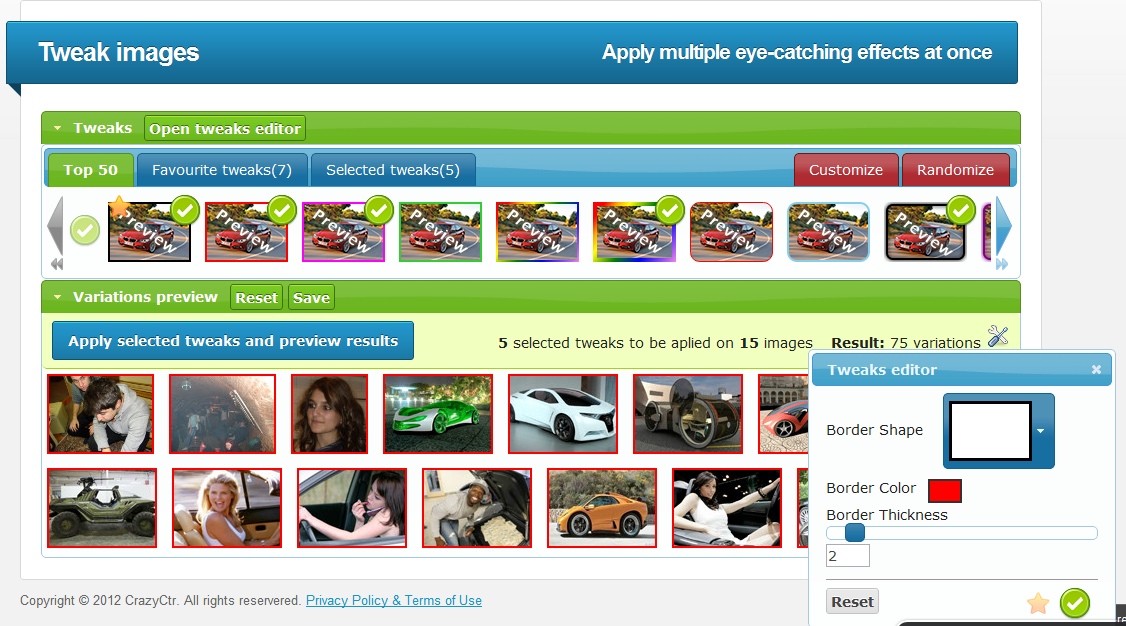
I just finished the new interface for CrazyCTR Tweak images. Now it's more flexible, has more options and you can generate more variations. Some new features:
- thumbnails preview for each tweak
- Top 50 tweaks - you can select tweaks from a Top made by us based on users' feedback
- Favourite tweaks - awesome feature that allows you to save the tweaks that gave you the best results. You can customize the tweak as you want than save it(add to favourites)
- you can select now what tweaks you really want to apply, for example if you want border and higher saturation you don't have to apply 2 different packs like in the old interface, now you can select them and apply all at once.
- function to create tweaks combinations - this gives lots of flexibility and great results. For example you can combine super easy a border and an image effect. Just click the save button near the Variation preview header to save current tweak and apply another one over it.
- Customize feature - this gives you lots of variations to choose from, now there aren't only 145 variations, with these feature you can get hundreds
- Tweaks editor - so you can edit any aspect of tweaks(like border color, saturation level, etc...)
Currently I'm working on the custom image size. The feature is implemented, but I'm working on the new pricing plan that supports it. It should be ready soon.
Let me know what do you think
I temporary enabled the custom image size option for everyone until I finish implementing the new pricing plan, so you can upload images of any size and tweak them.
Looks like a great tool, but I can't seem to figure out how to get the chrome extension.
I go to "gather new images from web" and then the page constantly refreshes until i push the stop button in my browser. It says "Please install the extension than activate it by clicking on its icon(on the browser toolbar)." but I don't see anything in the toolbar that indicates anything about an extension I need to install or activate. Any idea where I'm going wrong here?
Edit: here's a video that demonstrates what I'm experiencing.
http://screencast.com/t/BqAMc9U9Xo
Strange behavior on chrome. But it's fixed now, give another try 
CrazyCTR got reviewed by Luke from Peerfly. http://www.lukepeerfly.com/increase-ctr-crazyctr
Does this work for PPV or just POF/FB stuff?
Originally Posted by orlandoprofit
I love the new interface its very much easy to work with.
Originally Posted by dsw203
A short demo of the new interface:
http://www.crazyctr.com/new_interface
The only REAL question is....
Where do I get that sick soundtrack?
Originally Posted by Smaxor
PS: From now on the soundtrack is included as a bonus for every STM subscriber :P
Need your feedback guys. What do you think about this short presentation...I want to put it on the home page.
Very nice
Looks good, convinced me to give your 7 day free trial a shot!
Thanks for reminding me to try your service, seems like it will save me a lot of time in the future.
Awesome video dude. You got that video outsourced?
On a another note I like your web app.
Originally Posted by santisoft
Originally Posted by pain2k
Hey guys,
You all know that I was selling CrazyCTR...not anymore, i found a partner who has the resources to help me grow this awesome product to something big. Even if I was in full selling stage, I haven't neglected CrazyCTR and I worked on releasing new shapes/frames and I also improved the image gathering extension(many bugs fixed)
Some of the new tweaks added:
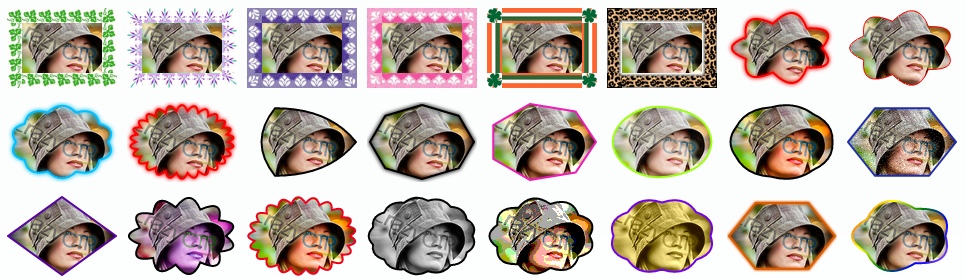
Ho Ho Ho stackers,
Winter season is now open!
Are your ads prepared for the holidays? We put up something special for you:

Coupon CODE: stmspecial30
Take advantage of the holidays madness with these awesome winter tweaks:

Also, Fastspring is our new payment processor since Today, more reliable, easier and with better subscription management than Plimus.
David Evans from OnlineDatingPost asked me a few questions about CrazyCTR, you can take a look if you want to know more about this tool. You may also get a free license for a year, just be the first to comment
http://onlinedatingpost.com/archives...with-crazyctr/
Hey guys,
How are you?
I want to let you know that we are preparing a blog for CrazyCTR with Case Studies, info about increasing CTR, tactics and so on.
So stay tuned!
Until then, go an try CrazyCTR ... the [stmspecial30] coupon for 30% lifetime discount is still available.
Everytime I export the images facebook says they are too small. pain in the rear to resize all of them. where abouts do I change the size within the website?
thanks!
Do you get this message when using the images cropped by the extension?
Why not trying to advertise on CPA company websites?
Perhaps in the Cake back-end etc.
Home > Vendors >