Create 42 ad variations in a split second (56)
Just came across this simple but great tool created by adam tal
Upload a picture and crop.
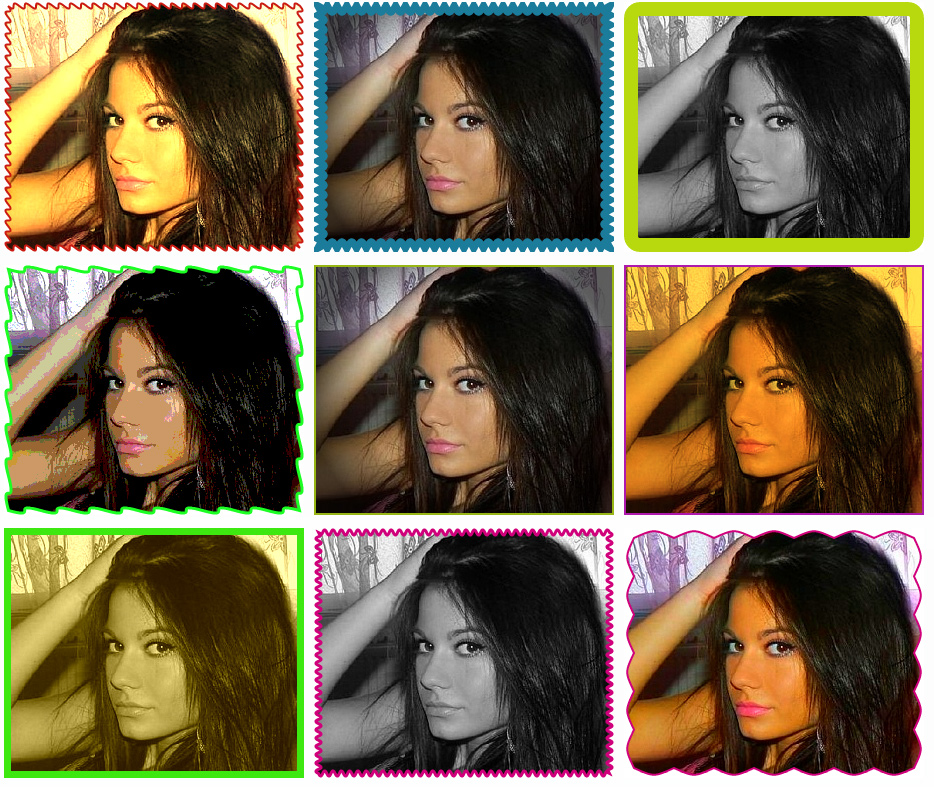
The site then generates 42 different images for you, using borders etc.

Here is a video:
http://fbadstoolbox.com/
motherfker.
for the love of mother... this is holy

i peed a little
Not gonna lie, this tool made a tent in my pants
couldn't you do the same thing for free with photoshop macros?
pretty bad ass tool! Save my days!
amazing man, great share.
This is a really good example of someone creating a nice SaaS product with very little startup costs and high sustainability.
Lol. Had to log in here to see if people are trashing my tool hahah. Glad you guys liked it. would love to hear any feedback so I can improve it - I have a long list of upcoming features & ui improvments, but I want to prioritize based on actual user feedback.
-Adam
STM coupon code?
Yeah as soon as I figure out how to create them :-P
What kinda discount do you guys want?
100% off for all STM members. We are all poor bastards, have pity sir.
will this tool work for creating different variations of IAB size ads ?
The sales page shows a mirror image function (with the girl at the birthday party) but it doesn't seem to exist in the actual program.
ya a stm code would be great, i bet alot of ppl would sign up if there was some kind of discount for STM members. also do you now have a free 2 day trial for the regular plan?
 Originally Posted by shoent


adamtal, sexy tool~~
$60 for the YEAR?!?!?! Atrocious!
ya everybody is ready to pull the trigger as soon as he puts out a stm discount on this i think
hey.. 60/year is NOT EXPENSIVE AT ALL... but having said that. I still dont mind some discounts over it. Pushes people over the fence, ya know. I are cheap.
Don't get me wrong I think this tool looks great! However the example of the CTR increase looks a bit crazy. Flipping the image horizontally and changing the 1px blue line to black meant nearly a 400% roi increase?
My Green is right. Are the results statistically relevant? How many impressions was each ad tested for?
Originally Posted by Mr Green
I trust that if you ran FB Ads you already created & tested variations manually, and are aware of the actual difference it makes. Still, if any of you bought this expecting a campaign to turn profitable just by adding a border, please let me know and I'll refund
 Originally Posted by shoent
The tool is was not really made with affiliates in mind (as users, no offence, I'm also an affiliate), which is why I haven't posted it here on the first place. That said, I'm happy it was posted as I really appreciate the feedback, so please keep it coming. Originally Posted by allthegold
Originally Posted by shoent
The tool is was not really made with affiliates in mind (as users, no offence, I'm also an affiliate), which is why I haven't posted it here on the first place. That said, I'm happy it was posted as I really appreciate the feedback, so please keep it coming. Originally Posted by allthegold
Haha, you are fine, I'm just being picky.
Wow, thanks for the share! This would eliminate about 1-2 hours of making my own variations.
Originally Posted by Mr Green
No offense to the creator, but with a little bit of setup time you can do something VERY similar in photoshop with actions/batchprocessing for all of your images. I can do a more detailed tut if people are interested.
Originally Posted by miked3
i'm definitely interested in a detailed tut about how to set it up in photoshop ;-)
@miked3 -> you're probably right. I started out with PS actions, but I was too lazy to keep doing it, especially every time I had a new variation. This is another reason this tool was originally aimed at a less savvy audience.
That said, I think for some people a couple of bucks are worth just the access to all the variations I've already created (I try to only use those who actually performed well for me), plus the tool will always be updated with new ones (no guarantee here, but that's the plan, plus I use it daily so I usually update it for my own benefit).
Also note the Image creator, which also saves me tons of work in Photoshop.
nusolutionz also has a very good point about getting better results with Photoshop - if you're creative you will always be able to do crazy shit which cannot be achieved with this tool, and sometimes when I'm not lazy (last time that happened was around Christmas lol) I do go into PS and create awesome shit.
But for the most part, I'm super lazy. So 90% of time I end up using the tool (even when I actually created something in PS - variations never hurt).
Aiiiight, figured out coupons. Sort of.
So here's a secret link you swear not to post outside of STM, right? (not like there's anything I can do about it... heh):
http://fbadstoolbox.com/membs/stmbiaatchhhh/
This gives you $6.65/mo on a quarterly plan (i.e. $19.95 per 3 months, renewed automatically).
$1 trial is still in place, so you have 48 hours to decide whether this is a super awesome tool or just a lame ass excuse to separate you from your hard earned money
Thanks Adam, that looks pretty legit. Do you care if I plug this out to my affiliates? Would make sure to use the normal link obviously.
@jimcrim, not 100% sure what you meant, but sure go ahead
Update: 82 variations.
Dozens more coming soon (btw, note the ones that are designed to make stock photos look unprofessional by adding dust and weird stuff... still figuring out new ways to do that). Tons of UI improvements and features will be rolled out in a while.
It be great to see all 82 applied to a single image  if you get a chance. im sure it would benefit people in understanding what the tool is capable off.
Would be best if you have extension for Firefox/Chrome like this one does :
--> http://www.crazyctr.com/
Yep working on tons of cool features now that we know how much demand there is for the tool (seriously didn't expect it), and how people are using it.
tjin ---> not sure if that's what you meant, but some guys have beeng blogging about it and posting some tests tehy've done where you can see most variations (I keep updating and switching them constantly). Links are on the homepage.
Also the image creation feature is going to be revamped. In the meantime you can get pretty cool results with it already, like these:


cool thanks
not all casestudies were actually uses of the tool but the two that were here are the screenshots of the ads generated:


We just released a newsletter for PKM affiliates - save 25% off a similar tool at CrazyCTR - use promo code "pkmnet"
Hey guys,
Glad to be back on STM after a long break.
I want to present a more powerful tool I created, CrazyCTR (some of you know it, i got some sales from this post
Some features:
- it generates 121 variations from just 1 image in a few clicks
- works in batch mode, so you can generate 4840 variations from 40 images as fast as you generate 121 from 1 image
- all images can be packed and saved to your computer in a zip file
- batch mode uploading images to your private account(up to 1000 images). The images are automatically resized to Facebook/Pof ad image size when uploading. You can also organize your images in campaigns for easy browsing.
- random tweaks(or variations) generator - that's a pretty cool function my users love - it combines border colors, sizes, shapes, image effects, image distortions with random parameters and applies them to your images...the resulted variations are pretty awesome. Since is random, you can generate hundreds of these, until you get bored
- [full featured batch image editor] - edit your images in real time and apply a combination of 25 effects like custom border colors/sizes/shapes, image effects(like contrast, saturation, hue, sepia, etc), image distortion effects or add badges, signs and marks over images to create attractive images that fit to your offers.
- [browser extension] that helps you collect and prepare images much faster. You can crop,resize and collect images directly from any webpage (including google images, deviant art, flickr, etc) without leaving the browser or using an external image editor.
I have a special LIFE-TIME coupon for STM, which is 30% off for all plans: stmspecial30
Here are some screenshots:


And just a few variations. The second screenshot is taken from variations produces by the random tweaks generator.

These variations are generated with the random generator:

You can try it free for 7 days (you don't need to pay a fee to register for the trial, just sign up with your email and password in 10 seconds and you can start tweaking your images). CrazyCTR.com
Originally Posted by crysper
PS: I also uploaded a 300x250 image... you dont accept those or what since when I try to distort it half of the image gets sliced up and goes missing....
the variations are not a problem, i'm working on scrollbar and some pretty interesting variations right now. However, it has much more than fbadstoolbox has... have you tried the random tweaks generator or the image editor?
Or maybe you tried it on the past, now it has 121 variations.
You added a animated GIF or something? It doesnt have any problem with JPG, normal GIF and PNG.
Originally Posted by crysper
Ahh I see. It seems like the tool auto resizes the image to pof and fb sizes only, and doesnt allow 300x250s to be edited unless you just change the border... If you make a gif though it wont resize it but it will slice it in half if you do anything to the image besides border changes...
Could you allow 300x250's as well? I use them with POF plenty of times as well..
Thanks!
Yea, it resizes the image because it doesn't need to take full image space since you are using it only for FAcebook/Pof small ad size. However, I just talked to Luke from Peerfly and some other users, so I will introduce soon custom image size, because so many requested it.
Hey guys,
I'm curently testing the custom image size, variations will work for any ad size so you can use them to create your own banners and LP. Here are some examples with a 300*250px. It will work like any 110x80 image, same batch mode processing, same variations, but at a bigger scale.
The feature will be up soon, however, because of this awesome feature, the price will go up a bit so if you want to still get this at current price you should subscribe very soon for the Pro yearly plan.
Just got the CrazyCTR tool and loving it so far. Thanks Crysper for being very helpful!
Originally Posted by niekrac
Quick update: I added neon borders. There is a new pack with 12 different rectangle neon borders but it works for any shape(not just rectangle borders) like in the last 2 images below. You can set the shape and glow level from Batch Image Editor > Border Shape and enable Border Glow.
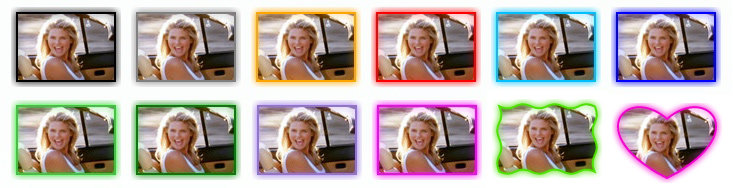
Tomorrow I will add few more badges and signs including the scrollbars. And, I hope, later this week, the custom image size processing will be ready for public.
Was looking at this yesterday. Crazyctr looks pretty bad ass as a time saver.
Crazyctr seems to be a better one because of its browser extension that could crop image directly. It helps make things even more efficient.
Thanks guys, glad you like it. I'll keep adding new variations constantly...and I'm preparing something awesome, you'll love it.
[update]
Added new variations, take a look:
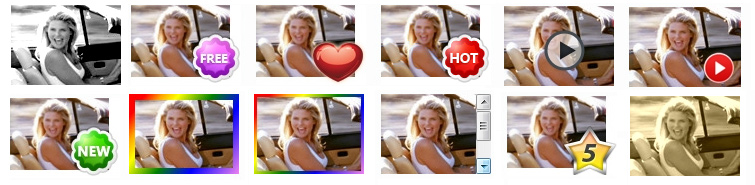
I also created a separate thread for CrazyCTR where you can post your questions/suggestions:
http://stmforum.com/forum/showthread...ons-in-no-time
Quick update:
launching 32 new features on fbadstoolbox - free upgrades + really cool offers to STM members ($0-$4/mo depending on..).
hit me up support@fbadstoolbox.com for details (too lazy to generate coupon lol)
The new features + tons of other tools here: http://trafficlab.co/members/plans
Here's quick overview of the features:
(FUCKLOADS OF) NEW FEATURES: (Preview: http://youtu.be/8uSla8A5eaU)
⇒ Newsfeed ads support
⇒ Best UI ever - Optimized for super-fast workflow.
⇒ Multiple uploads
⇒ Text % Indicator - Make sure you use the most of your newsfeed ad, while still complying with Facebook's rule of
text holding up 20% of the image or less.
⇒ Chrome plugin.
Click any image on the web and turn it into an ad or animated banner in any size - with one click.
Click any image on the web, and turbo-charge it on the fly. 200% faster than the competition due to our optimized work-flow process.
⇒ awesome new variations - all tested for blow-your-competition-out-of-the-water CTR's. Including Instagram filters.
NO RANDOM BULLSHIT - ONLY TESTED STUFF. If it didn't beat the control, we won't waste your time with it.
⇒ Included FREE: Graphics, icons, arrows, backgrounds, etc. Easily add, rotate, scale with a click of a button.
⇒ Advanced editing & effects for images & elements.
⇒ Save / Open your work + All uploads are now saved in your account.
⇒ Automatic copywriter. Use templates to create the best copy for your ads.
⇒ Download as zip, and several other minor upgrades to make your life easier.
⇒ Power-editor-ready split-test spreadsheet. One-click upload your variations to Facebook (coming soon, ETA: Early April).
You also get all the tools from UglyBannersWorkBetter.com and a bunch of new tools included.
It's all here:
http://trafficlab.co/members/plans
Home > Paid Traffic Sources > Facebook & Instagram