How to make winning push campaigns? (1)
So, since you're here, you are probably "struggling" to make a winning push campaign that will be profitable and scalable. Don't worry, we've struggled too, like everybody else, but now that we learned a couple of things, we would like to share a few things with you and hear some feedback.
You may observe this thread as a comprehensive guide on how to successfully run push campaigns - on the other hand, share your experience in the comments below - we want your view on this.
First of all, let's analyze some ground terms.
How does push traffic work?
Since you are here, I’ll guess you know how push ads work, but let’s just cover some basics in case someone who doesn’t know is reading this blog.
Basically, for push ads to be delivered, a user has to opt-in voluntarily to accept notifications from a particular domain. That domain can be owned by some company that provides push traffic.
You have probably seen a lot of time a prompt popping out that says:
“www.exampledomain.com” wants to: Send notifications
There are two options you can press: Allow and Block.
If a user clicks Allow, he opted-in to get notifications from www.exampledomain.com. If a user clicks block, he won’t receive any notifications from that website.
After we have users who accept notifications, we can start sending them to push notifications.
Push notifications usually look something like this:

Now that we understand how push ads are served and look, we are ready to create some campaigns and buy push traffic with the help of programmatic advertising.
Another thing - What is programmatic advertising?
Programmatic advertising made setting up the ads more efficient, as the system is no longer manually adjusted. Programmatic ads mean buying and selling digital advertising space, connecting the website owners with available ad space with advertisers willing to buy that space to promote their offers.
The advertiser who wants to promote their offer via a digital campaign will contact a programmatic ad agency. On the other hand, the agency will use DSP to automate buying ad placement for the required campaign to target the right audience based on location, demographics, user behavior, and online activity.
The benefits that programmatic advertising brings to the advertisers include the possibility to scale by reaching a large audience when buying ad space at different ad inventory. In addition, the programmatic ad makes the budget spent more efficient by better targeting the audience. The related outcome makes the targeting process more successful as more relevant ads are served, which means a more cost-effective investment for the advertisers.
The easiest way to buy traffic through programmatic advertising is on a DSP (demand-side platform).
I demand traffic!
The purpose of the Demand-Side Platform is to go there and say: “I demand traffic”.
DSP or Demand-side platform is a programmatic advertising platform where ad buyers can purchase and manage ad inventories from different ad sources.
So this means that DSP is an automated media buying through a real-time bidding system. You come, create a campaign, set the bid, and get in the pool with all other advertisers who are fighting for the same traffic.
This means that you should be competitive to get a particular ad space you are looking for.
Take Facebook Ads Manager as one of the most famous examples. Facebook has its own traffic and sells it through its platform - Ads Manager. If you go there and try to buy traffic, you will compete with all other people trying to buy that same traffic.
Who is my audience?
Now that we’ve understood all the basics and know where to buy push traffic, it’s time to find the audience to whom our ads will be served.
Targeting and finding the “perfect” audience can be pretty tough and exhausting. It is almost impossible to find the ideal audience, but we can get close to that.
I love to say that testing is the mother of this industry. So, test, test, test, and only test, until you find your “close to ideal” audience.
Your target audience will mostly depend on the type of offer you are promoting.
Targeting users by OS and device type
For example, if you are promoting a mobile app, you are obviously going to target mobile phones + operating systems used on mobile phones, such as Android.
On the other hand, if you are promoting an extension, you are probably going to target only desktop users + operating systems used on desktop devices, such as Windows, macOS, or Linux.
It mostly depends on the type of the offer and which OS and device type will work better. There are some offers out there that might work equally well for both desktop and mobile traffic.
Once you have decided which device type you will target, you can choose operating systems according to that.
For example, in this exact example, we are promoting an Android mobile application, which works only on newer Android devices:

So, in this exact case, we have included: Android 10, Android 11, Android 12
Browsers
In most cases, browser targeting can be a pretty important thing to target properly. Even though it may seem that users will behave on every browser the same, that usually isn’t the case.
Users subscribed to push notifications from some browsers may convert better than users subscribed from other browsers. From our experience on desktop traffic, it has been shown that users who subscribed for notifications from the Microsoft Edge browser convert better than users that came from some other browser.
But, in our specific case, we are targeting Android users, and Microsoft Edge does not exist for Android phones. The browser that is most targeted for Android users is Google Chrome and Firefox.

So, in our case, we are going to target Google Chrome users.
User freshness
For the beginning, let’s clarify what user freshness represents.
User freshness represents the time since the user opted to get push notifications. So, if the user opted in 7 days ago to get our push notifications, he will be in the 0-10 days user freshness group.
How to decide what to target?
If you’re running some offers with a more complicated flow and need a fresher user, it is highly advisable to target "fresher" user groups. If you are unsure which user freshness to choose, the best thing is to do the test!
So, if you are running one campaign for one product, make three different campaigns to see which user freshness will fit your product the best.
For example, you can target:
- 0-1 hour users
- 0-3 days users
- 3-10 users
This way, you will see and understand which of these work best for your product and which CPC suits you. Recommended CPCs are changing depending on the user freshness group you choose.
The most common user freshness targeting for the beginning is 0-3 days. So, in our case, we are going to start with that.

As you can see, there is an option to target users by hours. It is highly recommended to do it, but only once you get to know a real audience. Once you are sure about which device type to target, which is, and which geo, you can start “playing” with different user freshness groups.
Day & Time
Let’s say you are promoting an offer for which people are only interested during workdays for some reason. For example, it is an application that helps them be more focused while working. It is probably a much bigger chance that people will be more interested in this application while they are at work.
So, in this case, let’s target those users.

Targeting - overal
On most of the platforms, this is the targeting you are going to be able to choose. There will be some more specific things you could target on some of the platforms, but those targeting options are mostly made for some specific offers.
Making a whitelist and blacklist
WL and BL - account manager:
Starting with blacklists and whitelists can be a pretty good thing if you have an account manager.
Especially if your account manager has a whitelist for the vertical, you are running.
But, you have to be cautious with that because you might be missing some good sources by limiting yourself only to the sources your account manager has told you are good.
If you reach a limit with sources you whitelisted, you should try making a campaign without a whitelist so that you can potentially explore some new sources that will work well for you.
On the other hand, a blacklist is always highly recommended and welcomed, especially if the account manager tells you which sources to exclude -> account manager usually knows his traffic.
WL and BL - making them by yourself
So, if you do not have an account manager, or you have, but the WL that the account manager has given you does not work, you should try creating your own WL and BL.
A whitelist is always something that is going to take more time to create than a blacklist. Every source that is not profitable for you should be blacklisted. How?
For example, the payout for the offer you are running is $5. Every source that spends more than $5 should be automatically blacklisted in current and in every next campaign you create.
On the other hand, creating a whitelist can be more tiring because you will need more sources to make a successful campaign. It doesn’t make sense to create a whitelist campaign with 1 or 2 sources that have a low number of impressions on a daily basis.
But, this doesn’t have to be the rule. There are always exceptions where 1 source can have large volumes of traffic OR is converting crazy good, so it’s profitable for you to create a campaign with only one source.
Budget & Bids
So, let's start with bids. The bid is mostly going to depend on the targeting you have chosen. Browser, OS, device type and user freshness are going to affect your bid.

In our specific case, a bid the platform recommends is $0.091. So 9 cents per each click since Coinis DSP is on a CPC basis.
We will put $0.11 to ensure that we will get slightly more traffic on average.

But, let’s understand how we got this recommended bid.
So, your bid depends on the device type, OS, and user freshness you are targeting.
Desktop users’ clicks are more expensive than mobile users’ clicks. Edge users’ click is more expensive than Chrome users’ click. IOS users’ click is more expensive than Android users’ click.
Basically, like in life, it’s the play of demand and supply. If we have more of something than we need, it’s going to depreciate in price. So, we have way fewer Edge users than Chrome users, + they are better at converting, and as a result, we get that Edge users’ click is more expensive than Chrome users’ click.
It’s the same thing with user freshness.
The "fresher" the user, the bigger the competition. Everybody wants to get the freshest users, which means that demand is pretty high.
Higher demand means higher price.
As a most targeted user-freshness group, let’s take 0-3 days as a referral point. Those users are pretty solid and relatively fresh.
Let’s say the bid for this group is $1. If you want to target fresher users, you should definitely put a higher bid.
Let’s split fresher users into 3 categories:
- 0-1 hour
- 1-6 hours
- 6-12 hours
If you target users 13-24hours “old”, you should multiply a bid for 0-3days users by 1.2. So, you will get $1*1.2 = $1.2.
If you target users 2-12hours “old”, you should multiply a bid for 0-3days users by 1.3. So, you will get $1*1.3 = $1.3.
If you target users 0-1hour “old”, you should multiply a bid for 0-3days users by 1.5. So, you will get $1*1.5 = $1.5.
So, in our case, here is how the bids would look:
- 0-1 hour: $0.165
- 1-12 hours: $0.143
- 13-24 hours: $0.132
Now that you have determined a bid you want to go with, be sure to put a daily cap on your campaign so that it doesn’t go crazy with spending.
A daily cap is a must, especially if you are not in the situation to monitor the campaign during the whole day.
Always start small and then scale.
Last but not least - Creatives!
We are almost done with creating a campaign, but we have the last step to do: creating/generating creatives.
Even though we have left them as the last step, they are nowhere less important than anything we have previously mentioned about creating campaigns.
They can be an essential part of your campaign. Why? Well, the first thing a user encounters is the creative. It is a hook that will make them click on your ad and “heat them up” for what comes next.
If you’re buying your push traffic on CPC, it might seem unimportant to “play” with creatives because you are only paying for clicks, and you’re not losing money if someone is seeing it and not clicking. Moreover, remember that most platforms that work on a CPC basis calculate the eCPM of the campaign and distribute traffic according to that.
What is eCPM?
To explain what eCPM is, let’s first explain what click-through rate (CTR) is. CTR is a ratio showing how often people who see your ad end up clicking it.
If your ad is seen 1000 times and you get 100 clicks, your CTR is 10%.
So, eCPM is a metric that combines two things - CTR(click-through rate) and bid. Let’s explain this through a practical example.
If your bid is $0.5, and you get only 10 clicks per 1000 impressions (0.01% CTR), your eCPM is going to be $5.
If there is another advertiser bidding $0.3, you would probably expect that you will get more traffic because of the higher bid. But, other advertisers’ creatives earned him 50 clicks on 1000 impressions, which means that that advertiser has a higher CTR - 0.05%. That further means his eCPM is $15.
In this case, this other advertiser is going to get much more traffic than you.
So, the moral of the story is to create more creatives that are appealing to the end user and will make him click on them.
Our recommendation is to always start with a minimum of 3 different creatives. This way, you can see which of the 3 creatives has the highest CTR and proceed with the selected creative.
3 creatives are the minimum number of creatives you should start with, but it would be good if you could always go with as many creatives as you can (depending on the number of creatives allowed per platform)
Many platforms have their regulations regarding creatives, but Coinis Advertising Platform allows you to create up to 15 different creatives. The best thing is that you can create up to 15 creatives in no time, thanks to our creatives generator, which mixes headlines with images.
If you put 2 titles and 3 different images, the creatives generator will generate 6 different creatives for you in this way:
- Title 1 - Image 1
- Title 1 - Image 2
- Title 1 - Image 3
- Title 2 - Image 1
- Title 2 - Image 2
- Title 2- Image 3
Let me show you an illustrated example of this:
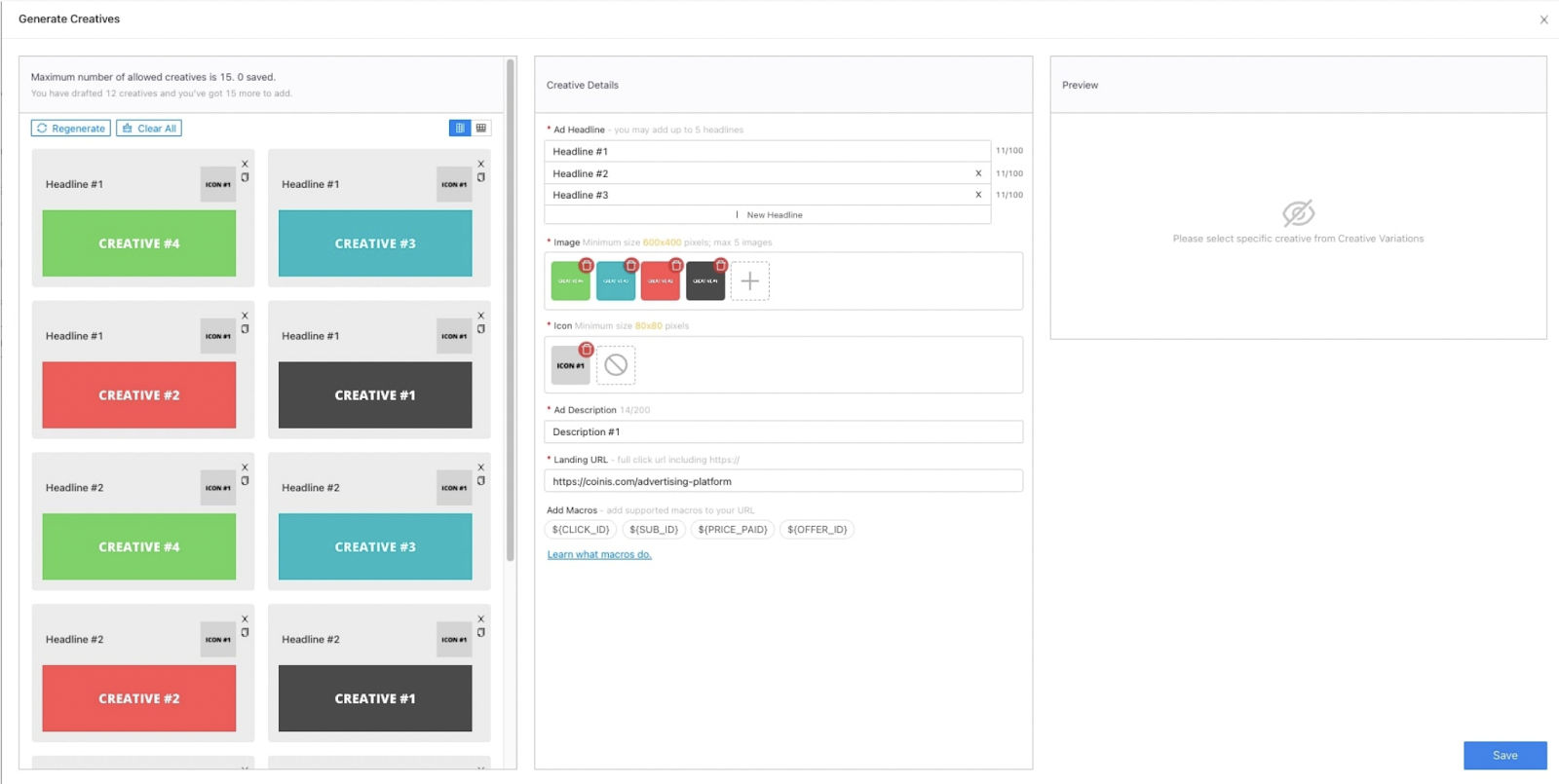
As you can see here, I’ve added 3 headlines and 4 images, and I've automatically generated 12 creatives.

Here we can see a list of all creatives.
So, to conclude the story of creatives, let’s just say that it is really important to create more of them so that you can find the best working creatives and raise your CTR, which will help you in scaling up your campaign.
Okay, so now we have created our winning push campaign, and the time has come to optimize it.
Creating might seem like an easy job for you, but optimizing your campaign is the real deal.
Optimization
Since optimization is a theme for a whole new blog and thread, so we will mention only optimization basics here.
First, to make optimization an easier job, we recommend that you always make one campaign per one GEO - one browser - one device type.
That would mean that you should create six campaigns if you want to run one offer in three countries and two different types of browsers.
That is not only because of optimization but also because of the bids. The bid for each of these GEOs (and browsers) is different.
This way, you have a way better look at your campaigns.
Source optimization
If you’ve set up your campaigns this way, the first thing you should look at when optimizing is sources.
So, when running your campaigns on an advertising platform, you will probably have many different sources from where your traffic is coming from.
You should sort them in descending order by spending and see the sources that spent the most money. You will most likely have a couple of top spending sources, which you should optimize.
But how?
If any of the sources have spent more money than you are earning from one conversion, that source should be excluded from your campaign.
If this happens with one source in more campaigns (it spends money but is not profitable), you should exclude it globally from all current and future campaigns.
Creatives
After you’re done optimizing sources, it is time to check creatives. If you’ve made more creatives, as we advised you to do, you should go and see which of the creatives had the best CTR. The creative with the best CTR should be a creative you will keep going with, while you should delete (or pause) all other creatives.
Day & Time
If you see that you get more clicks and conversions during working hours in working days, you should run your campaign only during those periods.
Most platforms can schedule a campaign and make it run on certain days, while it will stay paused on the other ones.

It should look something like this.
Browser, OS
If you’ve made a campaign as we advised you to do, so one campaign per browser and OS, you shouldn’t have a problem with this. But if you mixed them all up in one campaign, then you should also check the results per browser and per OS, to check which browser or OS converts better, and to stop the ones that are not converting well.
Impressions
If you see that you are getting a small number of impressions daily, you should raise the bid. But, if the bid is high enough, and you still keep getting a low number of impressions, then the problem is probably low eCPM. That means you should work on optimizing creatives to find ones that work better.
—-----
Get in touch with one of Coinis Advertising experts and get the advice you need on how to start. If you would like to work with us feel free to reach out via our chat or contact form at our website or via Telegram @ coinis_ltd.
Found this interesting? Tell us about your experience in the comment section.
Home > General > Affiliate Marketing Forum