This has been driving me nuts....TikTok Tracking ecom with Jumbleberry/RedTrack/Binom (12)
This has been driving me nuts....TikTok Tracking ecom with Jumbleberry/RedTrack/Binom
Hey all!
So I wanted to try and figure this tracking stuff out before asking on the forum, but I have absolutely no clue why it's not working. I've reached out to SquareDance(formerly Jumbleberry)/RedTrack/
The issue is I'm trying to get View Content/ATC/Initiate Checkout events to trigger but it doesn't seem to be working. My hypothesis/theory here is that my creatives could potentially do better if TikTok see these types of events, but because it doesn't I have a feeling they're serving me traffic that's less inclined to click through.
So this screenshot below is traffic I ran yesterday. You can see under Total VC/Click Button a lot events started to trigger. Just keep in mind yesterday I was running a bunch of tests to try and get it to work. These events started to populate once I integrated event API TikTok through JB. My understanding is that once a user clicks through the ad it should trigger a VC so in this case if I were to receive 67 clicks I should get 67 VC. However, I did think about click loss where the user might've exited the app before it fully loaded the website, but even then that didn't make sense to me.

RedTrack/
So at first I wanted to use the tracker to track events like VC/ATC/IC, but realized on Binom you might had to go through some additional steps to get those events posted. Was stuck here(commented on blog) and decided to move towards RedTrack that had TikTok integration in place.
On RedTrack, at first there were "conversions" that came through that weren't necessarily conversions, and I liked that it had the VC/ATC/IC/etc... columns available.


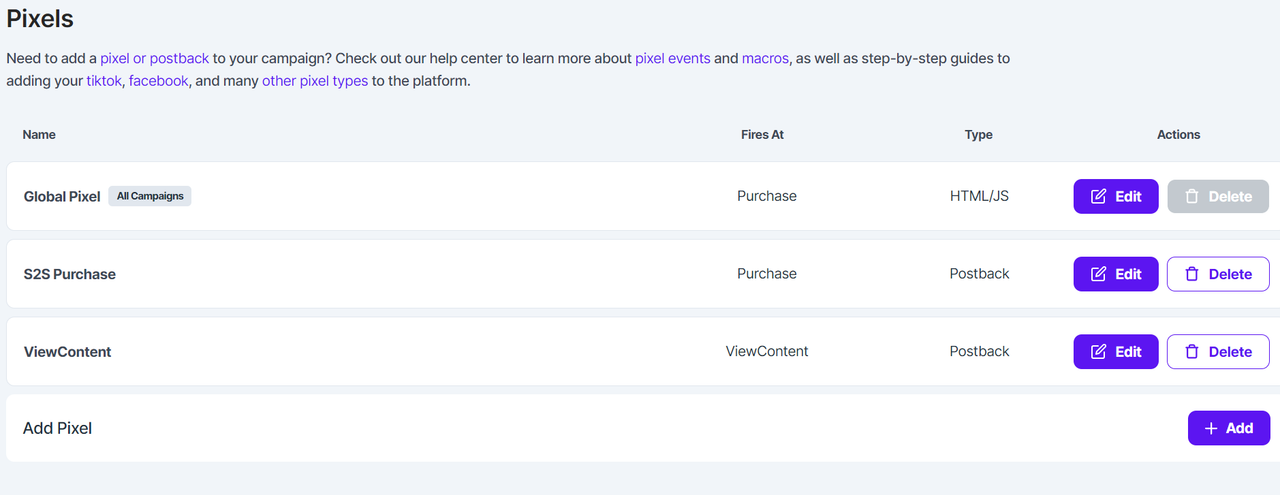
Now with Jumbleberry. I'm used to calling it Jumbleberry so I'll leave it at that. At first we were trying different methods like HTML/JS, Postback URL, TikTok Events API(which they rolled out this week).
<script>!function (w, d, t) {
 w.TiktokAnalyticsObject=t;var ttq=w[t]=w[t]||[];ttq.methods=["page","track","identify","instances","debug","on","off","once","ready","alias","group","enableCookie","disableCookie"],ttq.setAndDefer=function(t,e){t[e]=function(){t.push([e].concat(Array.prototype.slice.call(arguments,0)))}};for(var i=0;i<ttq.methods.length;i++)ttq.setAndDefer(ttq,ttq.methods[i]);ttq.instance=function(t){for(var e=ttq._i[t]||[],n=0;n<ttq.methods.length;n++)ttq.setAndDefer(e,ttq.methods[n]);return e},ttq.load=function(e,n){var i="https://analytics.tiktok.com/i18n/pixel/events.js";ttq._i=ttq._i||{},ttq._i[e]=[],ttq._i[e]._u=i,ttq._t=ttq._t||{},ttq._t[e]=+new Date,ttq._o=ttq._o||{},ttq._o[e]=n||{};var o=document.createElement("script");o.type="text/javascript",o.async=!0,o.src=i+"?sdkid="+e+"&lib="+t;var a=document.getElementsByTagName("script")[0];a.parentNode.insertBefore(o,a)};


 ttq.load('mypixelID');
 ttq.track('CompletePayment or I'd use JB's macro for event tracking which is xxeventxx');
 ttq.page();
}(window, document, 'ttq');
</script>
Postback URL for Global Pixel which would fill in the parameters where xxeventxx is.

https://blah.com/postback?status=approved&type=xxeventxx&clickid=xxc1xx&sum=xxpayoutxx

I would also test variations like the below based on JB's event tracking

https://blah.com/postback?status=approved&type=Purchase&clickid=xxc1xx&sum=xxpayoutxx

https://blah.com/postback?status=approved&type=Lead&clickid=xxc1xx&sum=xxpayoutxx

I thought all my problems would go away once they rolled out the event API integration with TikTok yesterday. LOL silly me guess I was wrong.

But this was where I saw a glimmer of hope. I implemented the event API and started running traffic again with Binom/RedTrack no results there. But, then I thought about using the direct link from JB and I guess that solved the trick(see first screenshot). I wanted to isolate it and truly test it without all the other data being ran yesterday. So I redid the campaign for today and for some odd reason no VC/Click Button events showed up so now I'm confused again. The turning point I noticed when it started to work is when I included &ttclid=__CLICKID__. But for some reason that didn't seem to work today.
I did one ad group like this to test with &3 filled out. What I optimized for.

https://blah.com/click.php?key=i489032802&ttclid=__CLICKID__&adgroup_name=__AID_NAME__&adgroup_id=__AID__&creative_name=__CID_NAME__&creative_id=__CID__&placement=__PLACEMENT__&1=CB6VTDRC77UFIN9HHTIG&2=6a419573c0772957191d355b779c075b5a44d7af&3=ViewContent
Did the same thing as above but without &3 filled out. I wanted to see if that would make any difference. These links are from Binom.

https://blah.com/click.php?key=i489032802&ttclid=__CLICKID__&adgroup_name=__AID_NAME__&adgroup_id=__AID__&creative_name=__CID_NAME__&creative_id=__CID__&placement=__PLACEMENT__&1=CB6VTDRC77UFIN9HHTIG&2=6a419573c0772957191d355b779c075b5a44d7af&3=__EVENT__
This is the link from the affiliate network. I manipulated the end a bit for privacy concerns but I'm pretty sure y'all experts are able to find my creatives. Right here, I appended the &ttclid=__CLICKID__ to the end. As I'm typing this out there should be a {clickid} near the end. Hmmm, gonna test something out.

https://orderjavy.com/lp17/?utm_source=jumbleberry&ttclid=__CLICKID__&utm_medium=390435&utm_campaign=jbmain&click_id=HsafdsdfasdfasdfasdfasdfasI%2F%2F%2F

Ummm so yea... this is what I've been up to in the past 2-3 weeks lol just figuring out this ecom stuff out. It seems that I love ecom a lot more since it gives me more creative avenue than lead gen does for some reason. But at this point from a tracking standpoint and not losing my hair, lead gen was way less technical.
Does anyone know what I might be doing wrong here?
Ok after banging my head a couple of more times against the wall. I think I have kinda figured it out. Hopefully this will help someone out trying to integrate Jumbleberry with TikTok and
- If you do decide to use a tracker, within the offer URL inside your tracker, put this:
Jumbleberry Offer URL for Javy Coffee: https://orderjavy.com/buzz/5-reasons-why-1-000s-of-coffee-drinkers?utm_source=jumbleberry&ttclid=__CLICKID__ &utm_medium=390435&utm_campaign=jbmain&click_id=12 3456454578787878787878_X%2F{clickid}%2F%2F
You want to make sure you append the &ttclid=__CLICKID__ into the link. Also you want to add the tracking subid you see at the end, {clickid}.
- If you decide not to use tracker, then the link you'll put in TikTok is just the Jumbleberry Offer URL.
Now based on this screenshot, I have to assume that after 100 clicks about 20% of viewers only logged as ViewContent. Based on my speculation above, I think it has to do with click loss in which the user exits the app before the page is even loaded. I would say a VC event is triggered when the user clicks the CTA link, but the fact that TT is not counting it baffles me, but w/e.
The idea behind testing ecom offers is you want to start with TOF(top of funnel) first all the way down to BOF(bottom of funnel) especially for a cold audience. Not only that, but from what I've learned and what a lot of pros seem to be saying is you want to start at either:
1) Optimize for View Content, once reached 50 View Content Conversions
2) Dupe Ad Set
3) Optimize for Add To Cart, once reached 50 Add To Cart Conversions
4) Dupe Ad Set
5) Optimize for Purchase
50 Conversions because that's when you pass the learning phase
I hear this is imperative for new accounts and new pixels. But then again I haven't ran ecom at mass scale to give my expert opinion. I think doing the steps above is just for the sake of caressing the TT algo to serve you favorable traffic.
Remember, for each stage the 50 VC, ATC, IC, etc... you want it to show under the conversions column as well. I made the initial mistake of registering VCs under the Total View Content column. So the 19 conversions you see in this screenshot isn't really a conversion. It's a "View Content" conversion.

Thanks!
It seems like my tracking in

Any solutions to this?
 Originally Posted by marnix


Thankfully, I use FunnelFlux's resources to activate the pixel by using this link.
1) Give FunnelFlux API access to the pixel using this link. Here's the reference(see Step 1 - Generate Access Token Method 1)
2) After you granted access, put this in your browser and put in your access token that you generate and then your pixel ID.
functions.funnelflux.pro/tiktok-s2s-api?ttclid=1234567&access_token=PutYourAccessTokenHere&event_name=InitiateCheckout¤cy=USD&revenue=10&pixel_id=PutYourPixelIDHERE

Actually, there seems to be another issue that has risen. I was looking at my stats today and I have no conversions/Total VC. And maybe I just am starting to realize clicks doesn't actually mean people clicking into your offer. It could possibly mean that clicks are just engagement clicks without the user clicking the CTA button or swiping left. They could click the "see more" on the text you put and that would count as a click. Trying to get more information on this.
However I have another speculation why it's not tracking any more VC/Conversions and it's probably because of the screenshot below. The conversions/VC stopped coming in yesterday afternoon/evening which coincidentally is where this notice popped up. I'm going to have to go back to the JB to see what's up with this.

FYI, if using https://test-resources.funnelflux.pr...html?pixel=XXX, there's no need to add the access token here or give us app access.
This page is all client-side using TikTok JS, so its just firing their pixel events directly. The access token is only needed for server-to-server communication, as this goes via TikTok app and must be authenticated.
Regarding your woes, any system that is using the TikTok API will need the TTCLID value that TikTok has sent. They should be clear on this -- odd if they are not.
The TTCLID is the unique TikTok click ID and without it, it would be near impossible to communicate any events clearly to TikTok.
So if you're using a tracker, you need to capture this for general conversion tracking, but then also pass it onward to Jumbleberry if they have some integration too. I believe before they were just using client-side JS events right? In that scenario they would not need it as it could rely on the TikTok JS and its cookies, it sending other identifying user info, TikTok matching it against recent clicks, etc. Switch to server-side and you need to be a lot more explicit with data.
Btw, I also made a primer page for FB pixels: https://test-resources.funnelflux.pr...html?pixel=XXX
Zeno's stuff is awesome and I STILL use it even with redtrack or
Also. Jumbleberry Squarepants uses Everflow, and you can setup your own postback for each event. It's quite nice and simple, don't need Tiktok involved at all outside your tracker.
Go to the offer you're approved on and there should be a pixels section. You can setup S2S postbacks for each individual event. Which will send a conversion for AddtoCart ViewContent or whatever back to your tracker with the payout=xxpayoutxx&cnv_status=xxeventxx or insert your own like payout=0&cnv_status=AddToCart
Once your tracker gets them, you can choose which to postback everything to Tiktok, or do conditional postbacks in Redtrack/
So. Tiktok -> Your tracker (saves TTCLID and translates to easy to read clickID for networks) -> Network offer (only sees clickID from tracker) :: event happens like AddToCart :: network posts back that event to tracker with clickID -> tracker sees the conversion with that event connected to that clickID (and converts back to TTCLID) -> post event and TTCLID back to Tiktok (via funnelflux magic or RT/Binom implementation).
Originally Posted by zeno
functions.funnelflux.pro/tiktok-s2s-api?ttclid=1234567&access_token=PutYourAccessTokenHere&event_name=InitiateCheckout¤cy=USD&revenue=10&pixel_id=PutYourPixelIDHERE
Originally Posted by jaybot
So I haven't done the method where I list out the S2S postback for each event. Jumbleberry Squarepants(don't know if that was intentional Jaybot
 ) has the option for S2S Postback on Multi-Funnel Events so that's where I put the link there. I've done tests with S2S postback between Binom & RedTrack and not getting it to work.
 Maybe if I show my tracker setup it'll be easier to debug what might be going on.
Let's start with Binom
TikTok
The postback URL link below is
https://functions.funnelflux.pro/tiktok-s2s-api?ttclid={externalid}&access_token={t7}&event_name={t8}¤cy=USD&revenue={payout}&pixel_id={t6}

Affiliate Network

Offer URL I put in Binom:
https://orderjavy.com/lp17/?utm_source=jumbleberry&utm_medium=123456&utm_campaign=jbmain&click_id=JHFSDJHFJSHDFJHSJDFHJSHDJFHJSHDJF%2F{clic kid}%2F%2F
https://mytrackingdomain.com/click.php?key=asdfasdfasdfasdfasdf&ttclid=__CLICKID__&adgroup_name=__AID_NAME__&adgroup_id=__AID__&creative_name=__CID_NAME__&creative_id=__CID__&placement=__PLACEMENT__&1=___PIXEL_ID___&2=___API___&3=___EVENT___
But this would be the postback url I'll put in Jumbleberry:
https://mytrackingdomain.com/click.php?cnv_id=xxc1xx&payout=xxpayoutxx&cnv_status=xxhitidxx&event=xxeventxx
As for RedTrack I've decided to record a Loom video as I think it'll be much easier to go through the setup lol. Let me know if I needed to clarify anything
https://www.loom.com/share/a60fbaabe...54a2dc9d3b7129
Did you try the TikTok API integration on Jumbleberry already? This is what I am trying atm, without any 3rd party trackers. Let's see how it goes!
Originally Posted by stungads
Also... The Funnelflux TT S2s magic link I have is this:
https://us-central1-helper-cloud-functions.cloudfunctions.net/tiktok-s2s-api?ttclid={ref_id}&access_token=MYAccessToken&event_name=CompletePayment¤cy=USD&revenue={offer_payout}&pixel_id=MYTTPixel
Also. What's thet values coming from in {t7}&event_name={t8}&pixel_id={t6} ? Where is that getting filled in? From
Originally Posted by marnix
So, I believe clicks can also include engagement on your ad like I mentioned above.
Originally Posted by jaybot

In regards to the FF TT S2S link, I got it from here. I've discussed with twinaxe about his link and I believe that was a old link and it was updated to the one I have now.
From TwinAxe's tutorial on tracker setup, I've been appending each individual campaign URL before I submit to TikTok. So from the standpoint of lead gen I think it works flawlessly because the only event you'd have to really work with is SubmitForm. But for ecom there's multiple events to optimize for before going to purchase. However, I just got some new insight that I should always target for optimize for purchase especially since this is affiliate marketing and not some brand that's absolutely new out there. There is no benefit to myself to generate ViewContents/ATC/IC before Purchase. If it was my own brand, then yes. If it's a brand new account, then yea probably have to run some TOF(Top of Funnel) campaigns, but if you have some spend on the account then go straight for purchase.
https://mytrackingdomain.com/click.php?key=0000000000&ttclid=__CLICKID__&adgroup_name=__AID_NAME__&adgroup_id=__AID__&creative_name=__CID_NAME__&creative_id=__CID__&placement=__PLACEMENT__&1=PIXELID&2=ACCESSTOKEN&3=OPTIMIZATIONEVENT
Home > Paid Traffic Sources >