Having some trouble setting up conversion tracking in RevContent with my CPVLab Pro (8)
Having some trouble setting up conversion tracking in RevContent with my CPVLab Pro
Hi guys. Anyone using CPVLab PRO by any chance? I want to be able to see my conversions in the RevContent dashboard, but I'm having some trouble setting it up in CPVLab. I followed the instructions provided on RevContent and I'm guessing something about my Postback URL is incorrect.
It looks like this: https://trends.revcontent.com/api/v1/conversion.php?api_key=xxxxxxxxxx&uuid={!tscode!}& amount={!revenue!}
CPV Lab has a postback URL setup guide for many ad networks, but for RevContent it says no information is available, so I'm not sure how to do this properly.
 Originally Posted by qtobrooklyn

Sent from my iPhone using STM Forums

You're practically missing RevContent click ID in your traffic source configuration.
Update your RevContent configuration on your tracker like below:

Then add the token to your campaign tracking settings or ad destination URL on RevContent.
Thanks platinum!
I reached out to CPVLab support as well and they just got back to me with this screenshot. So if anyone is dealing with this issue in the future, this is how your CPVLab setup for RevContent is supposed to look:

BTW: we have reps from CPV Lab posting here on the forum, so if anyone needs help, try to PM them: https://stmforum.com/forum/member.ph...pv%20lab%20pro
And if it still doesn't work, you'll need to go into the settings on the campaign in revcontent, select utm tokens and add the custom token pair below like so:
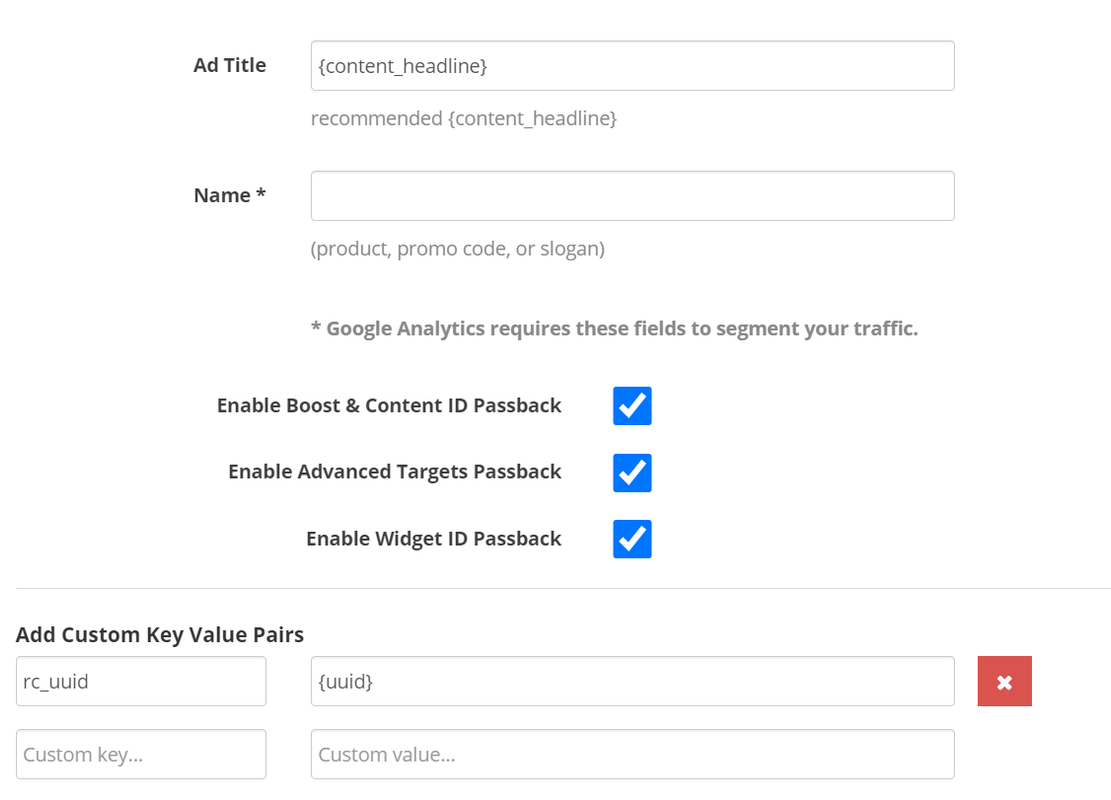
Just to update everyone, i had one conversion and it showed up in my RC dashboard, so the setup is working
Home > Paid Traffic Sources > Native