Combine Your Whole Data With This 1 Weird Trick (12)
Hi guys,
In recent days we discussed in @jaybot FA about the problem with combining data.
On
@diplomat advised to use AWS tools to join all data but I don't really know how it works.
But I know Google Sheets a bit and I can Google 
So I created the sheet which does the whole job.
I got so much help and value from STM so probably it's the time to give some love back. Maybe this sheet will be useful to somebody 
Anyway, how it works? I will show it with
1. Go to your tracker, select all placements from last 30 days from whatever GEO / offer / vertical you want. Click Export > Download CSV

Select placement (Zone ID), revenue, costs and conversions. That's all what we need.
2. Repeat step #1 with older period of time or whatever different data. Now you have at least 2 CSV files with various data.
3. Go to the Google Sheet Data Combiner. I shared it to view only. So just click File > Make a copy and use it on your Google Drive.
4. You can see two sheets in the file. It's "data" and "unique list".

The biggest problem with such 2 lists is that you have duplicated placements and different revenue / costs / conversions.
What the sheet does is combine data based on placement.
So it finds placement (even if you have 2, 3 the same) and add revenue, costs and conversions.
You just have to paste your data from multiple CSVs to "Data" sheet.
Then magic happens

In tab/sheet "Unique list" you have all data combined. With ROI and with Profit.
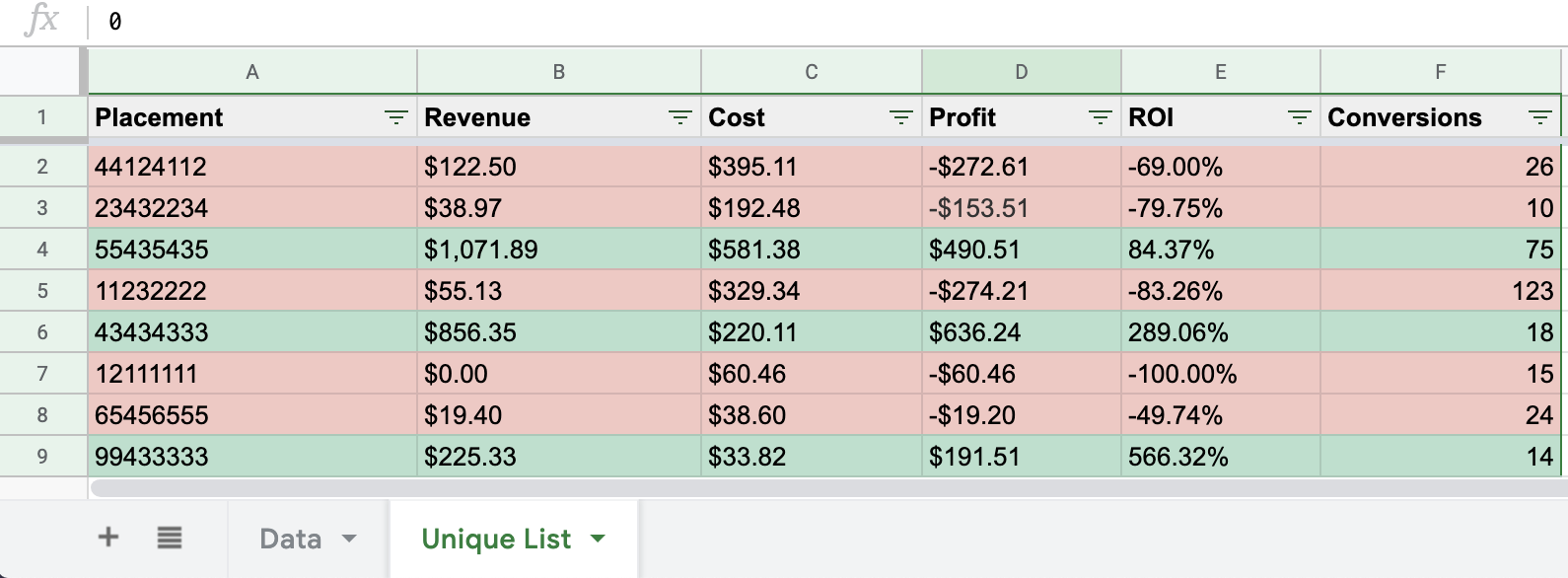
You can use filters on the top bar and select only placements with more than X conversions, ROI better than Y. Whatever rules you use.
Hope it helps to manage your data and squeeze even more juice from your campaigns
PS. Don't try to use placements from the file. They are made up haha
EDIT: UPDATE
I removed colors because yeah, they look sexy but at least on my computer it slowed down work of sheet A LOT. So I guess other people, especially with slower PC could experience the same.
Also added CPC and EPC because I noticed that creating lists without these variables sometimes makes no sense.
Of course right now you have to import visits from your tracker too.
awesome! I have made something similar in my gSheets as well to help with finding the right placements and to even help remove placements base on some data points. awesome work!
 Originally Posted by ianternet
 Yeah, I guess we could add here CPC and EPC and sheet could select only placements which are in enough profit to bid at specific placement.
But it's just theory, in practice for some reason it often doesn't work for me
I noticed that placements working differently when I bid differently. Trying to figure it out.Btw. Do you also see some lags in your gSheet when there's a lot of data? Some cells are disappearing etc.
This is awesome and now you are STM Newsletter famous! 
Damn, I feel Forbes cover soon haha
Awesome.THANKS!
Just updated the file.
I removed colors because yeah, they look sexy but at least on my computer it slowed down work of sheet A LOT. So I guess other people, especially with slower PC could experience the same.
Also added CPC and EPC because I noticed that creating lists without these variables sometimes makes no sense.
Of course right now you have to import visits from your tracker too.
Originally Posted by caravaggio
I used excel's consolidate tool for this kind of work until last week. With
However, this is really cool! Thank you for sharing this.
What a fantastic share! Much more efficient than my placement system. Thanks @caravaggio!
Amy
thanks for sharing awesome trick!
Nice share!
Home > Technical & Creative Skills > Tracking Campaigns