Follow Along - someone with no experience at all but with A LOT of will power (35)
Follow Along - someone with no experience at all but with A LOT of will power
Hi,
I joined the STM Forum a month ago to make it work for me, this time (I've tried affiliate marketing few times- but didn't gave it dissent effort and time to make it work for me).
This time I gave the word to myself that I'll do whatever it takes, pic new habits, get the right mindset, study new skills from scratch, practice & ask super affiliate as much as I have to create different results for myself.
I started my journey with the 1$ tutorial, which was nice- I even got a working campaign form this experience (it lest for three days and then I shut it down- because it started to show negative ROI- now I believe I could give it some more time).
Two weeks ago, I started the 40-days tutorial and had to take a little break to get my new HTML skill right and working on my landers.
I'll be happy to get your smart devices guys through this journey.
Goodluck! 
Great to see that you started the follow along.
Don´t forget to update it regularly and don´t shy away from posting as many details as possible.
The more you post, the better we can help
Trying figuring out all this "1000 different links" that are part of the testing process,
I'm kind of confused about this, so I'll try to conclude it here, pls correct me...
1) Postback URL: took it from
2) I gonna test 1 offer :
3) I gonna test 5 Landers: Voluum: landing page 1---> offer URL with the click id parameter.
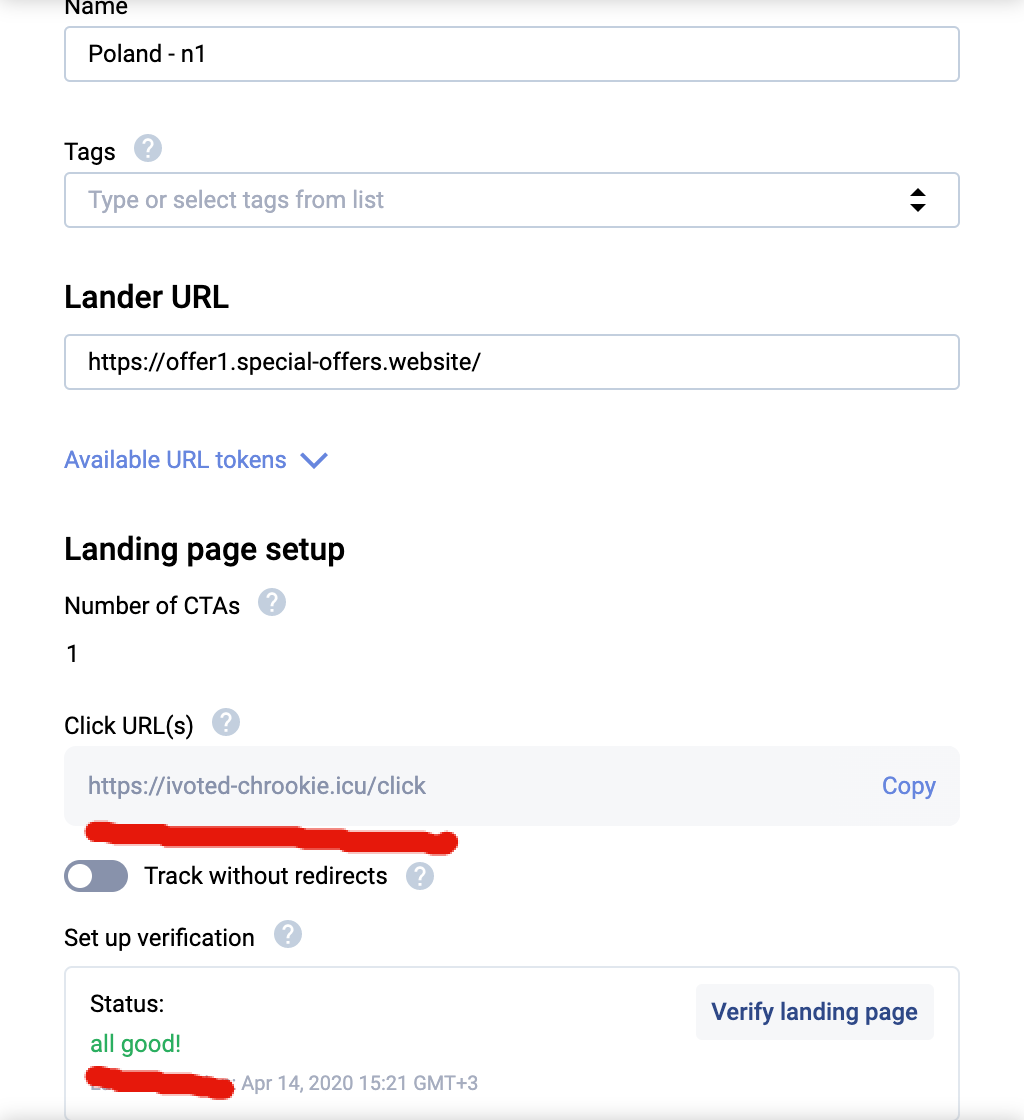
4) Landers that I'm gonna test: in each CTA for all of them post the CLICK URL from Voluum.
5) Testing for Boot test (based on this post: https://stmforum.com/forum/showthrea...live-campaigns): I add additional offer as CAURMEN had been instructed in the post:

6) I have changed all my landers CTA's to the Multi-offer click URL
7) New Campaign in Voluum:

8) And the problem Is: In the summery part of the new campaign in Voluum, after choosing all landers that I am gonna test & 1 offer from the affiliate network + 1 offer that leads to google.com appears the CLICK URL and no the Multi-offer click URL

So my questions are:
1. Did I get it right the whole process with those different URLs and parameters
2. Where am I mistaken in the "New Campaign" process in Voluum that I get the CLICK URL and not the Multi-offer click URL
Thanks so much in advance for your help, guys. I really appreciate it!!!
Please wait before you start campaigns.
It seems that there are some mistakes in your setup and your campaigns won't work properly so you would lose money.
I will reply in detail when I am back on my pc.
Welcome to STM mayadefr!
There are plenty of smart and helpful people on here! I started with the $1 guide too and really enjoyed it.
Good luck on your journey...
Thank manchester ,
It so encouraging to know that :-)
Alright Maya, here comes my hard but honest critic 
There are some mistakes in your structure that shouldn´t be there.
It´s absolutely mandatory that you understand how the different elements are structured, how the different links are working and what they do.
Otherwise you will make mistakes that can mess up your whole tracking so that you spend (and in worst case lose) your money without getting any good stats from it.
Or better, can you post your postback URL that you added to the CPA network here so that we can check it?
Otherwise you can´t receive that info from your postback when a conversion happens.
Did you paste the offer URL with click ID parameter on the landing page?
If yes, how did you do it?
Apart from that, it´s not the right way to do it.
On the landing pages you don´t add any offer URLs, you only need the trackers click URL.
It seems that you have small problems with the basics so better try to keep your setup as simple as possible and don´t make it more complicated than needed.
And a bot test isn´t that important, it´s much more important to get the basic structure running properly.
The multi offer click URL is only needed when you want to send users from different CTAs on your LP to different offers.
1) Postback URL: took it from Voluum--> past it in the affiliate network + have added to it: click id, payout & transaction_id
 Originally Posted by twinaxe

http://ivoted-chrookie.icu/postback?cid=REPLACE&payout=OPTIONAL&txid=OPTIONAL
This is the link i've paste in 'MYLEAD.GLOBAL' Affiliate Network:
| https://ivoted-chrookie.icu/postback?cid=[ml_sub2]&payout=[payout]&txid=[transaction_id] |
Originally Posted by twinaxe
https://golead.pl/p/Njzj/AkFl/ATpw
Here is how i pasted it in Voluum:

3) I gonna test 5 Landers: Voluum: landing page 1---> offer URL with the click id parameter.
Originally Posted by twinaxe
 Originally Posted by twinaxe
Is my process right?
Looks much better already
https://ivoted-chrookie.icu/postback?cid=[ml_sub2]&payout=[payout]
Start your first campaign but take care that you set the targeting and everything correct.
Happens that people mess it up in their first campaigns so better double check everything before you send the campaign for approval.
And also set a low limit first so that you can see if everything is working correct or not before you spend more money.
So...
i've got my first conversion in the campaign + some questions:
1. In both of them (the trucker & the affiliate network i can see the conversion) but the payout is way different: in the network it is 0.56 (the right one) / in the tracker it 56& - why the tracker got a wrong info about the payout and how can i fix this?
[Unfortunately the forum says i excited the max image storage, so i past here the links for the screen shouts]
https://dl.kraken.io/web/f4b7bb2fca8...a7b4e/vol1.png
https://dl.kraken.io/web/70b5689b314...e58f310/le.png
2. In the tracker i see 12,000 uniq visits but in the affiliate network there were only 362 - all the rest i guess where bots?- how does it work with bots- will they visit my campaign again during the time or i'm done with them? what should i do to fix it?
https://dl.kraken.io/web/f4b7bb2fca8...a7b4e/vol1.png
https://dl.kraken.io/web/70b5689b314...e58f310/le.png
3. From my 5 landers- only one lender converted and only once- can i based on that data decide this lander is my winner for now?
https://dl.kraken.io/web/27b82451e7c...8275f7/vol.png
4. How much money should i invest in this first test of different landers and offer?
(This data cost me 10$ till now)
Thanks a lot!!
Please insert the images correctly, then it´s much better and easier to read your posts
HERE I just posted a very easy guide how to do it.

Yout LP CTR is pretty low with only 0.71% and there were only 91 outgoing clicks registered in your tracker so in your CPA network you see even more clicks for the offer than your tracker shows
You can do it when you are really experienced but as a beginner you should stick with proven methods to avoid making mistakes and cutting the wrong elements.
And for this there something that is called "statistical significance".
This is basically a calculation that tells you from the collected data which elements are most and less likely to win.
You can read more about it HERE
HERE is a very good statistical significance calculator.
(This data cost me 10$ till now)
Number of landing pages x Number of offers x average offer payout x 10 = Test budget
When you don´t see any signs of success after 50% of the test budget stop the test and move on.
Originally Posted by twinaxe

Should i edit it manually next time?
Originally Posted by twinaxe
Originally Posted by twinaxe
Please make a screenshot from the offer payout as well, would like to see if the offer payout is set to auto or manually.


+ Another question;
While testing different landing pages in not English speaking geos, do you guys translating all the landers using native-speaking assistance (once it works, of course, I will turn it to to a native language)? Still, for testing purposes, i tried to use the translation of google translate, but the ctr of those landers is very low.
Thanks!
Maya
It´s really strange with the offer payout.
When it´s set to auto it should be passed back correctly.
Can you please send a screen from the tracker stats where we can see the conversion with the payout?
Did you receive more conversions to the campaign?
If yes, is there the payout correct?
Better get an account at Adplexity and download your landers from there.
That way you can build a good arsenal of landers in many different languages already.
Originally Posted by twinaxe

These are 2 same campaigns with the same issue- I had 1 conversion in each one of them in both the payout shows as 56$
That's really strange.
Can you then please post the exact postback that you put in the CPA network.
@mayadefr I'll try to get the exact postback urls we got from the affiliate network for these 2 conversions and send them to you on Skype.
Karolina
What is the right way to set different offers to different CTAS in one lander?
Thanks!
Originally Posted by mayadefr
Karolina
When I click on the CTA in order to check that all of them are working & redirect me correctly to the offer page (or at least are giving me an output that the offer is not available in my country) i get this error:

Can you guys check if the url address seems right and tell me why i'm getting this error?
Thanks!
One question, why do you want to connect different CTAs with different offers?
I strongly recommend against it for now, you are just learning how to run campaigns so it's better to keep your setup as simple as possible.
About your error, do you visit the landers directly or do you visit them through a campaign URL?
Originally Posted by twinaxe
Originally Posted by twinaxe
When you go to the landers direct this error is normal because the tracker then has no info where he should redirect you.
You need to visit the lander through a campaign URL so that the tracker knows what offers are connected to the campaign so that you can get redirected accordingly.
Originally Posted by twinaxe
What do you think about it?
Originally Posted by twinaxe
I will try through the campaign URL.
I strongly recommend that you read more about how landing pages work and how we use them, about how to setup campaigns in the tracker and how to use them and how the different links work and how to use them.
It seems you still have some issues to unerstand how all the different elements are connected and how they play together.
When you now start to run campaigns you will lose money for stuff that won´t work.
What do you think about it?
Promote iPhone offers on iPhone landers, vouchers for a specific site or shop on a lander customized for it and offers for a cosmetic company on a lander that matches the product.
But don´t run all 3 together.
I will try through the campaign URL.
What can be the reason for this error:

I'm entering my campaign successfully via the campaign URL from
Should I go live with this campaign, or is there something to be fixed before that?
thanks!
Don't start it yet, the reason is stated on the error message.
As we can see from the message it's the offer that is not reachable.
Do you really understand everything about campaign creation, tracking links and so on good enough now to launch campaigns?
It looks like as if you have pointed your click domain to a cdn (cloudfare).
You use the cdn only for the lander but not for the click url. The click url you need to point to
Best is to contact voluum directly and let them help you. Also make sure that for your lander and campaign you use the same click domain (you get one from voluum and have your individual one as well) --> use your individual one (standard choice for campaign is the voluum one --> needs to be changed).
Originally Posted by twinaxe
(i set in the traffic source the frequency to 1/24 + my bid was higher than the average suggested bid in POPADS).
Originally Posted by twinaxe
Here is the link of one of my landers in this campaign:
https://lan3.special-offers.website/
You may laugh at me, and of course, I do understand that in the beginning stages it is better to go simple, but I really would like to know why strategically I'm mistaken - why this can't work for the long run (i got very few clicks because the traffic split between all those offers, but why it is such bad idea to test different offers, and once an offers shoes positive single>> take it out to a new campaign and check it separately).
Originally Posted by twinaxe
Originally Posted by twinaxe
Originally Posted by twinaxe


and @Voluum , thanks Karolina, for your great support!
That. Is. Not. A. Typical. Lander.
It’s not even in Polish.
Get a spy tool. Adplexity. Anstrex. Whatever.
Again. You are not following the 40 guide. You’re just making shit up on your own.
Focus on one type of offer -> one lander.
E.g. Biedronka offer gets Biedronka lander. Either as a gift box, spinner, or quiz lander. In Polish.
I’m surprised you got any clicks through to your offer.
Sent from my iPhone using STM Forums
https://lan3.special-offers.website/
From where do you have that landing page and why did you think it´s a good idea to run that LP on pop traffic?
Here is a quote of me from page 1 of the thread
Originally Posted by twinaxe
Otherwise you run campaigns with landers that have no chance to succeed so you will loose much more money there.
Here in the forum is even a coupon for Adplexity to save $50/month.
You can´t just put lots of different offers on a bad lander together and hope that something works there.
Then you run campaigns in Poland but the LP is in English, and not even the best English.
Really, then the low CTR is no wonder.
I can only tell it once again, read again about landing pages and how to use them and also what landers are good to use.
And then please listen to us when we give you advice, when you run campaigns like this one you have no chance to succeed.
Don´t give it more time, more time will only be more losses.
The hard truth is that everything could and has to be done better.
Originally Posted by jaybot
Tnx, working on that now :-)
Hey there, how do you come along?
Home > > Newbie Follow-Alongs