Monetization tips & tricks from MGID (17)

We keep receiving questions about websites monetization with MGID. That’s why we’re dedicating this series of posts to tell you about the basic conditions of cooperation with MGID, what trends you should follow, and what mistakes you should avoid.
Why MGID?

Our features

Basic terms
- MGID works based on the CPC and CPM pricing models.
- We pay based on NET 30 payment terms. This means that e.g. the payment for July will be made on August, 30.
- Your number of unique visitors should be more or equal to 3,000 per day or 90,000 per month.
- MGID does not accept adult traffic. To read more about our policies, follow the link: https://www.mgid.com/content-guidelines
Average CPC
Tier 1 countries – $0,3
Tier 2 countries – $0,15
Tier 3 countries – $0,05
Payouts. MGID offers plenty of options:
- Epayments (minimum payout is 100$);
- Payoneer Prepaid Card (minimum payout is 100$);
- Paypal (minimum payout is 100$);
- Webmoney (minimum payout is 50$);
- Payoneer Bank transfer (minimum payout is 100$);
- Tipalti Bank transfer (minimum payout is 1000$);
- ACH bank-to-bank transfer (minimum payout is 1000$);
- International bank-to-bank transfer (minimum payout is 1000$).
Keep in mind that fees vary, contact your manager for the detailed information.
How to add the website?
STEP 1. Register and then log in to the MGID account.
STEP 2. Select “Native monetization for publishers”, then click on “Monetize website”.
STEP 3. You should provide the following information:
- Name
- Email address
- Website URL
- Phone number
- Message. We suggest explaining what your website is about in detail in order to speed up the moderation process. It’s better to provide screenshots that show the number of your unique visits per month.
MGID team
Most of the members here are affiliates - so tips on how to succeed as ADVERTISERS may make you more popular! 
Amy
 Originally Posted by vortex

Are MGID and Google Adsense enemies or good friends?
Today, Google AdSense is the giant of digital advertising. Placing AdSense ads is a sign of high-quality traffic, widespread audience and value of the website overall. Moreover, AdSense enables to get more insights about the audience, hence you can change website content and design to more convenient for the user.
Is there any option to receive even better results?
Yes. Google Adsense is compatible with other networks, thus you can use MGID and Google Adsense simultaneously. However, these ads should look differently than Google ads and must not violate AdSense rules. Here you can check the guidelines for how non-Google ads may be displayed along with Google ads.
Besides traditional widgets, MGID has new products like Smart widgets, push notifications, AMP and video widgets. Finally, by implementing MGID and AdSense solutions together:
1) You get more revenue, as MGID and Adsense have different ad algorithms. This means, that user will be exposed to a greater amount of ads that include Adsense banners and MGID native ad widgets;
2) You get more data about the audience. This allows you to analyze the quality of traffic by monitoring devices and GEOs where the audience comes from and days of users` activity on your website.
3) You can attract top advertisers from the whole world. MGID has been a market player for over 10 years, so we do know how to make both providers bring you solid revenue without competing with each other.
Finally, it’s well-known that often the win-win strategy is based on the ongoing cooperation of two or more leaders. Each side aims to maximize the profit for the common endeavor. Do not be afraid of using both MGID and Google AdSense.
We are always glad to assist you with creating widgets that will work well on your website and optimize them for gaining higher rates. Furthermore, we are open to cooperate and experiment in order to find the most profitable way of making the widgets work on the website.
Would you like to increase your earnings? Sign up at MGID right now!
Thanks MGID! I may apply to be a publisher down the road!
BTW - I think there are a couple of typos in the first post - I'm assuming you meant Tier 2 and Tier 3?
Tier 1 countries – $0,3
Tier 1 countries – $0,15
Tier 1 countries – $0,05
Amy
Yes, thank you! I edited the post
Hi, STM community 
MGID has vast experience in working with publishers. So today we will discuss widget optimization and share the best practices for website monetization.
Best widget combinations:
First of all, we recommend installing at least 3 MGID widgets on your website to achieve better results. The most profitable widget combinations are:
- under article + in-article + sidebar
- under article + sidebar + mobile
- under article + in-article + mobile
- under article + sidebar + header
Ad unit placements

It’s important to ensure that you’re using less than 30% of your desktop site’s first screen for ad space. A 30% ad, 70% content is a practical ratio for complementing quality content with ad content to the viewers.
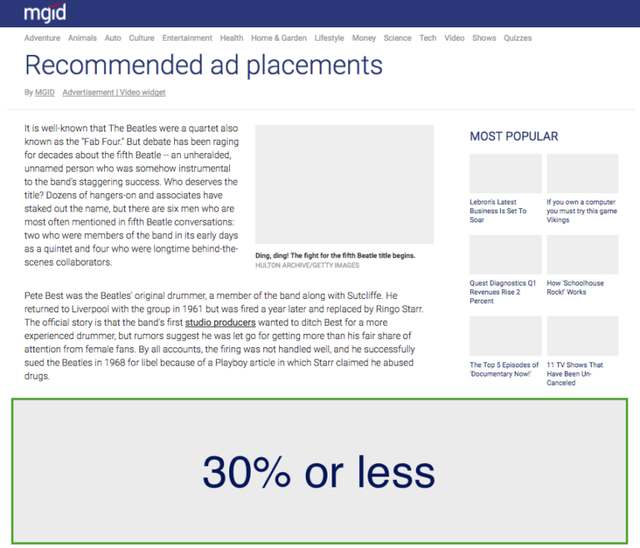
Finally, avoid all forms of pop-ups, first page interstitials, floating ads, and overlays.

Ad unit creation

- Start by choosing a type of widget. Then name your widget according to its placement, eg: “Under Article”, “Sidebar’ etc. to keep track of their performance.
- Use 1 image in a row for sidebar placement. We recommend 3-4 rows.
- Use different titles for the widget. You can choose anything from “Promoted Content” to “Check this out” in the widget creation window.

The most effective font size is between 14 px and 16 px.
Suggestions:
- Give new widgets at least 30 minutes to load before placing them on the site.
- Under article placement tends to show the highest performance possible. It is recommended to keep 3-4 images in 2 rows. However, if the content of your site is entertaining, then it will be good to use the 3 rows for your audience, as there will be more variety in the choice.
- Match the widget’s design to the website’s design. But always show the user that the content in the widget is sponsored.
- If you want to monetize banner placements, please consult your manager.
- Always place ads above the comments section, since most people won't scroll through the page after comments.
- If the website has a mobile version, make sure that the widget is displayed properly on both mobile and desktop versions of the website.
Performance optimization
- Use at least 3 widgets;
- Always pay attention to the visibility ratio. When Visibility is below 60%, consider moving the ad unit closer to the actual content of the page to not lose ad impressions.
Visibility rate (viewability) is a percentage of users who saw the widget on the screen, as compared to the page loads. Take a look at the example below:
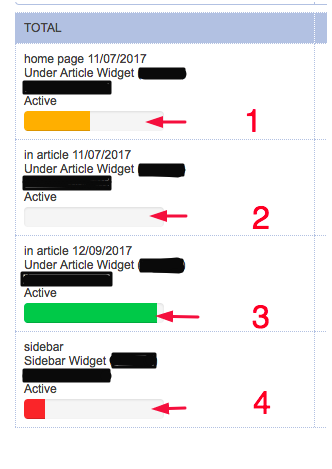
1 - This widget has low visibility.
2 - This widget has not been placed on the website
3 - This widget has high visibility.
4 - This widget has very low visibility.
If the widget’s visibility rate is low, please change the placement of the widget to a higher position on your website. For example, if the widget is placed under the comments, put it above this section.
- Analyze your stats by days. When making any changes, always check the detailed statistics by days to see actual changes.
- There are 4 content types of ads. To get the highest result from our cooperation turn all types on. If you have paid traffic from Facebook use only PG+R types. Please, read more details about the types here.
Widget’s statistics
To check the website’s stats go to Action Tab > Statistics:

If you have any questions, leave them in the comments below!
MGID team
Ad Manager or Double click for Publishers?
Google Ad Manager is gaining more popularity among publishers seeking monetization opportunities. Before we get into the basic concept, let us clear one of the most important questions: Ad Manager and DFP – are they the same thing?
DFP (Double-click for Publishers) was founded in 1996 as a system to display ads across a network of websites and track their performance to target specific users. The ad management tool gained wide popularity among publishes and after about 12 years it was acquired by Google. Later, Google announced a merger of DoubleClick for Publishers (Google’s ad server) and DoubleClick Ad Exchange (a real-time marketplace to buy and sell display advertising space) into Google Ad Manager.
So Ad Manager (further referred to as DFP) is an ad-server that allows you to manage, deliver and sell your ad inventory from different ad providers like Google, MGID, Outbrain, etc. Generally, DFP is used for ad unit optimization and provides publishers with better control over the ad inventory. All advertisers that are set to run via DFP go through an evaluation procedure before they appear on the webpages and/or in the apps. The evaluation is made through internal DFP algorithms. You can find more information here. On the whole, Google Ad Manager allows you to:
- traffic different ad providers: ad networks, AdSense, direct publishers, AdEX, etc.
- set up an internal exchange between ad providers including Google AdSense to maximize your revenue
- have a consistent reporting among all ad serving activities
What can MGID offer publishers which choose to work with DFP?
Since the Ad Manager is becoming more popular (and available) among publishers, MGID is also engaging the opportunities that the Ad Manager provides. Thanks to our in-house evaluation and moderation, all of the MGID ad inventory is applicable for DFP integration. Moreover, our widgets support the DFP’s option called SafeFrame that provides extra security to the pages and limits any influence the advertisers may have on the content of the website.
Google Ad Manager offers different variations of ad formats from natively-responsive ads to custom banner options and integrated video widgets. However, one of the most common issues that may occur when working with DFP is the standardization. Ad networks often have their own set of ad formats and display options that may not coincide with your best custom 332x784 ad placement on the website. For this reason, your ads may display incomplete or blank spots which definitely hinders the user experience.
MGID fights for the quality of advertising and meets the requirements for responsive ads. Our widgets fit the size of the placements they are set into, ensuring a totally native look. We also guarantee a 100% fill rate. This means that our widgets will display ads and never show a blank teaser to the users. For DFP publishers this gives an opportunity to use our ad inventory for both first look ad provider and as backfill for Adsense campaigns.
If you have any questions, leave them in the comments below.
Stay tuned!
MGID TEAM
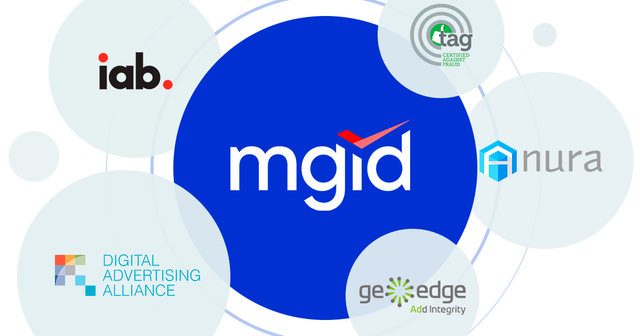
Hello, today we will be debunking some myths about MGID by telling you about our most important memberships and partnerships!
First of all, MGID is the first IAB member to announce all its ad formats are IAB-compliant. Interactive Advertising Bureau (IAB) establishes industry standards, conducts research, and provides the online advertising industry with legal support.MGID also became one of the first platforms to adopt the new IAB Tech Lab solutions, such as sellers.json files on its supply platform domains; sellers.json allows buyers to see a list of the authorized sellers and resellers an exchange or SSP works with. Similarly, the SupplyChain tool records the history of an impression, so buyers can see which sellers and resellers are involved in the bid request, giving more transparency and greater end-to-end visibility in the supply chain. To check all current members of IAB click here.
Furthermore, MGID is a member of the Digital Advertising Alliance (DAA), which consists of the leading advertising agencies, publishers, marketing companies, ad networks, and ad tech companies. As a member of the DAA, MGID clearly notifies customers about data collection and practices using an enhanced notice provided via the YourAdChoices Icon or link. The AdChoices have over 200 participants around the world, including companies like: Bloomberg, Facebook, Google, Microsoft, Yahoo!, and etc. Check all members here.
In regards to traffic quality, MGID has its own anti-fraud department and uses the Anura ad fraud protection software. Anura identifies real users, bots, and human fraud, thus allowing for better traffic quality and performance. On the whole, Anura has proven to have close to zero false-positive results and automatically stop leads from illegal sources. To read more about Anura click here.
In addition to this, MGID earned the TAG “Certified Against Fraud” Seal from the Trustworthy Accountability Group (TAG), meaning that MGID follows the rigorous requirements of the program to combat fraudulent traffic across the digital advertising supply chain, malware and internet piracy, as well as promote transparency. Check all members here.
The last, but not least MGID partner is GeoEdge. GeoEdge has over 50 different security and operational categories, so it guards against malware, non-compliance, inappropriate content, data leakage, operational and performance issues. Moreover, it helps MGID to identify Malware Files (Pre Click, Post Click, Page Scan), Malicious URL (Pre Click, Post Click, Page Scan), Phishing URL, Drive-By Download (Pre Click, Post Click), Automatic Redirect, Browser Locking, SSL Certificate Violation and LP change. On the whole, GeoEdge’s security and ad quality service detects over 40% more unique threats than any other vendor.
We do our best to ensure our clients have the best service and we will make further necessary changes to increase accuracy and transparency.
If you have any questions, leave them in the comments below!
MGID team
Hey, STM people
Let’s move on and discuss the MGID inventory for publishers.
Today, under-article widgets are a must-have in native advertising; they’re compatible with any website engine, screen size or browser.
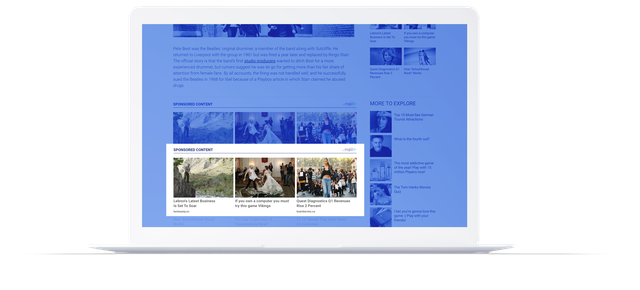
Then, the in-article widget has a non-intrusive native design and performs best on mobile, without occupying a lot of valuable screen estate.
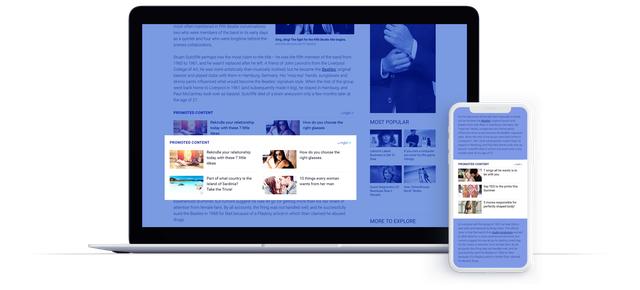
The sidebar widget is easy to implement, preserves site structure and offers additional revenue.
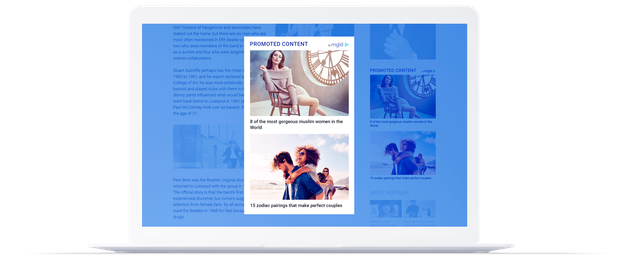
In turn, the header widget provides maximum engagement thanks to the high visibility rate.
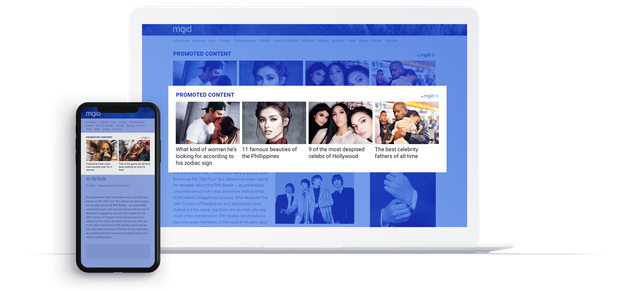
The mobile site widget appears only for mobile users. It has a 100% fill rate with great visibility. It generally enables you to get up to a 30% revenue increase compared to the traditional mobile ad unit. Also, in case you have an AMP page, we know how to make a convenient, comparable widget for monetization.

IAB display units are suitable for most ad servers and match IAB display sizes standards (300x250, 728x90, etc).

The solo in-article widget has a multitude of different designs and color schemes in order to fit any site. This widget, in particular, performs best on mobile, getting attention without occupying a lot of valuable screen estate.
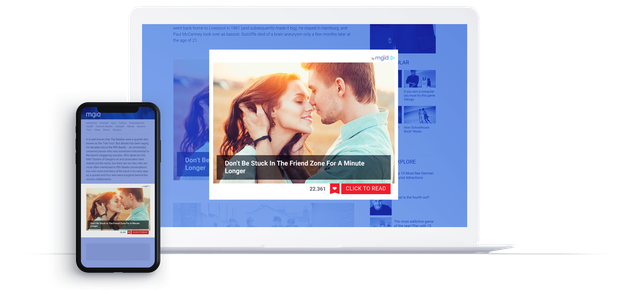
Finally, a smart widget is an all-in-one solution for publishers. It analyzes online user activity – such as what they’re reading, browsing and clicking on – and displays relative ads in different forms (native ads, IAB display units, native video). This drives higher click through rates (CTR) and increases the time consumers spend on websites. Simply put, the smart-widget is like an infinite feed with various ad formats that combine your internal content with sponsored content.
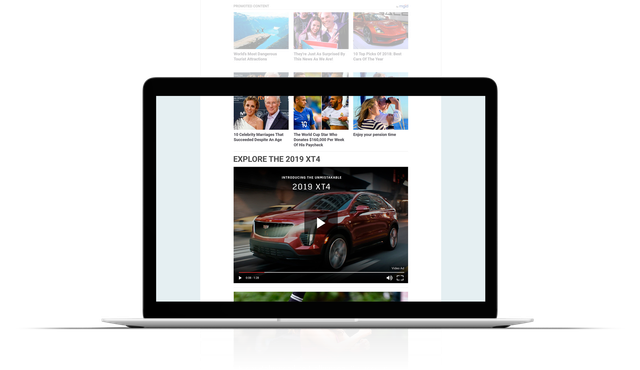
In conclusion, each widget can be used in combination with the internal exchange in order to best suit any site. Moreover, all of MGID widgets can be adjusted to the AMP pages. So you will have an additional source of income.
If you have any questions, leave them in the comments below!
Stay tuned!
MGID team

Hello!
As we have already mentioned in a previous post, the smart-widget is like an infinite feed with various ad formats that combine your internal content with sponsored content. It displays relative ads in different forms (native ads, IAB display units, native video). This drives higher click through rates (CTR) and increases the time consumers spend on websites.
Take a look at the example https://www.mgid.com/smart-widget/index.html
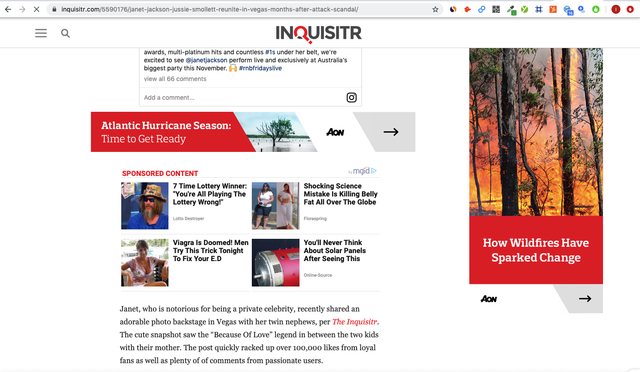
By default, a smart widget is created with an infinite scroll feature. However, if you want to remove the endless checkmark in the settings, it will only be on one scroll (15 teasers). In addition, MGID provides you with the option to make a smart widget with any number of scrolls, as often publishers ask to make smart widgets that are 2 or 3 scrolls. Сheck another example here https://www.inquisitr.com/5694593/da...victor-jordan/
MGID also provides you with a video option inside the smart widget. The video player will be displayed on the site as a large ad unit. Take a look at the example https://www.jagran.com/videos/astrol...ro-v39435.html.
Ideally, you should place a smart widget with an infinite scroll and allocate space for internal exchange + enable the video option, as our smart widget possesses a smart feed design that holds all native formats in one widget.
Finally, a smart widget is only suitable for news sites, so you should place it immediately below the article. If there is a comments section, then it’s better to place a smart widget after the comments. Remember that the widget is endless, so if placed before the comments section, users will not be able to scroll through it.
If you have any questions, leave them in the comments below!
Stay tuned!
MGID team
Hello STM people!
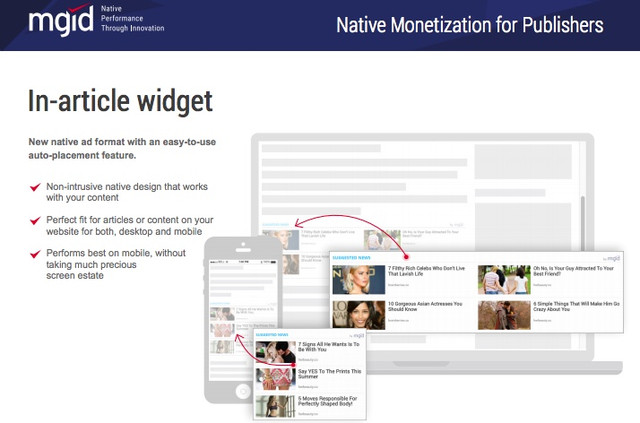
We’re continuing our series of MGID inventory posts by covering the in-article widget. The in-article widget is the 2nd most productive widget in the system after an under-article widget, and works well together with an under-article widget on a page.
As for main features, the in-article widget has a non-intrusive design and changes from 2x2 on a desktop to 1x3 on mobile. It’s best used for websites with long or medium articles, as this format helps to diversify content and increase user engagement.
As for the placement, we suggest to place it in the first half of the article, so you increase the visibility rate, and as a result, the number of clicks from the widget.
Since now mobile traffic dominates the world market, in order to effectively monetize your page, you need to use an in-article widget in combination with an under article widget., as these two widgets bring about 80% of all revenue.
If you have any questions, leave them in the comments below!
Stay tuned!
MGID team
Hello STM people
According to statistics, almost 72.6% of Internet users will access the web solely via their smartphones by 2025. Impressive, right? However, in today’s age web pages are still mainly designed to serve the desktop first. Sometimes, this may result in slow loading pages. eConsultancy study showed that 40% of users leave a page if the loading speed takes longer than three seconds.
Digital giants put a lot of effort into developing technologies that will improve mobile user experience. For this purpose, Google developed an AMP (Accelerated Mobile Pages). AMP сodes show 3 times higher CPM than the non-AMP widget. Besides, AMP pages are between 4 to 31 times faster compared to non-AMP web pages. AMP aims to improve the browsing experience, which in turn increases load speed, boosts traffic, raises SEO ranking, and lowers the bounce rate. Our studies prove AMP helps to increase website traffic by 10%, as well as sales conversions by 20%.
This website technology allows publishers to build pages that load on mobile phones almost instantly. AMP performs well for content websites with mostly search and mobile traffic. We do not suggest using it for streaming websites and sites with a low % of search traffic.
How to make AMP pages?
Click here to read how to set up an AMP solution for your website at MGID.
The use of an AMP HTML (an extended version of HTML with custom features) would be a major step forward in speeding up the mobile experience. It restricts the use of JavaScript components to those that do not burden the page, limits some CSS elements, and provides restrictions enforcement, while still allowing publishers to add preferred styling elements. Increased adoption of AMP would help to deliver lag-free mobile browsing with faster load speeds, increased engagement rates and decreased bounce rates, ultimately delivering a superior mobile experience and driving positive business outcomes.
Take a look at the case study below:
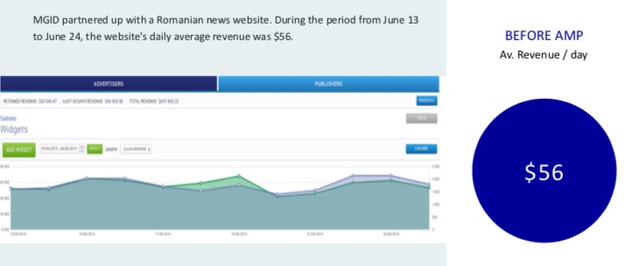
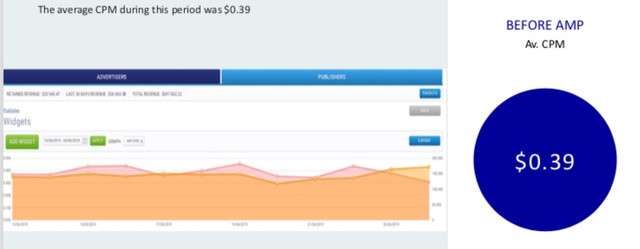
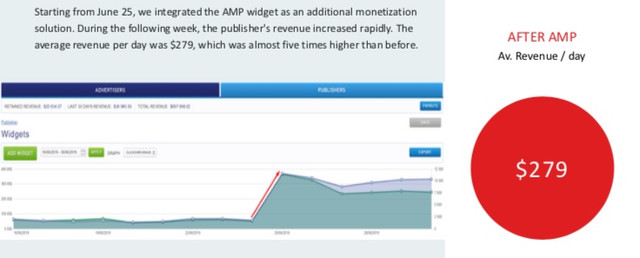
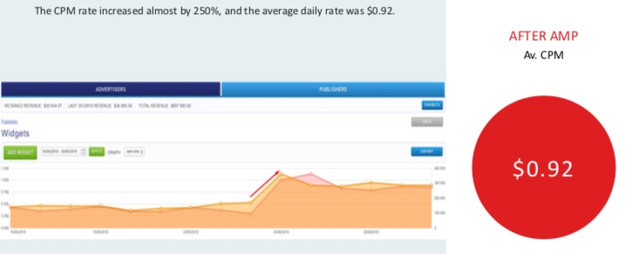
So, if you are an MGID publisher ready to acquire another revenue stream without disrupting the user experience, it’s high time you used our in-house solution! It allows you to enable AMP pages for all of your website’s inventory via the WordPress accepted plugins. Don’t miss the chance!
If you have any questions, leave them in the comments below!
Stay tuned!
MGID team
How to maximize revenue with MGID
Hey STM members,
Every day our managers receive tons of emails asking for advice on how to maximize profits. Today, we have prepared a pool of our best practices to aid you and every publisher in setting up widgets quickly and efficiently.
First of all, keep in mind that you can use both MGID widgets and Adsense banners; they are fully compatible. You get higher CTR and thus higher CPM and revenue.
Now, let’s discuss the widgets that are the most effective in our inventory.
Under-article widget
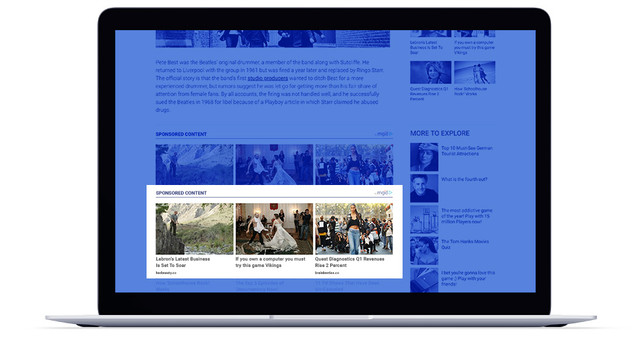
- the most powerful widget in our inventory that allows generating higher CTR and CPM, thus creating more revenue
coincides with the user’s natural activity stream, as a user is ready to consume new information after reading an article
- has a 40-60% visibility rate
- performs well for every website and every traffic source.
In-article widget
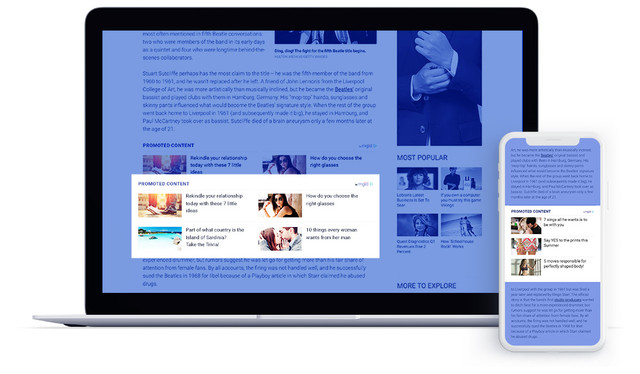
- resizes from 2x2 on a desktop to 1x3 on mobile
- works together well with the under-article widget on a page
- perfectly fit for long articles
The in-article widget is the second-best choice after the under-article widget. To get the maximum performance with the fewest number of widgets, you should use the combination of these two: under-article + in-article widgets.
Smart-widget
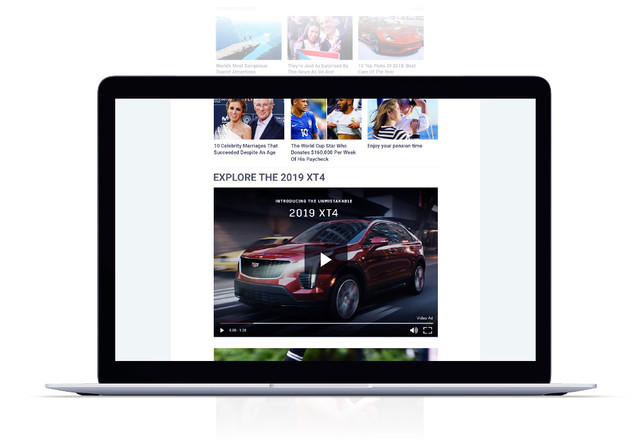
- a feed with various ad formats (native ads, IAB display units, native video) that combines your internal content with the sponsored content
- shows outstanding performance in desktop devices, so it’s recommended for websites with a high percentage of desktop traffic
- has a high CTR due to higher user engagement provided by internal recirculation and video solution.
By default, a smart widget is created with an infinite scroll feature. But you are free to test a different number of scrolls and ad formats within the smart widget to gain a better understanding of what your audience is looking for.
To get the most out of this solution, try placing the smart widget with an infinite scroll, allocate space for internal exchange, and enable the video option on top. Thus, you can achieve two goals at once: monetize your audience and retain it on your website.
In conclusion, these three widgets are proved to generate the highest results in the MGID inventory. However, we strongly suggest you to contact your manager for more specifications and tips. They will give suggestions about widgets that will work best for your website and guide you through the setup process.
If you have any questions, leave them in the comments below!
Stay tuned!
MGID team

Digital space is continuously evolving, so it is essential to be up-to-date with all upcoming and existing trends. Today, the video format is one of the most promising; according to Hubspot, 81% of businesses use video for marketing strategies. The study of Cisco predicts that online videos will account for more than 82% of all internet traffic by 2022 (15 times higher than it was in 2017). In addition to this, a video has proven to be the type of content with the best ROI. Thus, we strongly suggest you consider video as another way to monetize your site.
MGID is actively promoting and developing a video format, as it not only boosts monetization of websites but also increases user retention and engagement. There are two solutions in our inventory: the recommendation player and the combo widget.
The recommendation player provides video content that is monetized by using in-stream video ads from top brand advertisers.
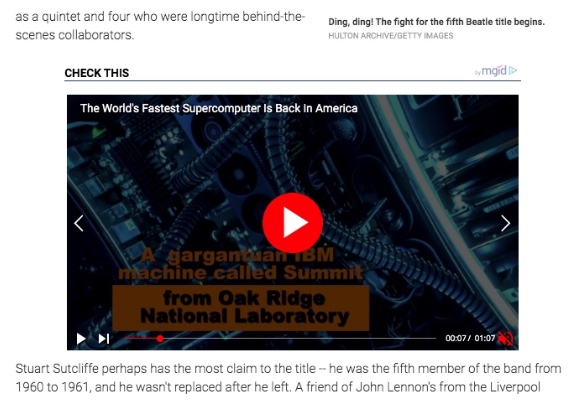
The combo widget is an advanced version of the recommendation player. It includes video content and native ads in one solution. The combo widget is currently the best option for publishers as it allows them to monetize the website throughout video content and native ads simultaneously. According to our data, native video ads show 3-5x higher RPMs than display ads.
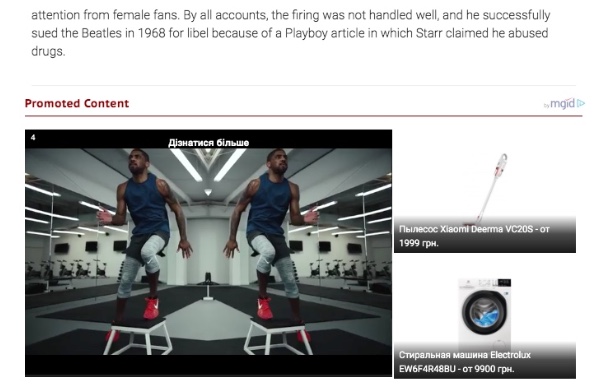
The duration of the commercial can be 6,15, or 30 seconds, but the video content can last from 1 to 2 minutes. All videos support the autoplay option at MGID.
As for devices, our video widgets are adaptive, i.e., they fit every device, screen size, and website layout.

Once you place our unit on the page, it will start showing videos that are highly relevant to your audience’s interests. The better you draw your audience’s attention to the website content directly influences the benefits they will bring to you.
MGID provides publishers with two options: they can show their own video content, or ask our creative team to hand-pick the video content that fits the site and their audience’s interests best.
One of the best-performing practices is to give the player the highest and widest possible placement on the site so that people notice it immediately.
After reading this article, you should have a better understanding of video monetization at MGID. Do not hesitate to experiment with trending formats in order to get higher results. As data shows, videos are excellent at boosting profitability and increasing CTR. Our managers know how to get the best results for publishers, so if you have any questions, just contact us!
Stay tuned!
MGID Team
How to monetize a website through push notifications
Hey!
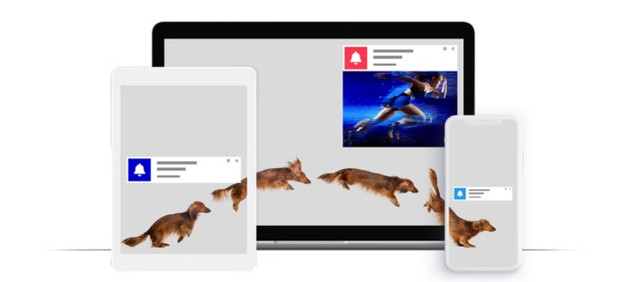
When browsing the web, you often come across a request: “Allow or prohibit the sending of notifications?”. If you click “Allow,” then you will be added to the user list. From this moment onwards, websites can send notifications to you whenever they want.
You must have figured out that today we will discuss another effective way to monetize a website – push notifications.
This is how a push notification looks like:
Benefits of Using Push Notifications
Push notifications are easy to opt-in and opt-out of, thus aiding in targeting the right users and successfully retaining them (93% with segmentation). Another advantage is that they will not affect website search results. As a whole, push notifications have proven to be a very effective way of monetization for various verticals.
MGID publishers are provided with two options: use internal recirculation and send push notifications with their website content, or allow MGID to send its own choice of push ads. By mixing these two approaches, MGID publishers achieve 2 goals in 1: audience engagement and monetization without any intrusive undertone.
MGID Smart-Monetization Tool
As for the frequency of notifications, our managers can set up any desired number of push ads. In addition to this, MGID has developed the smart-monetization tool; it decides how many push notifications will be sent the next day based on data obtained from the previous date. Namely, the tool compares the number of subscriptions and unsubscriptions per day, and then sets up the number of push ads to send tomorrow.
Opt-in options
Depending on the type of page, the publisher has two options: Single Step Opt-in or Two-Step Opt-In.
Single-step opt-in is available only for the HTTPS site, except websites on Blogspot and Blogger platforms. All the texts are the default of the browser in the single-step opt-in. You can not change it or add images.
All HTTP, Blogspot and Blogger websites only have a two-step opt-in option. That means you can repeat the message on the opt-in popup; you can choose the title, website logo, and CTA button. More personalized messages might often show good results, but a persistent problem is that the two-step opt-in option is not user-friendly and leads to fewer subscriptions.
Devices and OS
As for devices and operating systems, there are no web-based push notifications on iOS and Safari. On the other hand, push ads are available on Chrome, FireFox, Opera, Edge, and Android.
If you have any questions, leave them in the comments below!
Stay tuned!
MGID team
Widget implementations that are frowned upon (not only by MGID)

Hey!
Recently, we covered the topic of maximizing your revenue within the MGID inventory. We previously focused on the Do’s; in this segment we will cover the Don't’s. We hope this will aid you in saving time and increasing revenue.
Firstly, let us discuss website categories which are not supported by our platform:
- We do not accept websites with adult content. Adult content pertains to media containing exposed genitalia and female breasts.
- Websites with gore content are also prohibited. This includes grotesque and detailed violence.
- MGID does not work with websites providing unlicensed streaming services, converters and downloads of intellectual property assets, including: videos, books, images, photos, programs, applications, torrent services, etc.
Let’s continue with prohibited placements and practices. Below, we have ordered them from the most to least common cases:
- Hidden on-click links that send users automatically to the MGID advertisers landing page. For example, users finish reading an article and see a button that reads “Continue reading”, which addresses them not to the article but to an advertiser’s landing page.

- Placements that generate high volumes of involuntary and fraudulent clicks.
- Widgets placed in floating blocks that move with page scrolling and/or are displayed over a website’s content. Keep in mind that sticky sidebars are accepted, the main issue is that the ad cannot overlay the main content.

- We ask our publishers not to incentivize their audience to click on the ad. For example, using this phrase paired with MGID widgets: “If you want to support our website, please click any of the ads below”. However, we do recommend to include phrases such as “Interesting for you”, “More from around the web”, “Suggested news”, etc. The possibility to add them is provided in a client dashboard on a stage of widget creation.
- Widget placements that overlay video players. Such placements generate a large volume of random clicks because users accidentally click on the widget, rather than the video player.

MGID widgets cannot be displayed on a website which provides ad placement for adult content or products.
By following these guidelines, you will be able to generate a steady income, higher CTRs and maintain the status of a trusted and reputable publisher.
If you have any questions, leave them in the comments below!
Stay tuned!
MGID team
Home > Paid Traffic Sources > Native