How to get the most of Voluum? (7)
When I started as affiliate a few years ago (doing mostly SEO) I kept hearing the importance of collecting and analyzing data - this industry is all about the data and I do not know a single successful affiliate who do it without a tracker.
In this thread, I invite all newbies to ask questions about
Here is my question: How to group similar campaigns to analyze placements?
I promote an offer in one GEO, one traffic source, running several campaigns – 3 of them are active now, 10 were active in the past 2 weeks. This is because I use ProplerAds and in the first campaign, I was targeting all user activity with 3 offers campaign. Then I stopped this campaign and ran 3 separate campaigns – one per user activity. Then I stopped these 3 and started 3 new. Now I want to group data per zone id to filter the good one and the bad one.
Now I know which carrier performs best, what offer works best for me and I want to optimize zones.
The thing is that you can’t do it easy with default reports in
How to create a report for past 30 days, one offer, (one carrier?) all campaigns, grouped by zone id?
Great initiative @peweb2005 - I hope others follow!
Trackers are complex so it's very likely that functionalities you want are already supported, and you're facing a problem with discovery - that's where I come in. Everyone, if you're struggling with using
Our teams are focusing on UX improvements A LOT now. I'm available on the forums non-stop: I'm here to hear you out, engage with you and get to know you - all to make Voluum better for you.
So let's get to it:
 Originally Posted by peweb2005


I encourage you to play with different groupings options in the PropellerAds report to see which view suits you best (V1: zoneid → Offers → Campaigns / Offers → V1: zoneid → Campaigns etc.)
Only when you start from PropellerAds report, you'll be able to go deep enough to check placements. That's because zoneid is passed to Voluum in a custom variable so it can't be selected as a grouping option elsewhere.
Good luck and don't be a stranger, let me know if it helped!
Karolina
What does each of laner's tokens mean?
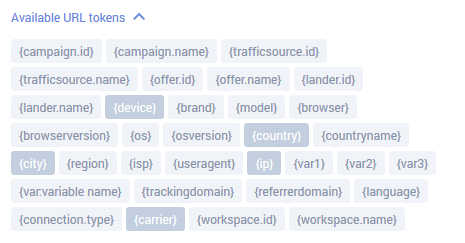
Some of tokes are clear but others are not, for me at least.
@peweb2005 There are some edge cases when you might want to pass some of these tokens to your landing page in a lander URL - like {tracking domain} if you use the same lander in campaigns using different domains to make the click tracking work (the domain used in a click URL on the landing page that redirects to an offer needs to match the domain used within the campaign URL) or {device} to display dynamic content on your LP ("Click here, iPhone user!").
But in most campaign setups and campaign funnels there is no need for that. Landing page is yours so there is no one to share your data with, not like with cases of passing information to an affiliate network platform or back to a traffic source.
To be honest, I'd say
Some examples:
var1 (var2, var3, ... also) is a custom variable used to pass information from a traffic source to Voluum. So if your traffic source setup looks like this:

{var1} token will be passing creative id value Voluum got from that traffic source to your landing page.
{workspace.id} and {workspace.name} relate to a workspace this lander is assigned to. More on workspaces here - you can use them to divide your Voluum elements into separate spaces.
Can you tell me which ones aren't clear to you? Then I'll focus on these and explain them further.
Karolina
Thank you for this thread:
My question to
In the @vortex newbie tutorial, she states that it's best to use our own custom domain (as opposed to the domain provided by
My issue is with respect to SSL on our own domains as used through voluum. I see Voluum does offer SSL for free---but only for the Voluum issued domain. Other than paying Voluum extra for the SSL on my own domain (which is expensive), is there another way to get SSL on my own domain? Can I just buy the SSL from my registrar--and will Voluum then accept this? [Hopefully I made sense here, as SSL issues are typically muddled.]
Thank you.
Great to see this thread working. Feel free to add your question, I'm here!
Your explanation was perfectly fine @devdev, now let me dive into this matter.
There are 2 types of tracking domains you can use - dedicated domain and custom domain.
A dedicated domain is new, provided by
A custom domain is bought by you, though SSL for it is bought, maintained and renewed by
Certificates for custom domains are included (for free) in all plans but the lowest. For Entry plan, using a secure connection is possible with a dedicated domain only, that was a business decision on our end.
I recommend using custom domains - in case they get banned, you set up a new domain, remove the old one from the tracker and add a new one, hassle-free. Though if left with a choice: custom domain or SSL (if only 1 is applicable), I would go for SSL - choose a dedicated domain and request SSL for it in the panel.
Someone asked @vortex the same question under Lesson 1 of the tutorial, here's what she had to say about it:
Originally Posted by vortex
I hope this answers all your question. Please share if you have more @devdev.
Karolina
Bumping up this thread cause it's a good one.
If you have any questions, you know where to find me - literally everywhere on the forum 
You'll 100% catch my attention when you tag me by @Voluum.
Thanks.
Karolina
Home > Tracking Campaigns > Voluum