Schedule Demo for RedTrack Publishers' management features (1)
Hello guys!
In
It takes care of the whole process of tracking and managing your affiliates so you may focus on what is important for you and your business.
Let’s be honest, growth management challenges are essential hurdles to success. And it’s defined by the quality of your publishers’ work as much as your ability to organize and track them. We’ve talked a lot about it with industry representatives to find out how we can help. To our surprise, it appears that many small and medium affiliate teams simply don’t have any solution to manage their publishers and have to rely on workarounds or overpay for enterprise-level software.
Challenge accepted. Our RedTrack team is happy to introduce you a new viable affiliate tracking and management solution with no excess features and reasonable price – Publisher Panel.
What exactly is Publisher Panel?
Publisher panel is a new feature in RedTrack that completely changes the way growing affiliate teams interact with their publishers. In addition to extensive tracking opportunities, small and medium-sized businesses can easily manage campaigns of all their affiliates by simply adding Publisher Panel to standard pricing plans.
This feature was designed specifically for the teams who struggle with functions overloading and high cost of the available performance marketing platforms. The main goal of RedTrack Publisher Panel is to help these teams to automate all media buying and management activities and keep all their data in one place with zero workarounds involved. And it should not cost an arm and a leg.
How Publisher Panel works:
To make the process of communication between managers and affiliates fast and convenient, we’ve created 2 separate workspaces for two parties.
To start as a manager you should follow 5 simple steps:1. Choose one of the pricing plans with Publisher Panel
2. Add your affiliates in Publishers tab, using their emails and setting personal passwords
3. Choose available traffic source or set up a custom one
4. Add affiliate network or create a custom one
5. Add offer you want to promote
6. Create a campaign
7. Choose a publisher to promote the particular offer and set personal conditions
8. Provide your publisher with a password to log in his workplace
Now you can track everything that happens with your offer with real-time statistical dashboard.
From the publisher side, it looks even simpler. They should enter their personal password and Log in to the app.
Inside the app publishers see the list of offers, traffic reports, postback set-up, and payout history.After accepting and starting promoting, they may track performance with
- CPA,
- Revenue,
- Conversions,
- Clicks,
- EPC — Earnings per Click

How will you win with RedTrack Publisher panel?
On top of tracking with 30+ data attribution points, SSL support, flexible postback settings, multiple integrations, and fraud monitoring, managers get access to detailed real-time statistics for all their publishers’ campaigns and can make amendments anytime. You may check campaigns that are ineffectively promoted, move them forward or bring them to the end.
With standard cost, domains, landers choice, and postbacks settings, you can apply 16 specific filters to each Offer. Among them are:
- Geo-targeting
- ISP
- OS
- Device brand and type
- Referrer Domains
- Proxy type
In addition to it, you can arrange up to 10 individual Subids
 Publishers tabPricing policy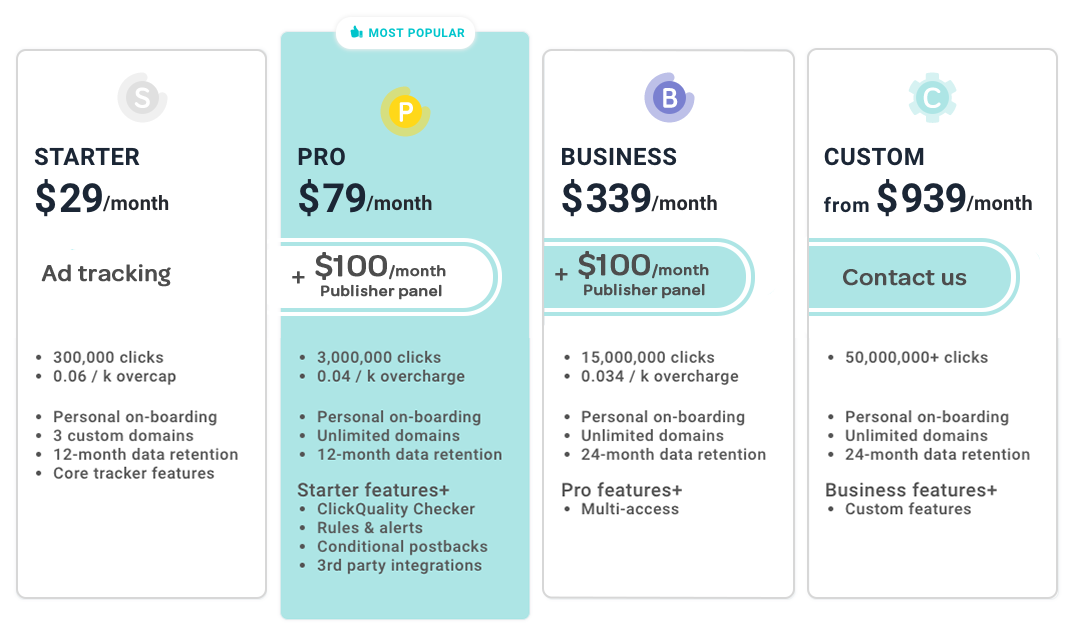
DEMO
As you may see, RedTrack Publisher Panel is a clear and comprehensive solution that fully relieves your headache as every aspect of management and tracking is taken care of. And saves your time and effort for what you do the best.
Schedule RedTrack Publisher Panel Demo now to see how it works.
Home > General > Affiliate Marketing Forum