Binom — Tracker For Professionals [-90% STM coupon] (49)

Binom Story
In year 2015 when iMobiTrax was already of poor quality, and
After all, doing our best for others is even more enjoyable then doing it for ourselves. By word of mouth the product was distributed from one person to another and by now in total amount of traffic it is one of the leaders. All this time, we constantly were improving our creation, and were so happy with its grows. At the same time, we were solving huge amount of the practical tasks, connected with operation speed, interface, new functions, also, for the long time we successfully hid from Adplexity and issued more than 30 updates.
During these years we put excellent support and development team together capable to create the best product, and service that we are proud to show to the broad spectrum of people working in the affiliate marketing.
At the given moment, more than 1000+ clients from all over the world work with us. They process more than 3 billions clicks per month.
Adspexity screen:

Binom is simple and easy solution with professional capabilities. During development we concentrate on the operational speed and flexibility to solve the maximum spectrum of AM's tasks.
Main pros:
- Interface and redirects speed
- Fix cost
- Simple and user-friendly (huge experience in AM allows us to make it the way it should be)
- Unlimited domains (with free SLL certs), users, amount of rules, data storage time
- Flexibility and customization
- No-redirect tracking (integrated landings and LP Pixel)
- Tracking of any events and displaying in reports with any formulas
- Ideal solution for teams: unlimited users with custom access rights
- Powerful API for with access to all tracker’s functionality
- Experienced technical support, free tracker installation and server setup + optimization
Intercom screen:

Cons:
- Self-hosted. We try to easy it for you with tech support, who can handle with everything that is related to the server. Including the tracker installation itself and server optimization.
Technical experience is not required! - If you store more than 300 million clicks, for most servers you may run out of disk space. We have monitoring and clearing systems in tracker for that.

Than good for your niche?
Pop-traffic, Mobile:
- Tracker can process huge amounts of traffic (up to 600 million clicks per month)
- Price does not depend on volumes
- Super-fast redirects and reports speed
- Filters system (including mathematical) for white- and black-lists
- Marks for publishers
- Check of tracker’s and landing’s domains for google ban
- Bots on landings detect and displaying them in a separate column for pubs filtering
- No-redirect tracking for loss reduce and cloaking within one URL
- Display of bots, scrolls and backfix percentage or any available metrics in any section
- IP ranges Report
- A powerful API for automation
Native Ads
- Marks for publishers
- Update cost by tokens, so you could match with stats in the source
- Tracking of behavioral factors through events, for example, the percentage of logged in social networks user
- Tracking of landing's viewing depth and exit points
- Group campaign reports for cross-analysis
- LP Pixel
- Integrated landings with PHP (create your no-redirect cloaks)
- Replacing domain's index page in order to track and filter moderators, bots and displaying its statistics
- No restrictions for cloaking rules: IP, user-agents, proxy traffic filters
- URL customization up to http://site.com/?article=about, understandable URL while using mod_rewrite. In fact, you can make a whole site inside the tracker
- Tracking of behavioral factors
Screenshots
Campaigns page:

Reports:

Traffic distribution:

Tokens mark:

What's in the plans?
- Auto-optimization of traffic distribution
- App tracking
- Trackers monitoring
- Deep Integration with sources and networks
Price
The cost of the first license is $99/month.
Additional (for the 2nd and subsequent servers) - $49/month.
We have discounts for a prolonged extension.
3 months - 10%, 6 months - 20%, a year - 30%.
It means that license will cost you only $69/month.
Discounts for STM users
First 10 clients from the forum will get a free license for a year.
First 100 customers will receive a 90% discount for the second month.
Then a 60% discount. First month is free
Use coupon: STM or push the link:
SIGN UP
... or see our live-demo.
We will be happy if you write your feedback at STM!

Binom team do care about our users and do value their participation in forums discussions.
Ah, seems I was too late for the free first year 
Do you have any plans to introduce a cloud based version?
 Originally Posted by eurosen

7 free-year-license left.
Originally Posted by eurosen
So recently, I have personally tested and explored many of the known tracking solutions. FunnelFlux, Thrive, Binom,
To be quite frank, I felt Binom was a very good fit for our needs and what we do. You can tell it has features that are practical and helpful for the true affiliate marketer. However, there were a couple of points that made me decide to not make the full switch over to Binom with our traffic. While my needs in a tracker may differ from others, I would recommend you give it a test.
If Roman or the other Binom guys want to chat with me in private to discuss my concerns, I am open to it.
Cheers,
Andrew
Originally Posted by Mr Payne
All one year licenses are gone?
hey @roman, still spot left for the "free license for a year"? having same issue like @eurosen
2 licenses left...
Free-year licenses are over.
95 licenses are available at a discount.
Finally you opened the thread here and I would like to post my review of Binom.
I am using Binom now for almost 1 ½ years and would like to give you a review about my experience with the tracker so far.
It´s easy to use, has some great features that I did not see anywhere else before and is absolutely affiliate friendly.
And not to forget the outstanding support.
Here´s the story how I came to Binom.
For many years I used CPV Lab but then I started running Pops with mobile offers (as many others) and switched to
But when you run Pops then
So beginning of last year I started looking for an alternative to Voluum.
I then tested AdsBridge, PixelK and Funnel Flux.
They all are pretty nice but none of them was what I was looking for.
Then one of my AMs told me about Binom, he knew that tracker from some of his High Volume Russian affiliates.
So I went to their website binom.org and was little bit disappointed when I saw that the website was completely in Russian.
But with help from Google translate I understood it pretty good.
They also had a live demo there so I used it to test the tracker and luckily the live demo was completely in english.
From just playing around with it I already liked the tracker but I still had some questions and more important I had some concerns about it because it´s a self hosted tracker and you know that Voluum is known for it´s fast redirects because of their worldwide server infrastructure and so.
I emailed the Binom support in English and received a nice and long reply where all my questions got answered and help for ordering and setting up a tracker was offered (Thank you Roman).
So beginning of last year I decided to switch from Voluum to Binom and to be honest, there was not one moment where I regretted the decision.
From what the support told me I even was the first or one of the very first Non-Russian Binom users.
First I had Voluum and Binom running simultaneous to do some A/B tests to compare performance.
I set up exactly the same campaigns with exactly the same targeting on the same traffic sources to have the same requirements.
Then I let some traffic run to check the trafficloss, the tracking accuracy and the redirect speed.
Long story short, I had no more traffic loss or longer redirect speed on Binom and it tracked all metrics very good.
Then I switched completely over to Binom and have the same server running since then and only had few small problems where support helped me to solve it.
The problems had nothing to do with the tracker but with my server configuration.
The switch from Voluum to Binom was also very easy.
In the settings you just enter your Voluum username and your password and Binom imports all your campaigns with all landers, offers and so on.
Really, it can´t get any easier.
Alright, let´s go to the different features and what makes Binom so good for me.
First there are the marks in the campaign reports to rate placements as good or bad ones.
I know this feature from CPV Lab and was glad to see that Binom also has it

With this feature you can rate the placements and sort them by rating or just show the good ones or the bad ones.
It´s a really nice feature to keep a better overview over the placements.
Also in the reports you have the filters

You can save them for later use so that you don´t have to create them everytime new.
When you then go to the campaign report you just click filters and choose directly the saved filter.
Saves lots of time when you go through the reports often.
And when you then want to export the placements to blacklist them you have several options for export: CSV, TXT and Clipboard.
Clipboard is very helpful, you don´t need to open a file and copy the placements from there.
Just export them to clickboard and paste them into your trafficsource.
Next one is something that is nothing too technical or so but something very helpful.
I guess most of you (I also do it) keep campaign journals where you write down when you started a campaign, what landers you used, what offers or similar and when you change an element you write it down in your journal.
Before I had spreadsheets, one for every traffic source and inside the spreadsheets I had journals for all my campaigns.
In Binom you can write the notes down directly in the campaigns, landers and offers and it even has a really nice editor for different formats.

Click one of the button to have the actual time and date and write your notes directly in the tracker.
No more needs for different documents per campaign or traffic source, you just have everything in one place.
In the overview the campaigns, landers and offers with notes are marked with a green star so you can spot them easily.
One thing I did not like on Voluum was when you setup rules you could not just copy them and paste them into a new campaign.
With Binom it´s possible and is really easy to do.

Just setup the rule, copy it and paste it into another campaign.
Or just setup a rotation with a whole set of rules that you then can use in any campaign you want

Just choose the pre-made rotation and all rules from that rotation are inserted into the campaign.
Well, I guess we all know the moment when our landers get flagged.
It is pretty annoying to change all lander URLs one by one so it would be nice to have something for it to make the process easier.
Here comes the solution

I like to group my lander based on the vertical.
In this example I used the group „Winner“ for sweep landers.
When my domain gets flagged I just choose to show me all landers from that domain, click edit and in the domain field I put the new domain.
That´s all, all URL are changed and campaigns can continue running.
There is also a „Check Ban“ button on the domains tab to check if your domains are flagged or not.

The next one is something where I am not sure if Voluum had it as well or not but I started using it on Binom.
You can prepare a CSV file with all details and upload it on Binom.
It works for offers and landers and give you the option to upload these things in Bulk without adding it all one by one manually.

One thing on Binom that is really superior in my opinion are the custom columns.

With that feature you can just customize the columns the way you want it.
It´s easy to do so and you can get stats for your personal liking that no one else has.
For example I wanted to get the average CPA value when I run several offers in one campaign.
In the formula field I just put
revenue/leads
and voila, there is a new column with that value.
Another one is that normally only the CR from all hits that reach the tracker is shown.
I wanted to have the real conversion rate from the clicks to the offer so I put
leads/lp_clicks*100
in the Formula field and have the real click CR in a new column.
Then I made a column with
cost/clicks*1000
to get the real CPM I pay for the traffic and made another column with
revenue/clicks*1000
to show me the max possible CPM I can bid to stay profitable.
This works for campaigns as well as for single placements and is extremely helpful when you run traffic on platforms where you can set specific bids per placement.
Another great feature from Binom is the event system that you can see here https://docs.binom.org/events.php
I guess most of you run Bot tests to check the Bot percentage of your traffic.
With the event system you just put a little JS snippet on your lander and create a custom column.
Then you get the Bot % displayed directly in Binom.
Probably also most of you have a back button script on yolur lander.
You can use the event sytsme to put a little script on your lander and create a custom column where the % of traffic is displayed that left your lander through backbutton.
These two things are probably the most interesting ones but you can do other things with the event system as well like reporting when a user stays on your lander for more than 5 seconds (you can set other values of course) or you can check how many % of your traffic scroll through the lander.
Apart from that you have many more nice and helpful features like user management.
I made another user account for my coder when he shall dp some work for me where the tracker is involved.
You just create separated users and give them different priviliges so that they only see what is important for their job/task and they will never see your real campaign data when you don´t want to.
You have a monitor tab to see the server workload and detailed information about the server.
In the settings you can change the order of the columns and the display style of the tables.
By default it´s set to coloured so that you can easily spot the performance.
You also have a code for LP protection so that noone can direct access your landers.
Then you have an API that is done very clever.
You have an API key like &api_key=abcdefg0123456 and this parameter you just add to any URL of the stats and get the stats in JSON format.
You can export your whole Binom settings with one click and in case you need to reinstall the tracker or move to a new server you can import the configuration just as easy.
You also can customize your URL format alot so that you don´t leave any traces because of the trackers default URL format.

On the campaign setup/edit page you can set an average trafficloss, set fixed CPM, CPA or CPC values or use the auto cost option when your TS supports it.
You can set the average trafficloss per campaign, the traffic cost will be calculated then accordingly.
You can also set a percentage for trafficloss in the traffic source setup.
With the last update you can choose between different currencies that are converted then by Binom.
You can set the currencies for offers and traffic so when traffic source is in dollar and offer is in Euro it´s no problem.
Just choose the proper currencies and Binom converts it, it´s really accurate.
When you create a new offer in Binom you can also set as cap and choose what to do with the traffic when the cap is reached.
Also with the last update you have a new redirect option to hide the referrer.
Before you only had „None“, „Meta Refresh“ and „Double Meta Refresh“.
Now you also have „Smart Meta Refresh“.
When you choose it the tracker checks the referrer and does a meta refresh only when referrer is not empty.
Also on the campaign page you have the „Traffic Distribution“ feature, there you can set how the tracker shall handle recurring users.
You can set it that the user sees the same lander/offer combination as he saw when he visits your link the first time or for example you can set it that the user always sees a new lander/offer/path that he didn´t visit before to see if he then converts.
For each traffic source you can use up to 10 different tracking tokens plus tokens for External ID and cost.
In the affilate network setup you can set offer URL templates for the different networks so that the subids and other parameters autmatically gets added to the offer link when you add new offers.
I know that nowadays a tracker must have an option for no redirects.
Binom has even two solutions for it.
One of them is a landing page pixel, you can read about it here https://docs.binom.org/lp-pixel.php
The other option are intregrated landers.
There you just upload your landers through Binom and then you can open them directly through the tracker link with no additional redirects.
You can read about it here https://docs.binom.org/integrate-lp.php
That´s all so far, I will update here when I forgot something.
All in all Binom is a fantastic tracker where you can see that it´s done by people with an affiliate mind.
The interface is very clean and you can spot all infos very easy.
Most important is that it´s working very fast, my biggest fear when I switched from Voluum to a self hosted tracker was that the redirect speed will be slower, the trafficloss will be higher or that the server can´t handle the traffic volume.
All of these worries got not confirmed.
Redirect speed is very fast, trafficloss is no more than before (in some cases even less) and the $40 server I use could handle all traffic so far.
Although I don´t run eCommerce myself I can tell you that Binom has some nice features for it as well.
For example conversion status with update.
I use it myself for Casino or Crypto CPA offers that have a CPL option.
That means that when the user signs up you receive a $0 conversion from CPA network and when the user deposits you get an update for that conversion with CPA payout.
I absolutely recommend you to check the live demo and play around with it or just use the 14 days trial to get a better overview over the tracker.
thats some nice review @twinaxe!
Copying rules, custom columns, events... amazing features!
Thanks for reviews, guys.
81 coupons left
Not specific to
Right now with hosted (e.g.
@realtalk
I only have one server for all Geos.
CDN and DNS for landers, fast DNS for tracking URLs.
Which DNS are you using for your tracking domain?
DNS Made Easy
56 coupons left!
I'm using
We use binom for adwords and facebook media buying and it is the best solution we found on market.
Also dev team is amazing - we asked for a few features and they added them in just few weeks in next update.
We ran decent volume through Binom and we are 100% satisfied and even more.
Small screenshot to show volumes and etc 

I do adwords and wother ppc sources. Can
I am trying to have
yes if he's doing the clean installer, all the support docs are on the website. it'll wipe the sites lol. he's basically installing a new os.
Originally Posted by thien425
We made our own autoinstaller that will install all necessary software for tracker and adjust it. But in order to run it – you need to have clean server with those OS. If you decide to reinstall OS – this will eraser everything that you have in your server.
We can provide you with referral link for DigitalOcean hoster (where you will be able to take VPS for test and also will have $10 dollars).
Or we even can make free tracker on simple server for you to test. This tracker (due to lack of server power) will not be able to handle millions of clicks daily, but it will be enough for few hundreds thousands and for you to test I guess
Originally Posted by vaskassmile
 Originally Posted by imdude
what ip detection does
Originally Posted by vaskassmile


What's new?
Integration with Traffic Sources (strange matches )
So far, there are some pop sources and a few native. In the future, we will add Facebook, Google, and even more native sources. So far, we integrated:
ExoClick
PropellerAds
AdCash
PopAds
ZeroPark
Clickadu
TrafficStars
PopCash
PlugRush
SelfAdvertiser
MGID
RevContent
At the beginning there are only basic features: linking matching campaigns, start/stop and changing the bid, where it is possible.
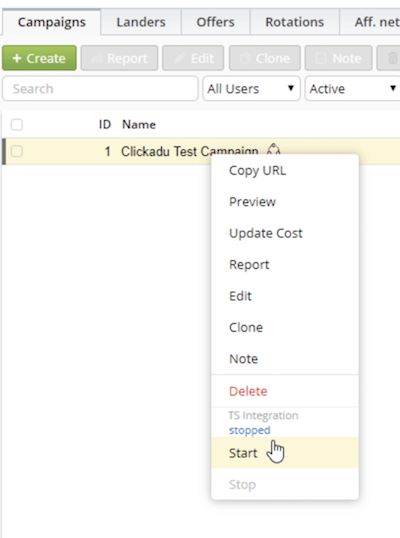
In the next update we will add white and black lists, balances (you can setup notifications, which is very helpful), and cost synchronization.
In general, there is a large field for work, both in terms of new features and traffic sources support. A lot of hard work, but also a lot of convenience in the end. The API capabilities are huge and supported be almost all traffic sources. And in conjunction with triggers system this will be a blast. Stuff like <publisher rule> -- > add the publisher to the white list.
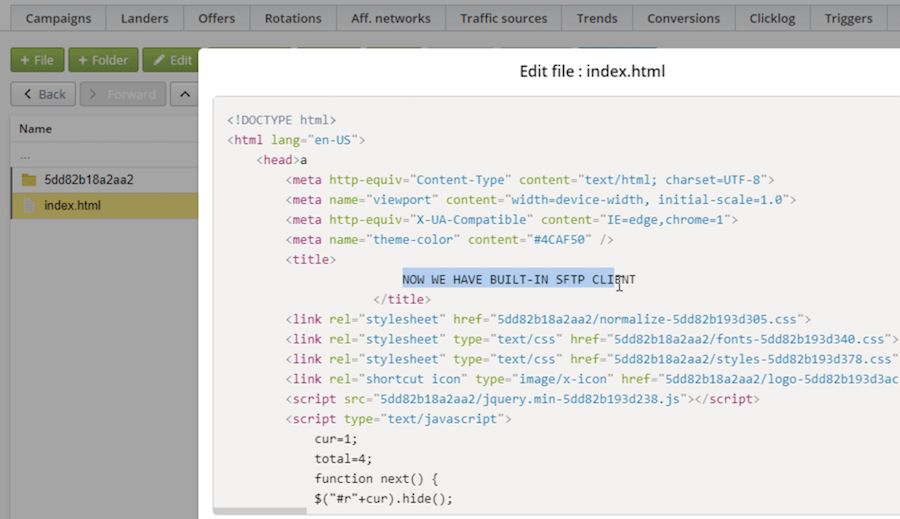
Code editor
I recall my long-standing desire to edit landing pages directly from the tracker. This would be very convenient, I thought, when I was running campaigns myself. We decided to implement it. In addition to the editor itself, there is also a built-in file client. You can use it to view files on your server with tracker, or connect via FTP to a third-party server. Tracker will remember the location of the land page even on an external server.
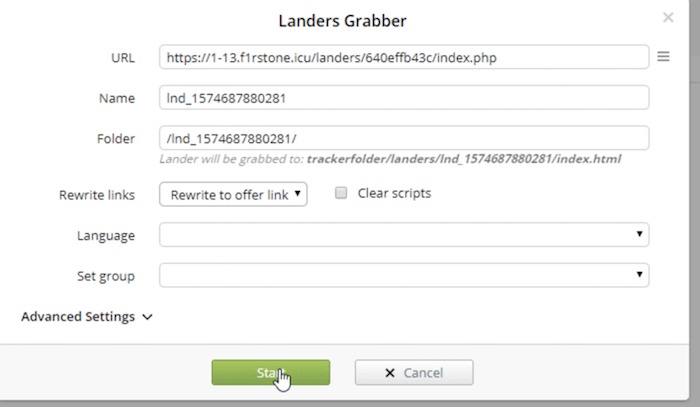
Landers grabber
Sometimes you have to steal the landing page. Now it's easy, you can even grab them in bulk. The feature is not perfectly, you can say it is in beta-mode, but it's working. Should you have any issues with it – send them to support, we will work on it. Again, it is convenient to edit grabbed land pages with our new code editor.
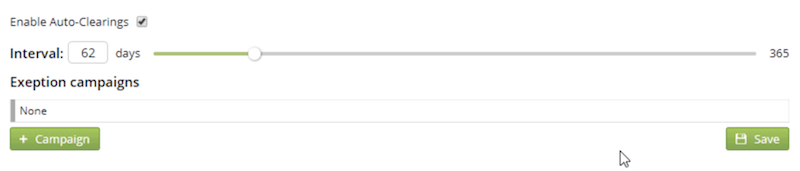
Auto-Clearings
This feature was asked by many with large traffic. All you need is set the time interval and the data is purging itself.
Full list of changes
- Multithreading algorithms, increased speed and stability
- Deeper Integration with traffic sources
- Grab Landers - Landing copy feature (doc)
- SFTP Landing Editor
- Automated clearings (doc)
- GEO filter on the Offers tab
- Language filter on the Landers tab
- New notes: Aff.Networks and Traffic Sources
- New traffic distribution rules: crawler and headers
- CSV download for conversion logs
- Time zone option in general stats
- MagicChecker key automated check
- Rules in ClickLog
- Postback to Traffic Source for any conversion changes
- Keyboard shortcut disabling option in Settings
- Improved language recognition
- Improved tracker’s update system
- Improved integrated landings algorithms
- New self-diagnostic feature, improved stability
- New columns for the number of nested elements of Paths, Rules, Landers, Offers
- New tokens: {cnv_currency}, {path_num}, {lander_num}, {offer_num}
- API: Monitor and Trends
- Improved SSL verification
- Accelerated Custom Time general statistics uploading
- Responsive design improvements
- S2S postback percentage adjust on Campaign level
- Selected report lines copy to clipboard
- Click uniqueness for unlimited time
- Click uniqueness setup by any Header (IP, User-Agent, User-Agent + IP, etc.)
- Click API: Integrated and Multi-offer landings
- Error output in Monitor page
- Upsell disable option for manual conversion updates
- New Triggers condition: Offer - Payout Shift - Same
- Ability to send a postback with event/lp_token by clickid
- Token Update cost from the context menu
- Automatic campaign domain selection during metarefresh
Great update
Just thought I'd drop some thoughts here. I am by no means a super affiliate but I've ran my share of profitable campaigns over the years. I've used a bunch of trackers but used
Holy shit am I glad I gave them a go.
Set up was easy considering you're self hosting your own tracker which sounds intense. But their support is excellent and they really know their shit.
The actual tracker itself is set out so logically and clean with all the stats you need in each tab. Really makes having an overview of your campaigns super easy to read.
If you want a scale-able tracking solution right out of the box that won't break the bank and can handle insane traffic. GET BINOM!
Last week I have changed from a cloud tracker to
Was quite afraid about handling all the tech stuff for a self hosted tracker. Thanks to the excellent support from the
The UI and workflow of Binom is neat and logical. There is no bullshit, no distraction. After a few days I was familiar with the new logic and now I wonder how you could design otherwise. Old habits can die faster than I have thought.
What I like about Binom:
- having as many tracker domains as I want --> new tracker dom can be installed within 5 minutes
- reports open in new browser tab + it remembers your former setting + you can save presets and filters
- copy zones into clipboard --> very useful when you want to block zones and don't have an automatic optimization tool for that yet
- integrated landers --> for locations near to your server incredible fast, sometimes also for very remote countries
- being the owner of my data --> is all on my server and I can decide what to do with it
- UI efficiency --> things that you usually have to click in your workflow are very close to one another
- dom flag trigger via telegram --> get your alerts wherever you have telegram + Binom can swap the flagged dom automatically
- no limits or event caps --> the determining factor is the server which of course you can upgrade when needed
- reports open promptly
- ease of setting up a new camp (all on one page in a neat and logical order)
And best of all:
The Binom support! The team is speedy like road runner. First response was always within 2 minutes. From there the magic happens. They understood my problems promptly and could explain solutions in a way that I understood. Feels like as if you are a part of the team.
Final words
Today I laugh at my initial fear of going for a self hosted tracker when I started AM. All you need for Binom is a server and tracker domain pointing to it. If you have no clue just contact support. They will even teach your granny :-)
For pops Binom is an excellent solutions to go with (I am only doing pops). So if you want to scale on pops give it a try and get hooked :-) If you are a noob give Binom a chance, too. Yes... in the beginning many things are quite intimidating, but for this you have "mama support".
Hey Lars, check out my THREAD about Binoms custom colums.
The custom columns can be really helpful to add some new functionality to your stats.
Any more updates on new features coming soon? Interesting ones would be automation and bot/fraud detection.
Thanks.
Originally Posted by eurosen
Making our own cloacker and Facebook integration, will start open beta testing soon
Cool. Why did you decide to make your own cloaker given you already have the magicchecker integration?
And were you able to do something with the Thompson Sampling suggestion I made last year?
 , that sounds exciting haha
Originally Posted by eurosen
, that sounds exciting haha
Originally Posted by eurosen
But I agree that rules based optimization would be fantastic.
Originally Posted by twinaxe
Originally Posted by eurosen
So it´s not only about just getting rid of bots but rather about getting more insight about that traffic.
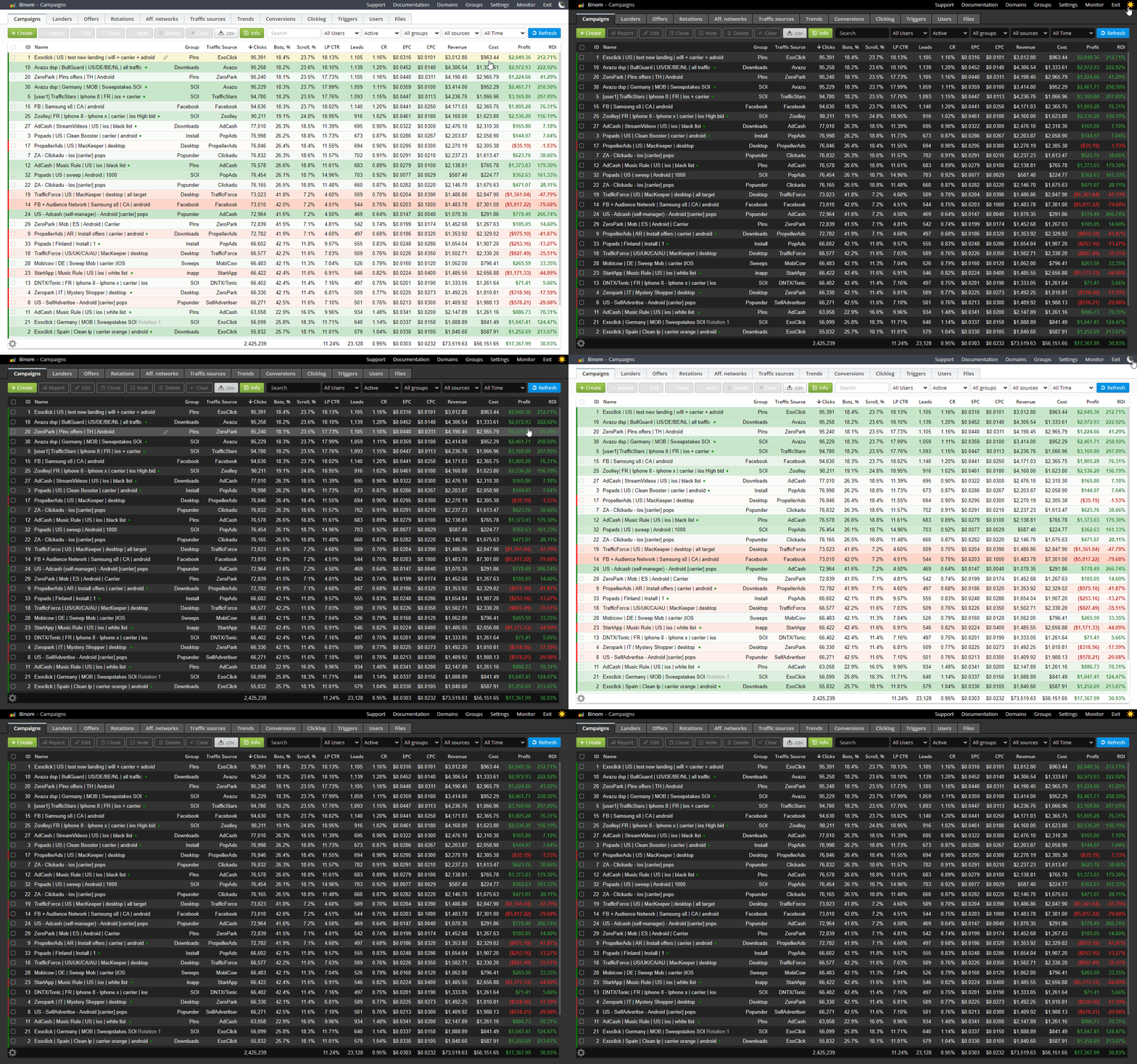
Dark mode
We've been asked for this. Now it's here and you can switch colorization to your liking. Burn those midnight oils and give some rest to your eyes
Facebook integration & Facebook cloacker (beta)
Since lots of our users also work with Facebook we've added deep integration. Now
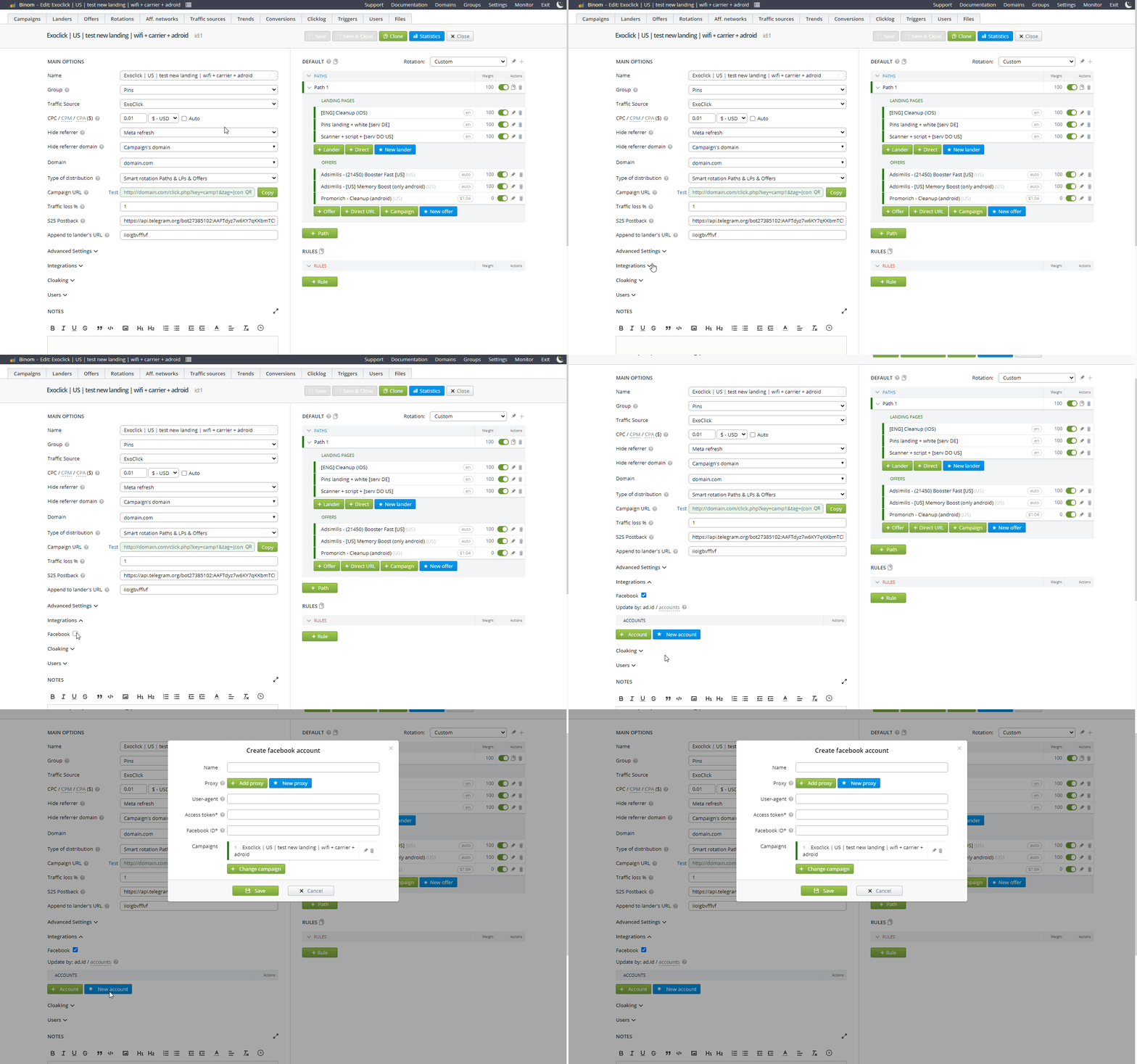
We are also experimenting with cloaking. We will improve it during our next updates but you can check it out already:

JS Cloaker
Sometimes you can't add .php script on your site. For example, some famous site constructors don't let you do that, so you can't use Click API script. That is why we've developed JS Cloaker. This script will help you send traffic to a landing page and change its content depending on whether or not Binom detected it as bot traffic. You may look at it as a LP Pixel + Click API in js.

Mass collapse/expand in reports
Right mouse click. Did you know about it?
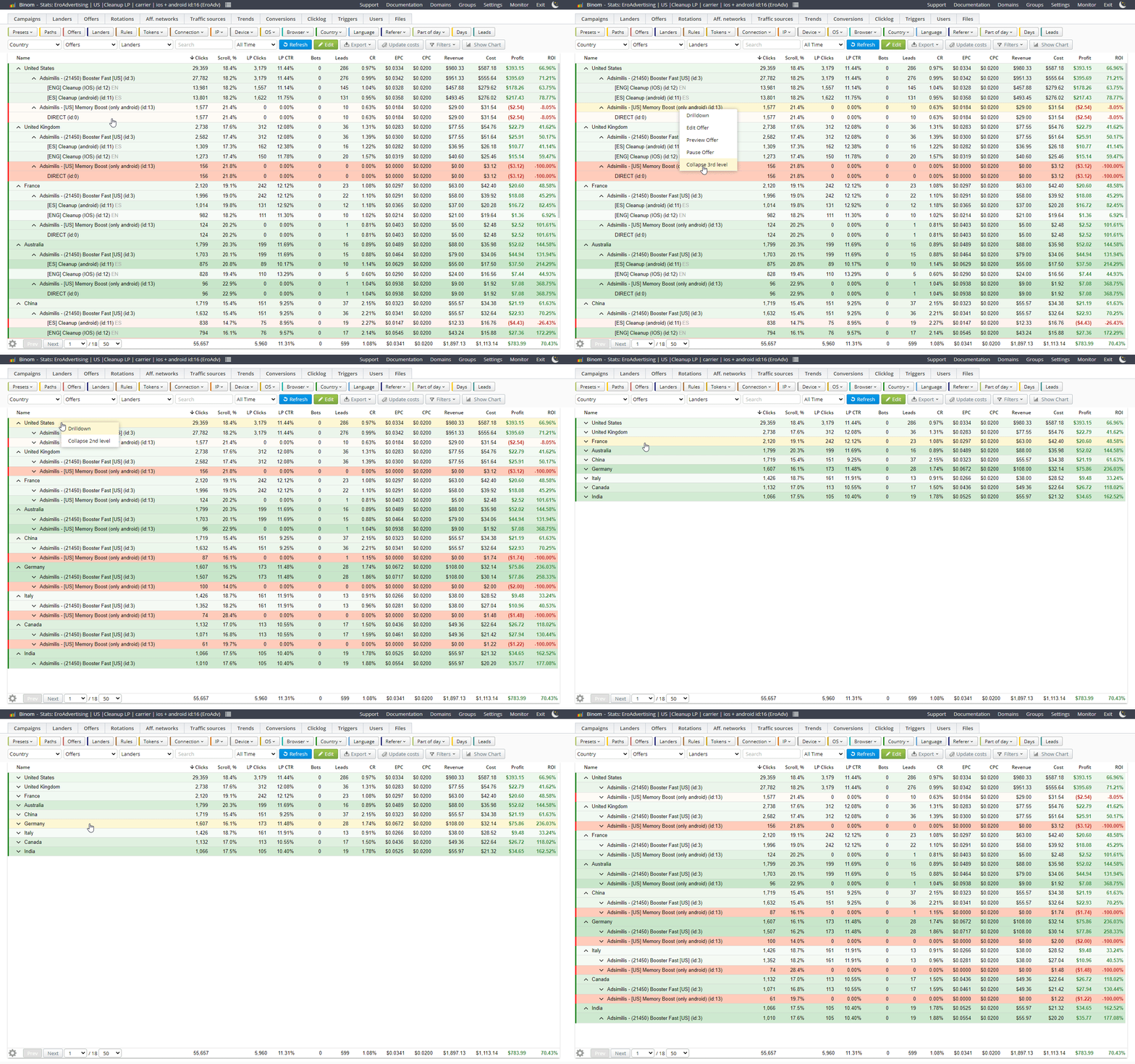
Other improvements:
- Updated Devices Database. Now you will have more accurate device detection;
- Updated search bar. Now you can use regular expressions, campaign key, landing page url or an offer page url in a search bar;
- New currencies. 12 new currencies and Bitcoin;
- Bots column. With all the new cloaker stuff we couldn't forget about new column!
- Multiple report linse select with shift;
- New Total Scheme type. For even more accurate statistics in your custom columns;
- Responsive design improvements;
- Notes in Rotations;
- Landing ripper improvements;
- Mass campaign postback % edit;
- Integrated landing’s files copy;
- Conversions log optimization;
- Logs and reports .csv export imrovements;
- Exact match checkbox in rule by referrer and URL;
- Known bugs fixes.
Lots of new features are comming in 1.16. Stay tuned
There are some issues with the Click API and one of them is that the referrer appears as Unknown. And the support is useless, almost seems like a bot. Definitely not beginner friendly
Originally Posted by brandusasimona
Can you please send me some details of that conversation with our support in PM? I'll check what we can do with that

Congrats to the award, you guys deserve it.
Hope to see you again soon, unluckily I won´t make it to the MAC this year.

We are glad to present you Binom 1.16.
New features:
- Facebook comments
Now you can set your tracker to hide or delete Facebook comments automatically
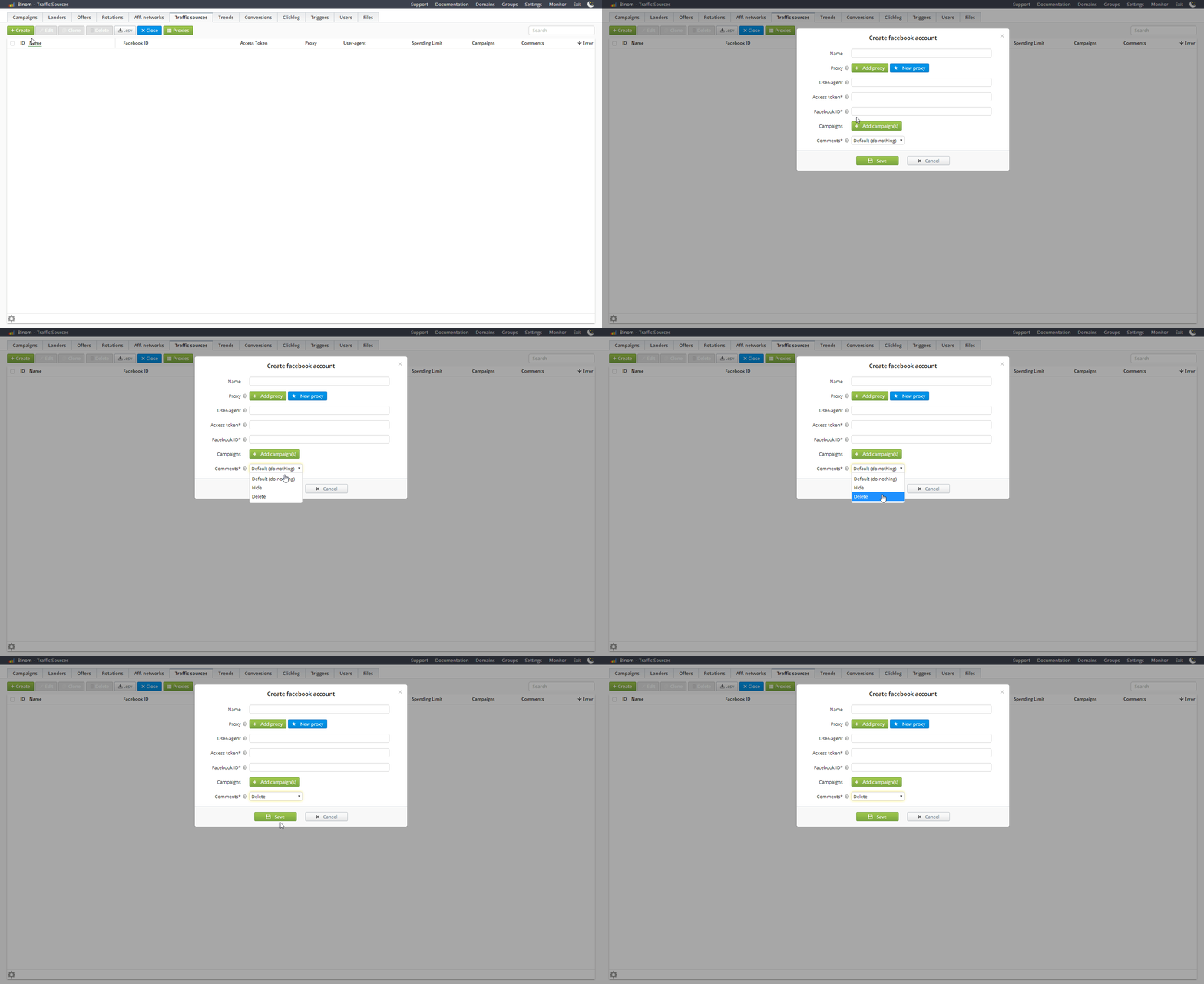
- Facebook multiuser permissions
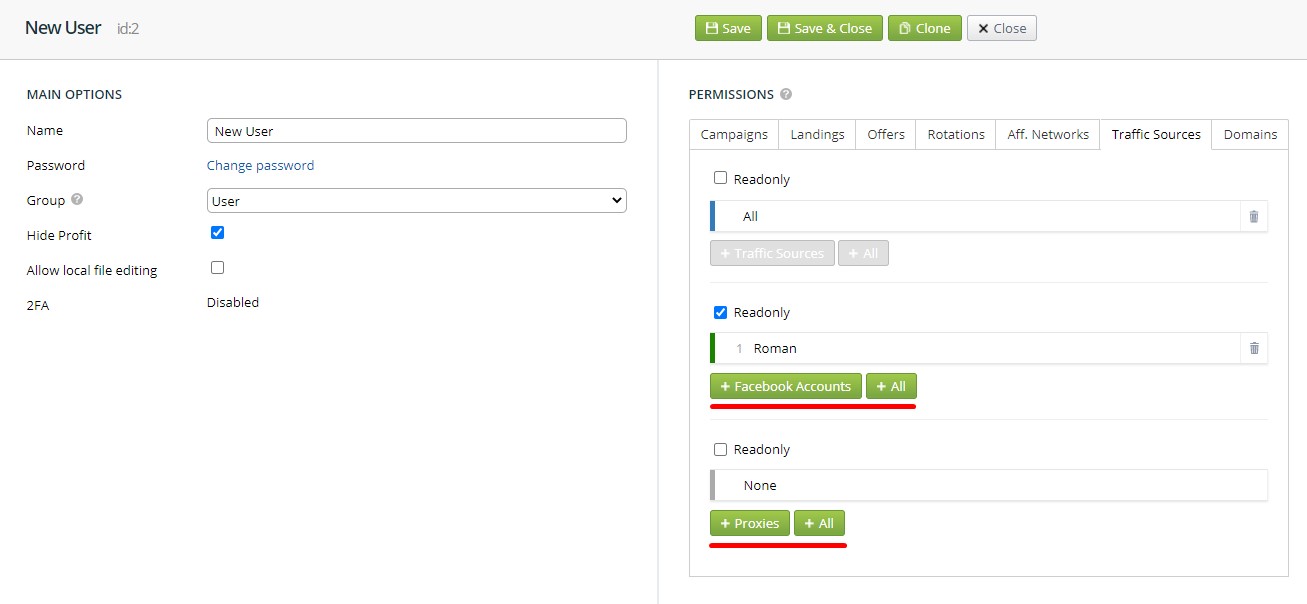
You can also assign your Facebook accounts and Proxies to different Users
- Adspect integration
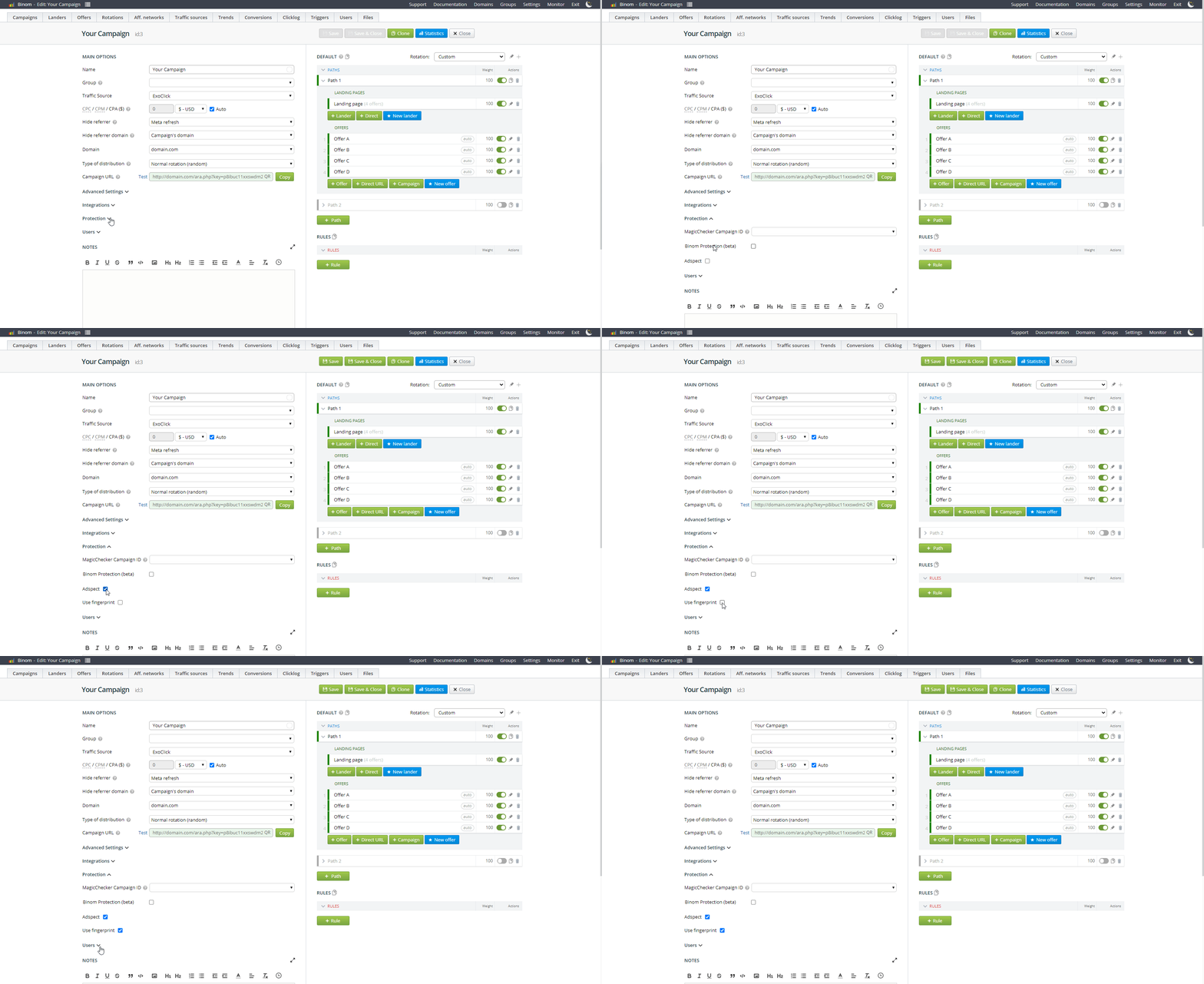
We've added integration with one of the best protection solutions on the market. Facebook, Google and any other traffic source can be filtered by Adspect
- Auto CPA
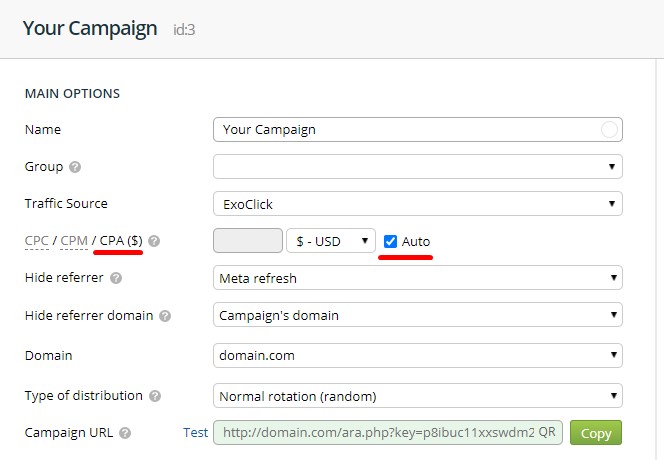
New Cost model
- New currencies
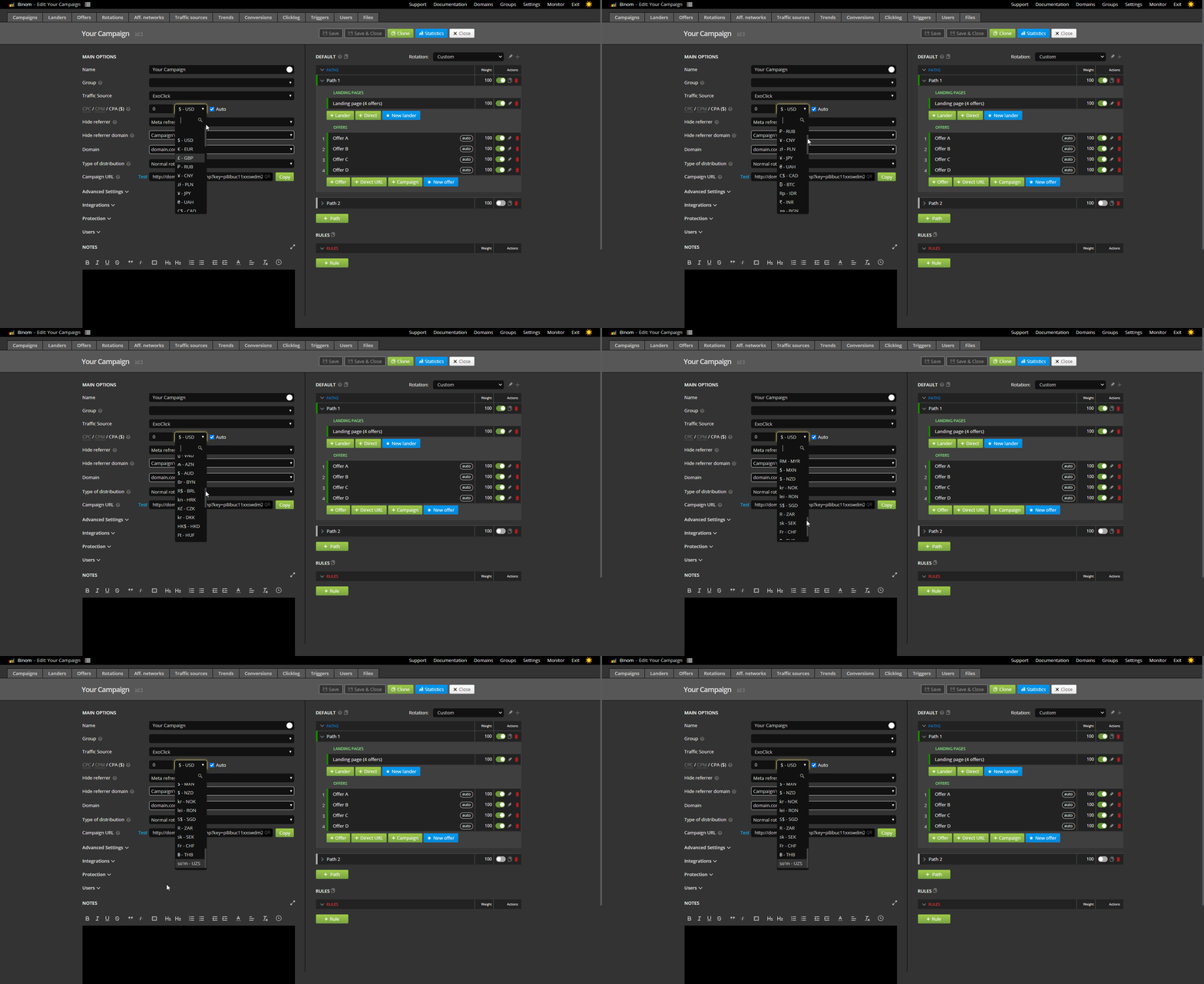
Even more now
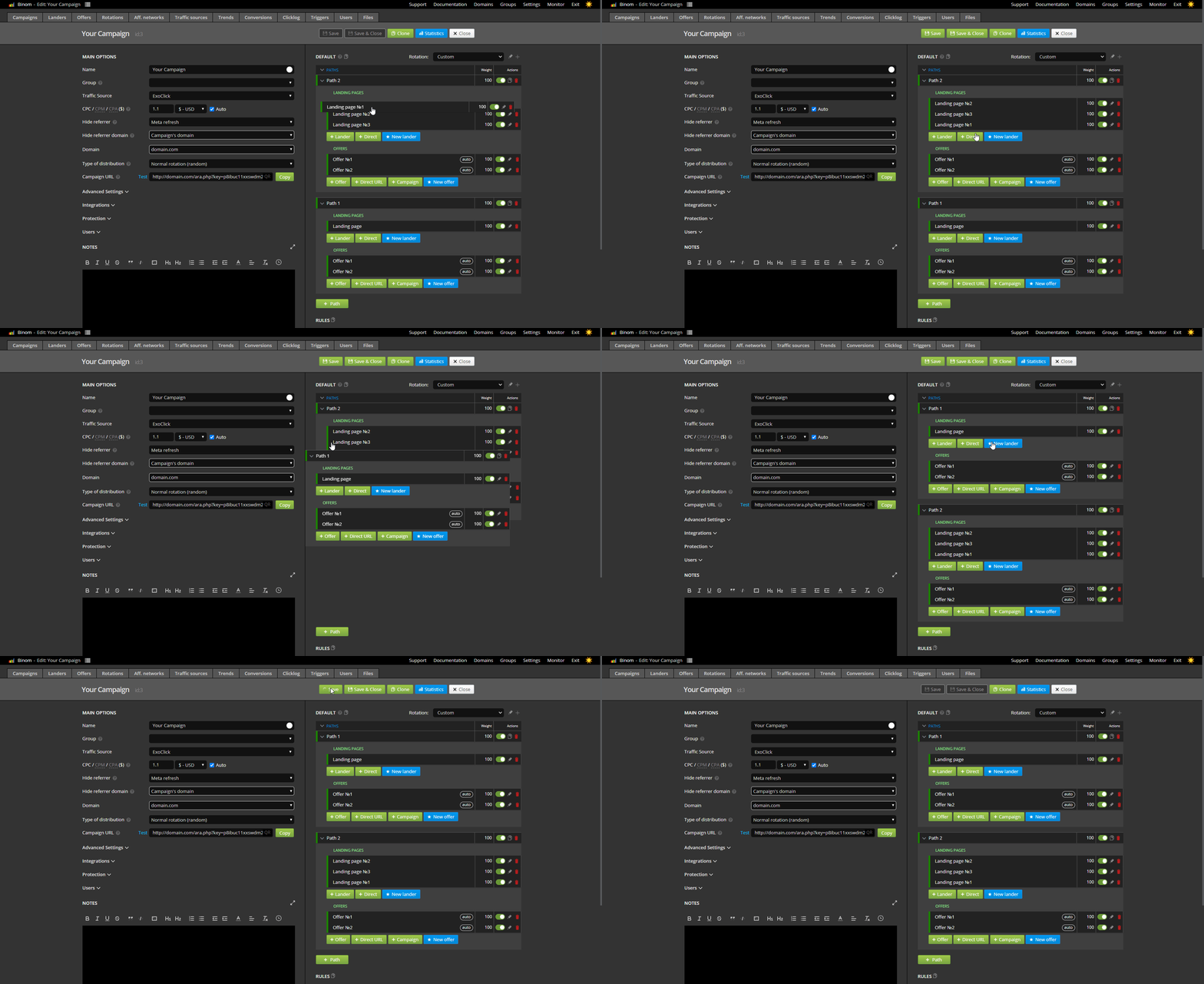
- Drag-N-Drop
Now you can easily move funnel elements(rules, paths, landing pages, offers) of your campaign
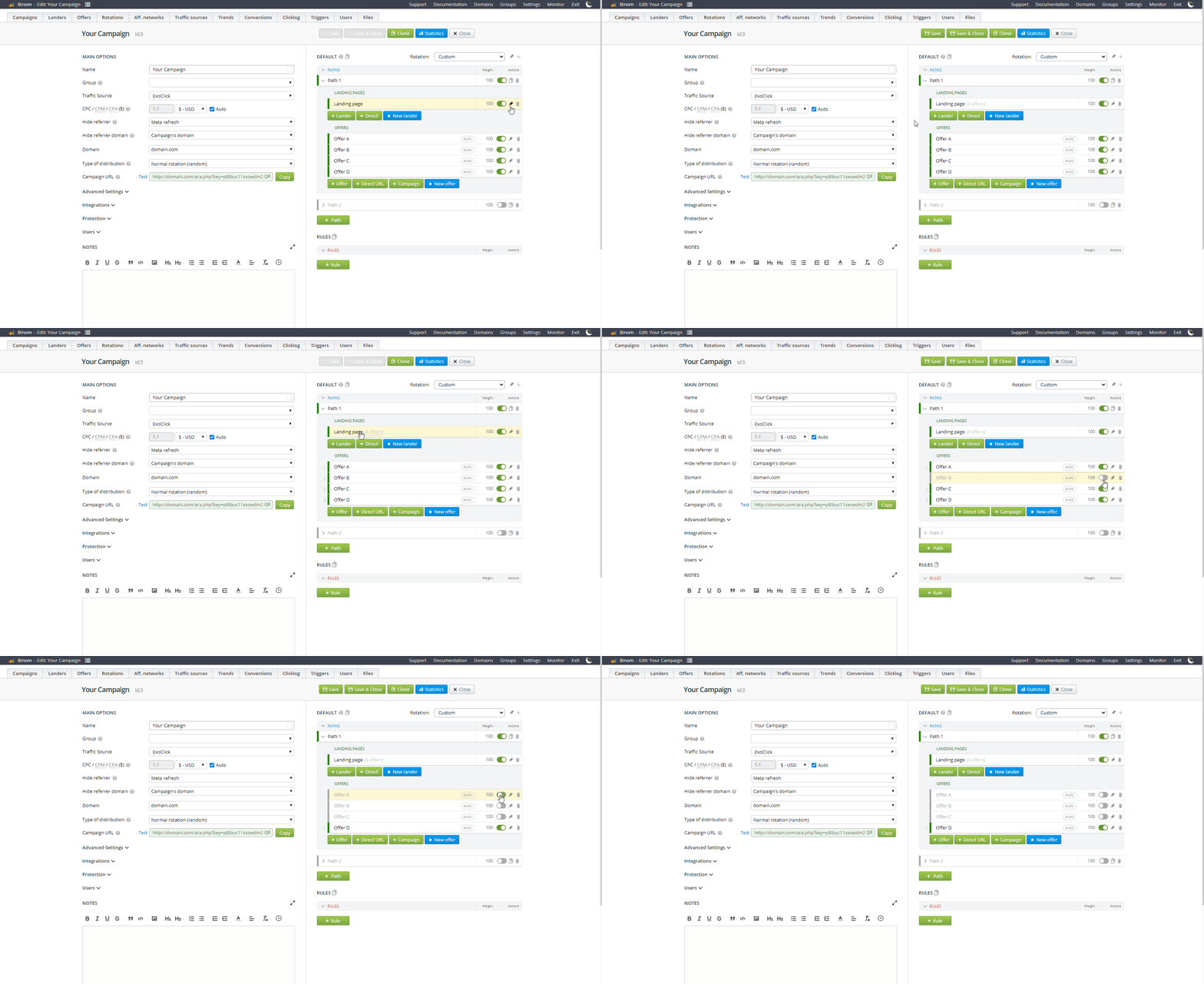
- Sequential numbers
For offers in multioffer landings
- Improved compatibility with PHP7.4
- Improved stability of Facebook integration
- Users accesses for campaign name display in Domains tab
- Known bugs fixes (including duplication of the "Access-Control-Allow-Origin" header when using JS-Protection)
Home > Tracking Campaigns > Binom