Scripts for landing page Issue (10)
Most of landers need fixing as i followed vortex and mia threads they are very informative however many java scripts didn't work properly such as model and brand delivery
Your <script>document.write(getURLParameter("brand") + (" ") + getURLParameter("model"))</script> is outdated!

any suggestions regarding this issue would be appreciated the lp is attached.
Have you added those parameters to your landing page URL, so that
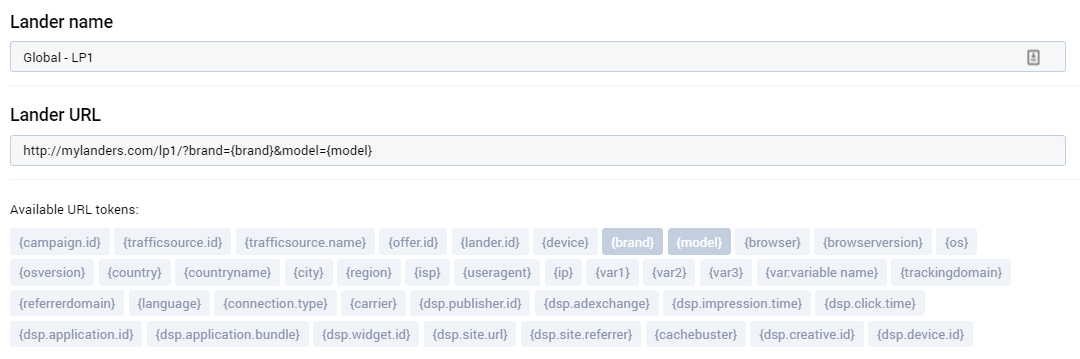
Yes, you need to add /?brand={brand}&model={model} to our URL in
You can test with /?brand={Apple}&model={Iphone} for example
Im using bemob they have different tokens i tried this one but didnt work
/?brand={deviceVendor}&model={deviceModel}
here's tokens list

I don't know bemob but you need to use /?deviceVendor={deviceVendor}&deviceModel={deviceMo del} I think
I have test with a bemob account and it work like
Caurmen's explanation here should help:
https://stmforum.com/forum/showthrea...ing-Parameters
In the case of bemob: Based on the screenshot of tokens provided by speedy, /?brand={deviceVendor}&model={deviceModel} should be correct!
Also: You don't need to change anything in the landing page code - as long as you're still using the parameter names "brand" and "model".
You're probably not testing it properly. Browsing directly to http://www.lander-domain.com/?brand={deviceVendor}&model={deviceModel} will NOT allow the lander to properly detect the brand and model, because your lander itself does not have that capability.
Try to create a campaign on Bemob, and then browse to the campaign url from your phone, and the brand and model should fill in (to reflect the brand and model of your actual phone).
Or, if you're just wanting to test whether the lander itself is working (without testing the token detection capability of your tracker), you can manually substitute the values as pierren suggested:
Amy
Yes sorry for my mistake, it's Vortex's answer that's right.
Like this demo URL http://bemob-samples.s3-website-us-e...={deviceModel}
or for test : http://bemob-samples.s3-website-us-e...html?p1=Iphone
yess it works! what vortex said is correct we should use camp url and volum/bemob will populate the device model..
 Originally Posted by pierren

But like you, I provide more value to offset the occasional mistake. Thanks for all your contributions to the community pierren! I was very impressed that you would spend the time to do testing on bemob just to help out another member. Much appreciated!
Amy
Home > General > Affiliate Marketing Forum