Redirecting Visitors Based on Local Weather - Here's How To! (6)
Want to redirect your visitors to different landers/offers based on their local weather?
Ha! Not sure if there's a real need for this, but I thought it was a good test to see if FunnelFlux was flexible enough 
So here's how you can do this thanks to FunnelFlux PHP nodes and its integrated custom rules.
First, let me show you the funnel diagram:
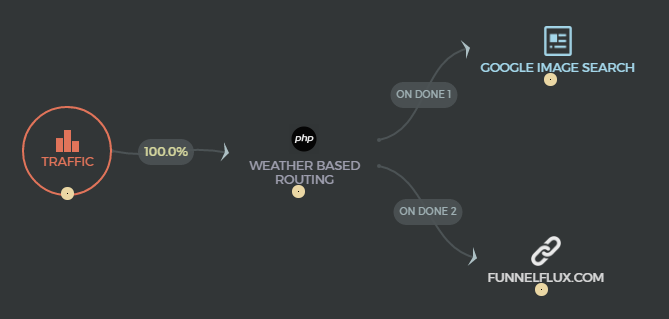
The traffic is first being filtered by that "Weather Based Routing" PHP node. It is then being sent to 2 different pages, depending on the result of that filter.
If there's thunderstorm, the visitor will be sent to http://www.funnelflux.com/
Otherwise, he will be sent to Google Image Search, and the search query will be filled with a description of the visitor's weather... So if the sky is clear, he will see images of clear skies! If there's a tornado, he will see images of tornados...
Before I show you the content of that PHP node, give it a try and enter that funnel yourself by clicking here.
What was the result?
So let's have a look at that custom routing filter... When I double click that node, a PHP editor pops up:
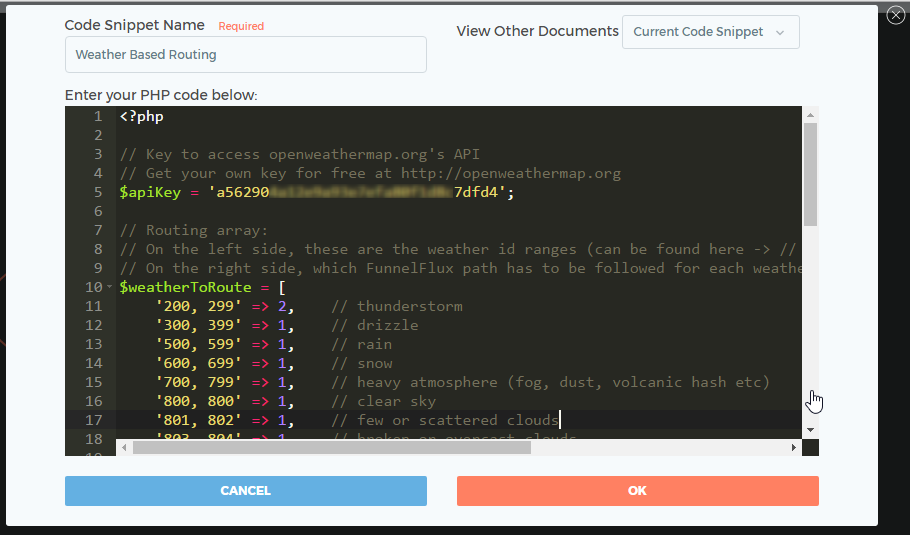
I'll give you the full code below, but first I want to explain how the filter decides to route toward one node or another. It's really simple.
Have a look at the 2 exit connections after the PHP node:
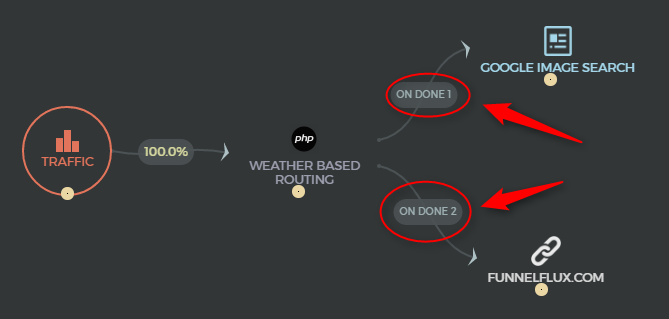
They have a path number. Path 1 to go Google Image Search, and Path 2 to go to FunnelFlux's website.
In order to route the traffic to one of these nodes, the PHP node just needs to return that number:
return 1; ----> to follow path 1.
return 2; ----> to follow path 2.
You can have up to 64 exit connections per PHP node.
It is then possible to create very complex logic depending on your own specific needs.
Furthermore, it's not shown here, but you can also use Javascript nodes in your funnels to execute Javascript code and redirect to different nodes by using the exact same return syntax.
Here's the full code for that weather based redirect logic (it calls the OpenWeatherMap's API):
<?php

// Key to access openweathermap.org's API
// Get your own key for free at http://openweathermap.org
$apiKey = 'REPLACE-WITH-YOUR-KEY';

// Routing array:
// On the left side, these are the weather id ranges (can be found here -> // http://www.openweathermap.org/weather-conditions)
// On the right side, which FunnelFlux path has to be followed for each weather condition.
$weatherToRoute = [
    '200, 299' => 2,    // thunderstorm
    '300, 399' => 1,    // drizzle
    '500, 599' => 1,    // rain
    '600, 699' => 1,    // snow
    '700, 799' => 1,    // heavy atmosphere (fog, dust, volcanic hash etc)
    '800, 800' => 1,    // clear sky
    '801, 802' => 1,    // few or scattered clouds
    '803, 804' => 1,    // broken or overcast clouds
    '900, 906' => 1,    // extreme (tornado, windy, very cold, very hot, hurricane etc)
];

// Get visitor's latitude and longitude (the tokens are replaced by FunnelFlux automatically)
$latitude  = '{location-latitude}';
$longitude = '{location-longitude}';

// Call openweathermap.org's API to get the visitor's current weather id and description
$request  = "http://api.openweathermap.org/data/2.5/weather?units=metric&lat=$latitude&lon=$longitude&APPID=$apiKey";
$response = file_get_contents($request);
$weather  = json_decode($response, true);
$currentWeatherId = $weather['weather'][0]['id'];
$currentWeatherDescription = $weather['weather'][0]['description'];

// Let's add the current weather's description to the accumulated params
// so we can add it to next node's URL (and show relevant images on google search)

include 'PHPNodeHelpers.php';
PHPNodeHelpers::accumulateParam('q', $currentWeatherDescription);

foreach($weatherToRoute as $idRange => $route)
{
    $aRangeParts = explode(',', $idRange);
    $idMin = trim($aRangeParts[0]);
    $idMax = trim($aRangeParts[1]);

    if( $currentWeatherId >= $idMin && $currentWeatherId <= $idMax )
    {
        return $route;
    }
}

?>
One of the main reasons I love this app. Very flexible. Thanks for the code. All of the internal tokens are usable like that in the php nodes?
Haha, this is actually pretty cool.
I can think of some attractive angles that can work well with this.
 Originally Posted by cmdeal
 Originally Posted by pain2k
Yes, all tokens that you normally use on landers/offers can be accessed the same way in the PHP/Javascript nodes.
But still you cannot add simple javascript like that
if (typeof window.orientation == 'undefined') { document.location = "http://stmforum.com/"; }
<html><head></head><body>
                            <script>
                                function customUserJSFunc()
                                {
  if (typeof window.orientation == 'undefined')
                                }
                                window.returnVal = customUserJSFunc();
                                setTimeout(function(){
                                    var redirectUrls = [];
                                    if(!window.returnVal || typeof redirectUrls[window.returnVal] === 'undefined')
                                    {
                                        if( typeof defaultRedirectURL !== 'undefined' )
                                        {
                                            window.location = defaultRedirectURL;
                                        }
                                        else
                                        {
                                            for(k in redirectUrls)
                                            {
                                                window.location = redirectUrls[k];
                                                break;
                                            }
                                        }
                                    }
                                    else
                                    {
                                        window.location = redirectUrls[window.returnVal];
                                    }
                                }, 10000);
                            </script>
                        </body>
                    </html>
Hey, nice catch! Thanks for that, we'll fix it asap.
FYI, that wouldn't be the right way to do the redirect if you want to track things. If you do the redirect yourself, then FF can't know where your visitors are being sent to. The right way to do it would rather be something like:
if (typeof window.orientation == 'undefined')
{
  return 1;
}
BTW, welcome back
EDIT: It's fixed - the issue came from the one-liner using opening and closing curly braces { }. That line was mistakenly taken as a dynamic token, and a value was not found for that non-existing token.
Home > Tracking Campaigns > FunnelFlux