How to increase your ROI and save your budget on Google Display Network (11)
How to increase your ROI and save your budget on Google Display Network
Every pro GDN advertiser knows that mobile and desktop are never going to convert the same way. That's why its super important to block bad stuff as fast as possible right from the start.
To do this, you need to apply a -100% decrease mobile bid adjustment under the Settings > Devices tab on a campaign level.
Secondly, you want to click Display Network>Placements tab, and add in under campaign level exclusions for placements: adsenseformobileapps.com
That's the two most important steps; but we're not done yet - if we really want to maximize our ROI, and minimize wasting our ad budgets there's one more step which is a must.
These are the SITE CATEGORY EXCLUSIONS.
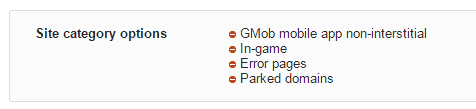
You want to click on a campaign, then DISPLAY NETWORK > +TARGETING TAB > Campaign Exclusions > Site Category Options and exclude:
Gambling, in game, gMob app non-interstitial, error pages, and parked domains.
This is what it will look like after you are done:
Hey attila, yes that's important info. I have couple of other queries, I'll really appreciate if you could help regarding those :
1. Do you recommend frequency capping, and if yes what's your recommended cap.
2. Do you have some suggestions regarding this --> http://stmforum.com/forum/showthread...isplay-Network
I follow you on facebook and through your blog. You are a great inspiration.
Thank you iAmAttila!
I just started GDN and your suggestion can improve my ROI! I've been doing -100% mobile traffic only.
Can I ask you a question?
I live in a small country and want to reach ALL AVAILABLE TRAFFIC (impressions). When I create a campaign which targeting should I use? I would be happy if there was a button "ALL" but there is not  I still have to set targeting options... would you suggest what to choose to reach everyone in my location?
Best,
Vaz
 Originally Posted by vaz4cash

You want to target all the topics on GDN under the display tab, and then click targeting, select ad group, select other type of targeting > topics and add all.
Originally Posted by iAmAttila
Oh, and check your final link to make sure it actually works. For some reason I forgot that crucial, common sense first step, blithely ignored the warning signs, and pissed away $700 in short order which, as I am sure Caurmen would agree, buys a very nice bottle of Scotch. As they say in the Army, "check your load, then check it again." Wasn't google's fault, I put a "/" where there should have been a "." in some php code, and for some strange reason didn't check to see that the page I'd configured actually worked.
Originally Posted by vaz4cash
^ Speed PPC Campaign Builder?
iAmAttila,
I started 3 separate campaigns
1 - Topics only (all)
2 - Demographics only (all)
3 - Interests only (all)
I live in a small country that's why I can't target by Keywords. I simply don't get enough traffic If I do that (another problem is that my language is not supported by Google Adwords). Basically, I target users from my country on sites that are in other Google Adwords supported languages.
Here is an issue:
When I go to Placements in each campaign I mostly see MOF (Made for Adsense) websites which generate useless clicks for me and cost me money. Most of these sites are on free domains (.ga .tk etc...). Here are examples:
http://www.lodztradre.ga/
http://geonews24.ga/
http://autoinsurancehere.tk/
How do you block *.ga/*.tk/*.info domain extensions?
And another question...
How would you find top VALID traffic sources where you would simply place your ads?
I see from statistis that good quality traffic comes from:
Youtube.com
Facebook.com
anonymous.google (Whats this?)
yahoo.com
accuweather.com
And others
This data is according to the conversions data (action + view through)
***
The main point is that I want to get the highest quality NEW (not retargeting) traffic from GDN without wasting my money on MFA sites.
Vas, you can blacklist the poor performers (targeting exclude) or create campaigns with specific placements only (take a look at tools > display planner for ideas).
BTW anonymous placements are sites that don't want to reveal their identity - generally these are high quality sites.
Thanks for the tip.
Why would they don't want to reveal their identity ?
I never thought of that exclusion list - excited to start it! Getting of those low value sites should help for sure!
Home > Paid Traffic Sources > Display / Media Buying