[OPTIMIZATION HACK] How to Lower Your Landing Page Load Time and Increase Your Profit (19)
[OPTIMIZATION HACK] How to Lower Your Landing Page Load Time and Increase Your Profit

There are many tools out there that can tell you your Ping time, load times, and other interesting information presented through colorful graphs and pie charts. Most of us, beyond running these tests are clueless as to what they really mean. Well, if your page is loading slowly, many people on mobile or web will just cancel out and leave altogether - but you paid for the click already so you lose out not ONCE but potentially multiple times because of opportunity costs.
Why does this happen? The answer is not complicated if you think about it... Imagine this, you are browsing the web - wanting to read the latest breaking news for example on the tragic Germanwings plane crash that just happened recently. You click on an image on news.google.com that has a picture of the blackbox, it opens in a new tab, but after a few seconds nothing, it still says page is loading.
You close the tab, go back and click on another news article on the page. See what just happened?
You never, ever saw what you wanted to because the image you clicked on (that got your interest) never materialized in form of a web page due to some connection issue. This happens more often than you think. From an affiliate marketing standpoint, what just happened was you had a high CTR banner, someone clicked it because they wanted to learn more about what they saw on *the banner with that shocking picture;*but when they did click, they could see NOTHING. *
Maybe due to a connection issue, NO PAGE*came up so they closed the screen. * BUT, you as the affiliate marketer were charged for the traffic regardless. So let me teach you what you can do to lower your load time, and also your lost traffic and increase your profits. Here we go...
How to optimize your landing page so they load FAST (and Make You More Money!) [readers digest version]
1. Go to www.webpagetest.org
2. Enter the Lander URL and select the same geo as where your hosting is (so if your site is hosted in france,select paris, france or another test location from france)
3. Press START TEST & Wait for it to complete
4. After it's done, you will see the results.
The results will appear as letter grading above these 6 criteria.
First Byte
Time Keep Alive
Enabled Compress
Transfer Compress
Images Cache
Static Content
Effective use of CDN
What do these mean?
First Byte Time
This is a hosting related thing you can't do much about personally. Ignore it, usually it's A if the host is good *anyway. But it can be another mark too if the host is configured separately. That does mean it's bad. I just ignore this.
Keep Alive Enabled
This is the use of persistent connections, which is also a host related thing. I wouldn't worry much about this personally because it's not where we can make the most impact.
Compress Transfer
There's something called GZIP, which automatically zip's up the website a viewer has requested and the server sends it to them in compressed zip file format, which then their web browser (may that be mobile or web) automatically unzips and shows them the website.
This is a must, it can save you a lot on hosting bandwidth charges, but it can also help you deliver the website faster to people on slower connections (say mobile smart phones). Adding a few lines in a .htaccess and uploading it to the same location as your index html or php file can do the *trick to get compression working for you.
Compress Images
Many of the JPG, PNG and GIF files we create and use on our landers are uncompressed.
This means that they aren't optimized for speed and contain a lot of extra junk like thumbnail, meta data, and other technical stuff we can strip to compress their sizes down. You probably heard of lossless image compression, and maybe even used some tools to get the image sizes down.
There are many out there that can help you compress images, one of which is to do it in Photoshop either one by one or using Batch processing.
There are also batch automation tools which can take care of optimizing and compressing your images in bulk. The tool of choice for me is Caesium, which is a 100% free software available right here
Cache Static Content
This is also another neat hack you can implement very simply in a manner of seconds by adding some special lines of code into the same .htaccess as the compress transfer part. Effective use of CDN CDN's are content distribution networks - basically you upload your static content like images, css files, etc to a server and it will sync it with all its nodes all around the world. So if you have a central landing page/tracker server, and you decide not to buy one for every single country - you can host your index files on that central server and throw everything up on the CDN, so if someone from germany accesses the site, it will load as fast as if they are accessing it from Hong Kong as the static images are served from the closest server to the visitors location.
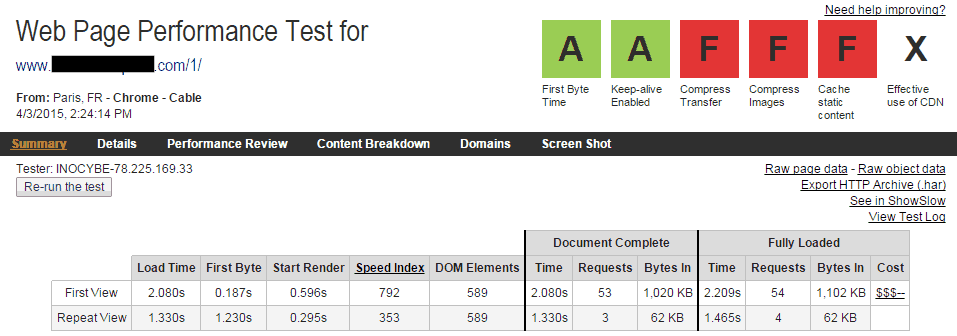
HERE WERE MY INITIAL RESULTS: (not bad, but can be optimized!)
5. Now it's time to take care of the problems.
I got an F on 3 things: Compress Transfer, Compress Images, Cache Static Content.
Here's what I did to fix them..
We can address the Compress Transfer, and Cache Static content by opening notepad, or another text editor; then creating a .htaccess file, and putting the following code into it:
<ifmodule mod_deflate.c>
AddOutputFilterByType DEFLATE text/text text/html text/plain text/xml text/css application/x-javascript
application/javascript
</ifmodule>
<IfModule mod_expires.c>
ExpiresActive On
ExpiresByType application/javascript A604800
ExpiresByType application/x-javascript A604800
ExpiresByType text/javascript A604800
ExpiresByType text/css A604800
ExpiresByType image/gif A604800
ExpiresByType image/x-icon A604800
ExpiresByType image/icon A604800
ExpiresByType image/jpg A604800
ExpiresByType image/jpeg A604800
ExpiresByType image/png A604800
</IfModule>
After you've pasted this text, press save but make sure you aren't saving it as a text file. Rather a file with no extensions (no .txt on the end) Then upload it into the same directory as your landing page.
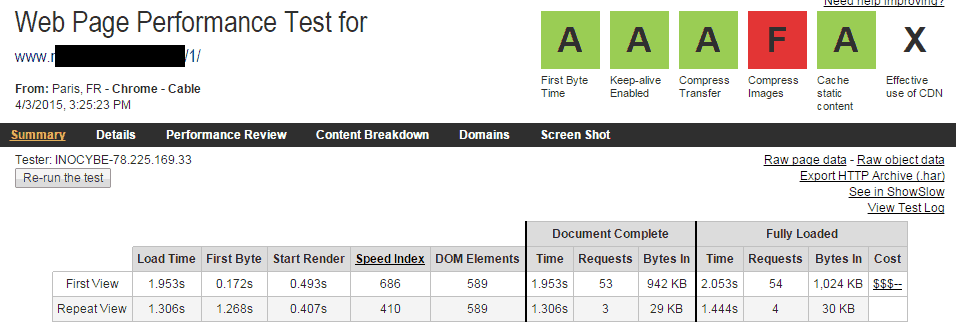
I've re-ran webpagetest and here are my results after implementing the above "HACKS" (Loving what the mainstream word on the street is at the moment')
Sidenote: You can use* http://checkgzipcompression.com/ to quickly check if your site/landing page domain is gzip enabled. *
If it's not, you can enable it on cpanel under the cPanel - Software and Services - Optimize Website section. Alternatively, you can email and ask your host to enable it for you.
6. Next we want to compress images.
If you don't have a copy of the landing page's images on your hard drive already, download it into a folder from your host via FTP and then open
and click Add Folder.
Caesium
After doing so, select all, and click on Preview.
This is going to trigger the tool to automatically parse everything and calculate how much it can or can't be compressed.
Remove anything where the difference is a +% as shown below and leave only the images that Caesium was able to reduce in size.
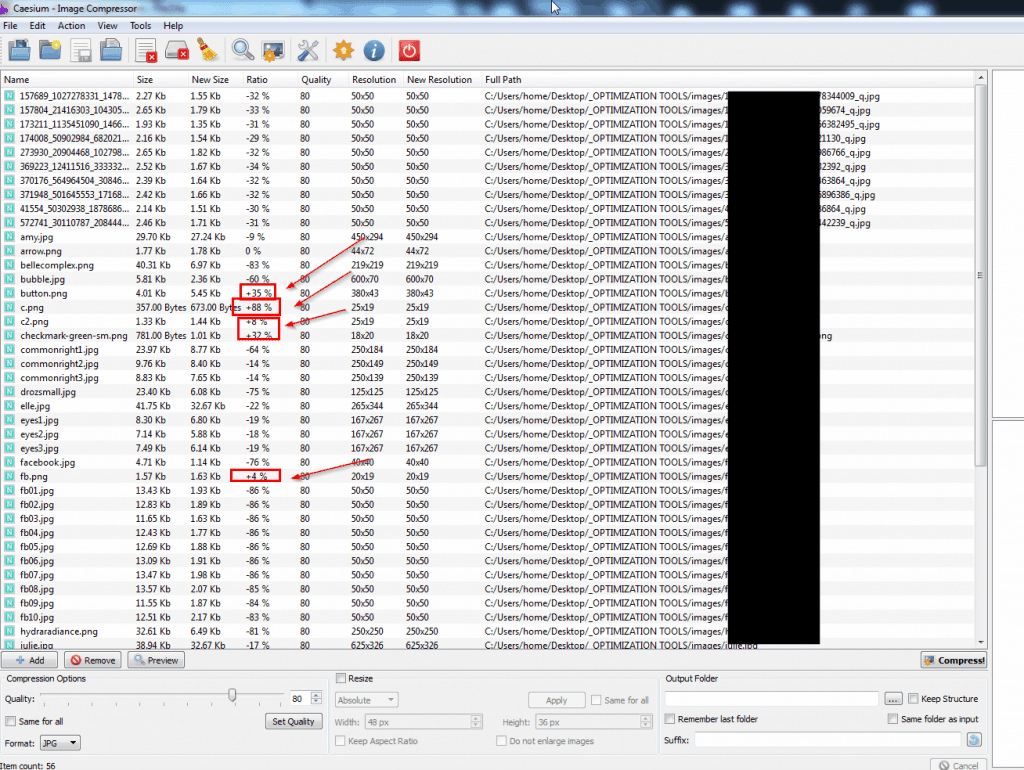
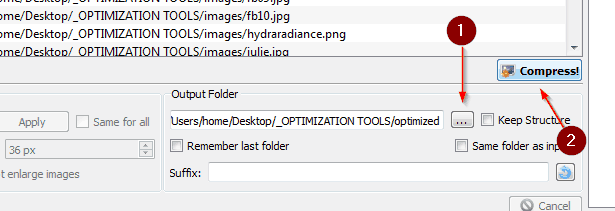
After you are done removing the files Caesium cannot compress, select what folder to export to, and click the Compress button
I ended up saving 936kb's by optimizing my images with this app!! That's HUGE!!
Upload the new images and replace the old ones on the server
7. Now re-run the test on webpagetest.org and you should immediately see an improvement in your load time, and also on your over all score.
Here's my result:
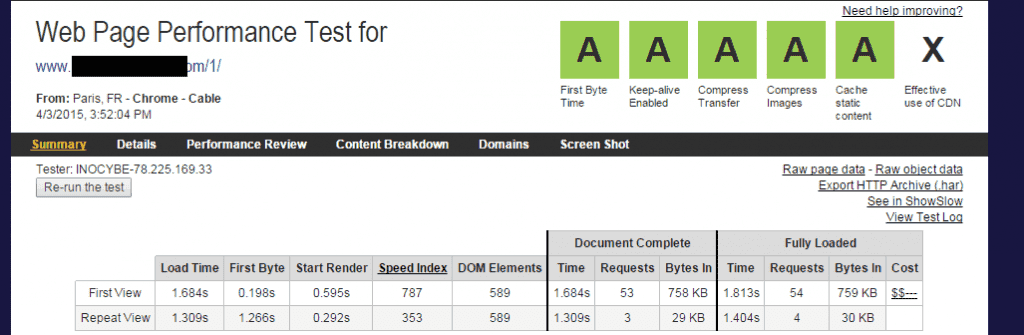
As you can see I was able to get my over all score to be A,A,A,A,A,X
Reduce load time, and also reduce the total size needed to be loaded which means CR and CTR will go up on mobile and web.
That's it, happy optimizing!*
NOTICE: The following information is a method practiced and in use by my staff, *there's probably many other ways you can accomplish the same thing. *Let this serve you as ONE of the many methods out there.
PS: The app used in this guide is for Windows, if someone finds a equivallent version for iOS let me know so I can update the guide. Thanks in advanc
I actually implemented before all of these small improvements, and thought that my pages load fast enough on pop traffic.
However today I decided to install Cedexis script to check real stats. And it was terryfying, average load time is 5 seconds with a small 100 kb lander and jquery library.
Then I checked with Webpagetest multiple times, and it seems like my Amazon Cloudfront Cdn often reponds with a first byte after whole second. And that for each file that is present in the lander, so each image shows from 200 to 1000 milliseconds to first byte.
So my question is - is this normal? Sould I change CDN, which one would you recommend?
What is even funnier is that I just turned off CDN and tested with Webpagetest loading landing pages directly from my dedicated server - from different locations. The loading times are 3-4 times less than on a Amazon CDN. Exactly because time to first byte is very small, like 20 milliseconds.
I've been running traffic for month through CDN, seems like I lost a lot of money with my setup. Can anyone say about their experience.
Something like this we used at the beginning for some of our most active clients of LPOptimizer who had bad loading times...often we re-write the entire lander because it was ripped or made by a un-experienced coder.
We're thinking to do this again and attach it as a service to LPOptimizer.
That's why, until we put everything up, we'll rewrite the lander to be very lightweight, we'll optimize the images and compress/gzip resources if needed(js,css) for free(for one lander). Just send me a PM and include your lander zipped, I'll send you back the optimized version.
A few things:
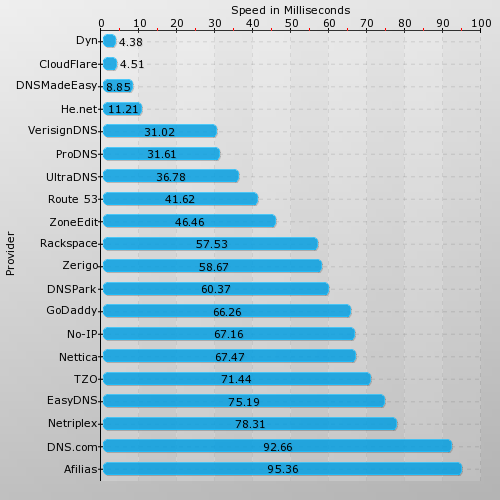
- Pre-first byte: Using a CDN just for DNS purposes can increase loading speed for some visits quite a bit, as much as 100ms+, even if you are using another CDN for actual CDN work (maybe your chosen CDN doesn't have as mature a DNS platform). This is an older image but shows the differences you could expect on some visits:
- Gzip compression level: Level 1 is enough, I don't worry about setting it higher. If you set it to 6 or 7, for example, you risk crippling your server with a sizeable lander receiving 100 visits a second or something. Just set it to 1 and forget about it IMO.

 Originally Posted by sonicglm

Only issue if you need php.. but to be honest, there's not a great deal you need it for now on most simple landers..
Originally Posted by dynamicsoul
The only drawback for me is that I can only have 1 landing page per container (since the CNAME automatically loads the index.html), and since theres only 1 CNAME per container I need to create a new subdomain to point to each landing page like subdomain.landingpage.com and I can't use pages like landingpage.com/page1, landingpage.com/page2, etc, which would make things simpler.
Do you have another way of doing this dynamicsoul? I'm pretty new to this stuff, and this is how the guys at Rackspace advised me to do it. thanks!
Yeah that's the only drawback.. but if you connect with Cloudberry it's really easy to create new folders and pages.. just as fast as FTP to a website/server.
http://www.cloudberrylab.com/free-op...-explorer.aspx
Edit: although you can have subdomain.domain.com/l2.html, subdomain.domain.com/l3.html
that will work fine..
to be honest, I just use the raw rackserver url as my lander while testing, if it gets CTR or conversions, I'll CNAME it then to make it look "proper"..
http://www.cloudberrylab.com/free-op...-explorer.aspx
that will work fine..
to be honest, I just use the raw rackserver url as my lander while testing, if it gets CTR or conversions, I'll CNAME it then to make it look "proper"..
you cname the subdomain to the index file.. then any other pages are simply /filename.html , same as a website.
Thanks dynamicsoul! I haven't tried that yet but I will today. Rackspace reps told me that couldn't be done and I believed them... guess we can't belive everything company reps tell us haha. This will help me a lot, much better than coming up with a unique subdomain that makes sense for each landing page.
Hi everyone,
Here's my results

I am hosting my whole landing page (index.html) and images into cloud files (hong kong container).
This lander is aimed at Malaysia, but the closest server for testing is Singapore.
For DNS, I am using route 53. So my custom domains points to Amazon and then from Route 53 points to rackspace.
2 questions.
a. How come with rackspace the first byte time is F instead of A?
b. How could I enable htaccess in rackspace cloud files? Reading here doesn't seems possible
http://stackoverflow.com/questions/1...iles-rackspace
Any workaround to get 'A' for cache static content?
Any help? Thanks.
Thanks for the guide Attila,
If I want to see what speed my target geo audience is getting, how do I test? @ericchuawc, I think Attila mentioned that the location is where your server is, not where your lander is aimed at. Correct me if I'm wrong!
I.e. my hosting is in the States, but my target audience is in Singapore.
I'm using Lunarpages hosting, and ran a campaign in both Brazil and Indonesia. There were conversions on the Brazilian end, but Indo was really bad. I'm wondering if loading speed has to do with it. I'm using CPVLabs on my hosting, used redirects from FB (followed Zeno's guide to FB) straight to Google Play to install the app, so I guess the compress transfers and compress images are not the problem?
Is there anyway to test how slow/fast my Indonesian audience is experiencing with my U.S. based host?
Here are my scores when I set the location to Brazil and Indonesia. I tested twice for Brazil, very different results! 
Attachment 6675
Attachment 6676
Indo:
Attachment 6677
Awesome guide! A related post that came out yesterday:
How I sped up Nomad List by 31% with SPDY, CloudFront and PageSpeed
TL;DR
- 500,000 pageviews per month
- 100 million assets served
- Basic db caching reduced load time from 30s to 4s
- SPDY will help when more browsers support it
- CloudFront CDN for images saves 2s over HTTP, negligible improvement on HTTPS
- PageSpeed saved 1s over HTTP
Originally Posted by iAmAttila;217318We can address the Compress Transfer, and Cache Static content by opening notepad, or another text editor; then creating a .htaccess file, and putting the following code into it:
[I
How do you create an .htaccess file? My notepad will only let me save as txt. thanks
Originally Posted by jeanmonline
So, I got an F on compress transfer and cache static content, I copied your code onto notepad and saved it as a .htaccess thing. I then uploaded it to the same folder as where my index.html file is. When I rerun the test on webpagetest it still gives me an F. I'm not sure what I'm doing wrong. Please advise 
Originally Posted by itzpeter
Try this code:
## EXPIRES CACHING ##
<IfModule mod_expires.c>
ExpiresActive On
ExpiresByType image/jpg "access 1 year"
ExpiresByType image/jpeg "access 1 year"
ExpiresByType image/gif "access 1 year"
ExpiresByType image/png "access 1 year"
ExpiresByType text/css "access 1 month"
ExpiresByType text/html "access 1 month"
ExpiresByType application/pdf "access 1 month"
ExpiresByType text/x-javascript "access 1 month"
ExpiresByType application/x-shockwave-flash "access 1 month"
ExpiresByType image/x-icon "access 1 year"
ExpiresDefault "access 1 month"
</IfModule>
## EXPIRES CACHING ##
Cheers, Gene
Home > Affiliate Marketing Forum >