iAmAttila's Ultimate Spying Guide for Mobile (58)
All right guys, some of you remember me posting a spying thread that explains how to spy on your competitors using a proxy and android apps. That is one way but today I decided to go a little deeper to explore many other ways from cheap to expensive that can help you get a lot of great ideas to minimize your risk, and maximize the profits - I'm calling this iAmAttila's Ultimate Spying Guide for Media Buyers - because really, it IS really bad ass!
I plan to make this guide very detailed, so be prepared ... it's gonna be LONG! Feel free to skip ahead if you want to the part that is most important to you.
Questions i'll be showing you how to find answers to
A) What offers are running on a specific site?
B) What offers are being run on specific app placement?
C) Where/what placements/traffic sources/sites is the offer being advertised the most on?
D) What creatives are being used for specific offer and which ones are being used the most (sizes,angles, etc)
E) What landing pages are being used?
F) Exposing other affiliates trackers, learning which ones send the most volume for an offer, and finding their landers/creatives
G) Spying on your CPA Network and finding out if they are re-brokering the offer, or you are really going direct to the source
Methods and Tools We will be using in our journey:
In order to do spying you need tools, these tools are expensive for the newbie but a must for any successful media buyer. I use all of these tools below myself every time I spy and my friends - the best of the best like Charles Ngo & Finch use 'em too!
1. WhatRunsWhere
2. HideMyAss
3. Opera Mini Emulator for PC & HMA VPN Proxy
4. STM Adult Ads Spy (available FREE for STM Members only - lucky you)
5. SimilarWeb to find who is sending most volume to tracking link/offer landing page
6. Ad planners like Decisive's, ExoClicks, TrafficJunky's, etc. to find sites/placements to spy on.
are you ready?... Let's get started!
A) What offers are running on a specific site
Scenario - Adult Dating Campaign / TJ & PornHub 305x99 placement
Imagine you are about to do a mobile adult dating campaign, you don't have an offer picked out yet, didn't talk to your reps nothing - instead you are taking an other approach. You looked at TrafficJunky and learned that there's a shit load of volume for CHEAP in Argentina. The site you have this great opportunity for tons of volume and cheap pricing is on the Pornhub 305x99 banner sizes. Great! Now let's figure out what offers are currently running on it
PRO TIP: You always want to see what offers are running on a placement, because it gives you an idea of what kind of offer WORKS there.
We can use 3 methods here to find out what's running on the 305x99 placement on PornHub.com
Method 1) What Runs Where
This method works great to get an idea on what kind of offer types are running on a specific site's placement. While you can't select exactly the 305x99 size when you follow these steps you will be able to pick out those banner sizes with your eyes right away.
-Login to what runs where mobile here
-Click the publisher tab, where it says enter domain here, type in pornhub.com, then click search

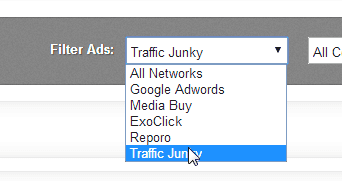
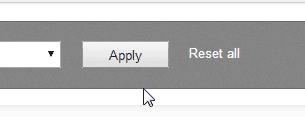
-From the All Networks drop down select Traffic Junky and click Apply
-On the left side menu click on Banner Ads and now you will see all the banners that are running on this particular site.
TIP: To see what's the best ad that was running the longest click on Sort by AdStrength. This is usually good sign that this type of offer is working great on this particular placement.
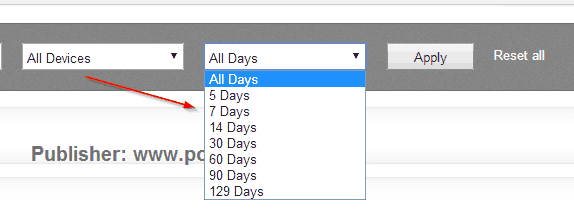
Note: WRW lets you see creatives within a specific time range, ie seen on the last 7 days, last 14 days, etc. You can play around with that as you like using the grey menu
Method 2) Opera Mobile Emulator on PC and Apple and HMA Proxy
This method is awesome because you can use the opera mobile emulator to pose as any popular smart phone / tablet from your PC or Mac. If you don't have Opera Mobile Emulator you can grab it here Once installed follow these simple steps.
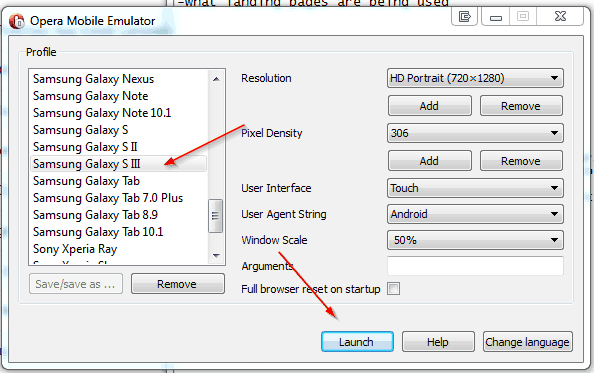
1) Open the Opera Mobile Emulator, select a profile - ie: Samsung Galaxy SIII or iPhone (whatever you intend to target) and click Launch
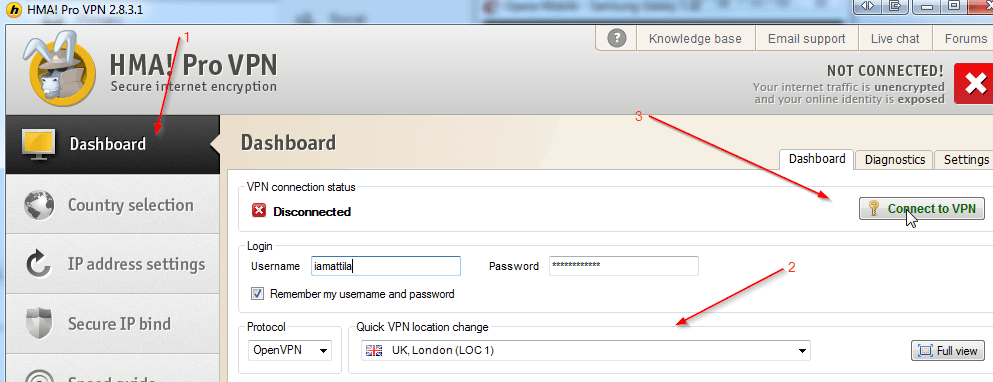
2) Start up HMA Pro VPN and select the geo you want to spy
-Open HMA Pro VPN
-Click DashBoard, then select a geo from the Quick VPN Location change dropdown menuand then click Connect to VPN
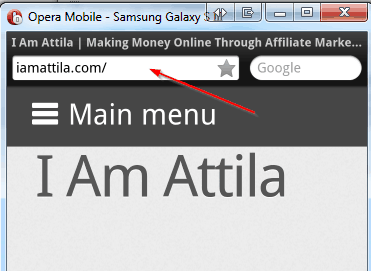
3) Go back to Opera Mobile Emulator, and you should see the opera browser already open, type in pornhub.com in the address bar and press ENTER
Method 3) Check out the site from an mobile phone using the built in browser
This is fairly straight forward, if you have a smart phone handy simply go to the site using your mobile phone and refresh it to see what offers are being run right now.
You can use your HideMyAss VPN accountin connection with their HMA App for Android to spy on different geos. To do this you simply install the HMA app from Play Store, then open it, select the geo you want to spy on, connect to the VPN, then go to pornhub and see what banner ads come up.
B) What offers are being run on specific app placement?
Scenario: Picture this.. your AM hits you up and says there's a hot new global CPI offer called Acme Speed Up! It pay $10 dollars for 1 install. WOW. You are a big super star affiliate, you don't mess around and you go for the placements with top volume. You immediately jump on APPANNIE and see what the top are 20 apps right now in the utilities category are. Sweet, you jot down the list of top 20 util appz. Next, you want to pick which apps have your competitors ads on them (lets just say for laughs which apps have clean master advertising) how do you find out?
Method 1) Grab an android phone, install apps on it, and open them and see whats running there.
NOTE: If you don't already have an android phone, then you can pick up a cheap one on ebay.com or local craiglists. I recommend Samsung Galaxy S3 as a bare minimum.
#1) Open Google Play Store on your phone by clicking its icon

#2) Click on the Magnifying glass to search
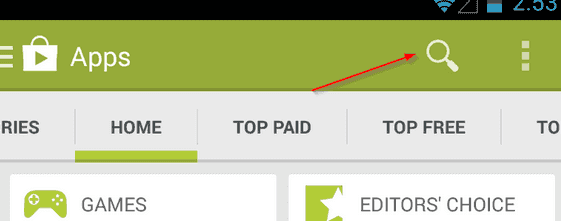
#3) Type in the name of the app from your list, and tap search on your keypad.

#4) After you located the app, open it's page and tap the INSTALL button

#5) Repeat the above steps for all of the apps you've written down until all 20 is installed.
#6) Open each app one by one, and wait a few seconds. Make note on a piece of paper what ads you saw. I recommend exiting the app, and opening it again a few times - so you cycle threw a few different sessions to catch more banners/advertisers.
#7) One important thing to remember is to always spy in different countries, this is where the HMA Proxy VPN comes in handy. Basically you'd want to check what kind of banners run on specific placements in the geo the offer you want to promote accepts. In our case its a global offer so we'd want to test it in a few tier 1 countries, a few tier 2 countries, a few tier 3 countries. The more data you have the more solid plan you can make.
To conclude our scenario: I'd install the top 20 apps app annie showed me, check out whats running on them using the steps above, and then figure out which one would be most suitable for my offer (i'd look for competition/same offer that im promoting being advertised - because if someone is already advertising it on a placement, chances are that is where my demo is)
Method 2) Use a tool like whatrunswhere to see what ads are running on the specific app placement.
If you don't have an android phone, and don't want to spend too much time spying - a quick way to get insight whats running on a specific placement is to use a spy tool. My spy tool of choice is WRW (get it here) for this. The quick method is good, but the time consuming method #1 I talked about is way more accurate, and solid. Affiliate marketing is a dog eat dog world, so those take take extra steps are often the ones that are crushing it!
Anyway, here's how you'd look up a specific placement to see whats running on it using WRW:
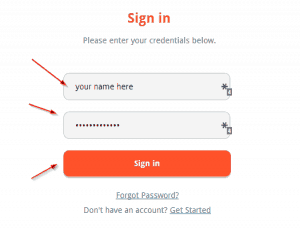
#1) Sign in to WRW
#2)Click on By Publisher on the top menu
#3) You have to get the package name of the android app you want to look up. To do this follow these 3 simple steps
a) Head over to http://play.google.com
b) Type in the name of the app in the search bar and click Search

c) Click the app's icon on the search results page and when you arrive at its landing page, look in your browsers address bar

#4) Now that you have the package name, head back to WRW and type in the package name and click SEARCH.

That's it! You will get all kinds of data, I personally head over to the Banner Ads section on the left menu, and sort by ad strength to see which ads ran the longest to find what kind of offers do best on this placement.
C) Where/what placements/traffic sources/sites is the offer being advertised the most on?
This is a very good question that helps that if you get the answers to can help you save a lot of time and money.
Let's look at an example - someone is interested in promoting the game CPI Farmville2, they never promoted a farming game before but have limited funds. They did their research and know happy farm was killing it before and it is a very similar game to farmville. So what can they do to find out where happy farm advertised so they can put their ads for essentially the same kind of game on those placements?
Lucky for you WRW is very powerful when it comes to answering this question, while there's other ways to find out what placements worked great for a specific app, this is the one that gives the highest impact time invested vs outcome gained. So let's answer this question together.
Where/what placements/traffic sources/sites does an offer advertise on?
#1) Sign in to WRW
#2) Click on By Advertiser up top and type in the name of the game -

#3) After a few seconds, WRW gives us a breakdown of Traffic Sources, Categories, iFrame Hosts/Placements, etc all on one screen. We can dive in and explore it in great detail - which I won't do here.
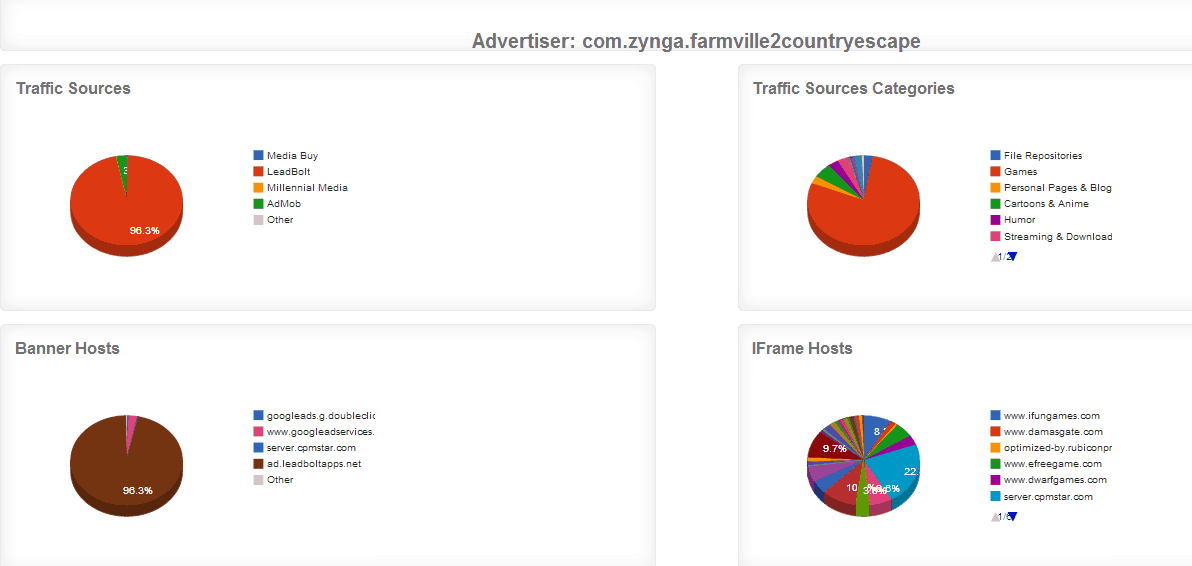
What is important is to take a note of the top traffic sources, these have been proven to work so if you want to promote this offer - start there! Also look at the iframe hosts/placements - these are sites that worked well for this offer, again start there if you are budget limited.
The data tells the tale of success, if a placement was seen/used for many, many days for an offer that means it was working. The right demographic that is interested in the offer is on that site, so by targeting the same sites as your competition (similar offer) you are saving yourself a huge amount of guess work.
D) What creatives are being used for specific offer and which ones are being used the most (sizes,angles, etc)
WRW is very lucrative tool, I don't know of any other one for mobile atm that is as good. By doing a simple lookup you can quickly find out what angles, banner design styles and banner sizes work best for an offer. Let's look at a very popular App Mobogenie. (The process is the same for any mobile offer, you just type in the one you are interested in promoting - I'm just showing you real examples so you can get it easily.)
#1) Login to WRW, and click on By Advertiser
#2) Type in the boxcom.mobogenie.markets press search
#3) Click on banner ads in the left column
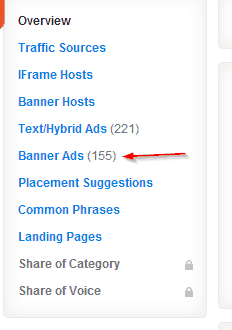
#4) Next select sort by Ad Strength
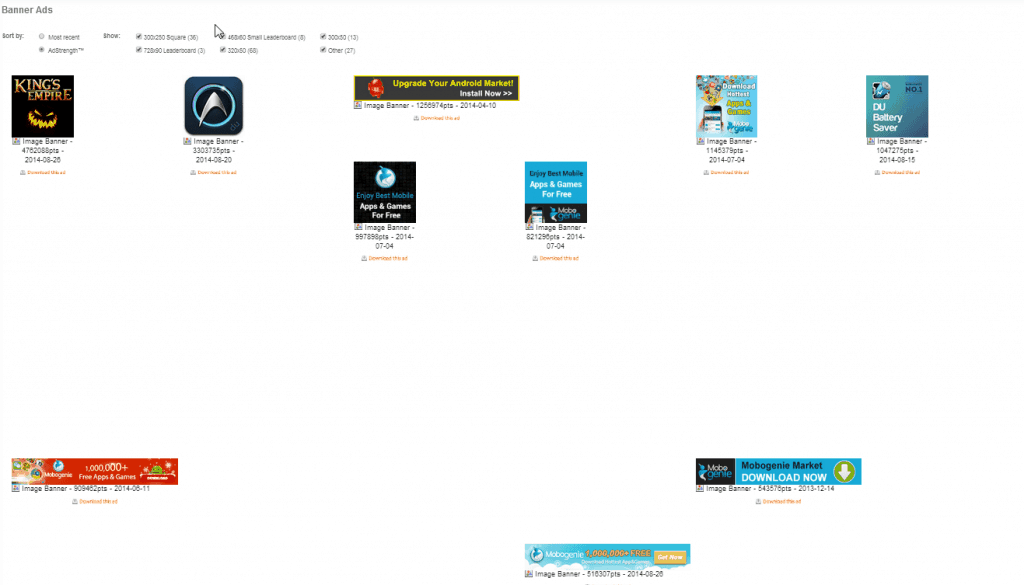
#5) And look at the banner sizes that come up. Also make note of the angles, and the look and feel of the banners. This is all very important.
Taking these ideas, and using it as a jumping board is a great way to find success fast; never steal - just take an idea lets say a design and change it a little bit, improve it, then test it. Take the angles (the text written on the banners) and reword it so it has the same meaning, try different variations - you'd be surprised how a little change can mean a huge difference in CR!
For Mobogenie I see a few things
-The 120x120 and 320x50 banner sizes are most popular
-Upgrade your Android Market! Install Now (Angle1), Mobogenie 1,000,000+ Free Apps & Games, Download (Angle2) and Mobogenie Market - Download Now (Angle3) are the most popular.
-Blue colour, red with white font, and system message looking banner is the style that seems to be killing it.
E) What landing pages are being used for mobile offer?
To find landing pages for an offer things get a little bit more complicated. Unfortunately more often than not, i'd say 80% of the time WRW is going to be useless here showing you no landing pages other affs are running if you look it up by offer.
I am going to show you how to find some landings for the infamous WHATSAPP content billers. It will be HARD to do this, but I will take you a journey so you can see the methods you can try.
Method #1) Analyzing Upstream Data by Working Backwards
First things first, when you are working backwards you want to identify the offer landing page, this is where everyone ultimately sends their visitor that pushes the offer. To do this, just follow through on the campaign link your AM gave you for the offer.
After I followed the link I got from ClickDealer I arrived at http://p.shoopadoo.com/mx/whatsapp.pinsc/
Step #1) For the hell of it, Lets see what WRW brings up when we type p.shoopadoo.com in the where does domain advertise box.
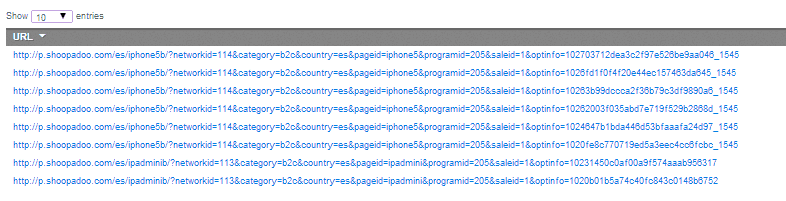
As you can see nothing of use to me, its all the same domains just variations of the official landing page for the offer. Meh.. next..
Step #2) Head over to Alexa.com and type in shoopadoo.com and press search. On the results page scroll down to upstream sites.
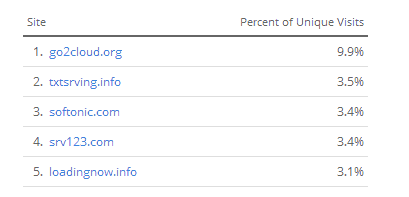
What do we have here? Hmm.. could these be the tracker URLs of other affiliates? Let's find out!
Step #3) Go back to WRW, and type in each domain from the list above and see what comes up under landing pages.
1. go2cloud - meh nothing, but i discovered a lot of traffic sources seem to have subdomains on go2cloud top level domain, so that's something to investigate later maybe..
2. textsrving.info - not found in WRW 
3. softonic.com - some irrelevant text ads found - no lps
4. srv123.com - nothing found
5. No search results for "loadingnow.info".
Okay, well that is dissapointing - alexa didn't get us closer to finding an LP -- this method didn't work this time, lets try another way..
Step #4) Go to www.similarweb.com and type inshoopadoo.com hitting search
We now want to check two things, the top referring sites column, and the top destination sites column.
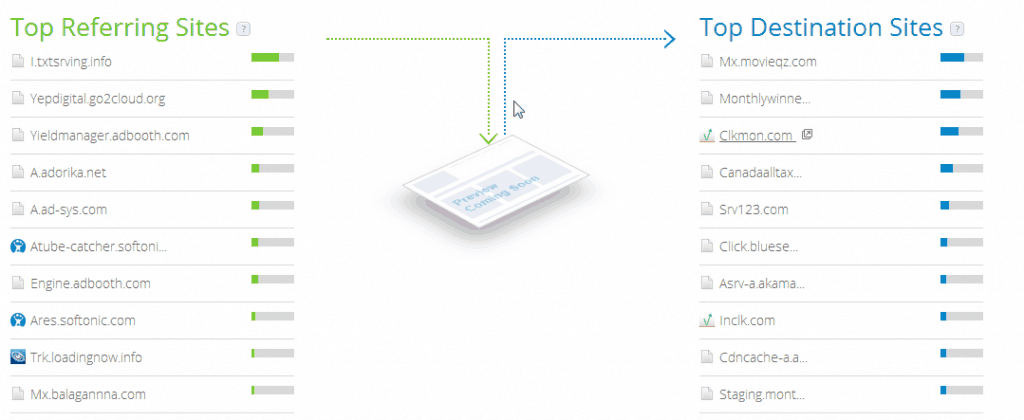
We're going to run every site in WRW, see if something comes up.
UPDATE I ran it and some came up but not with relevant information. So we're back to square one. The reason why I am showing you this hands on follow along style is because I am hoping to get something very important across, doing spying is no walk in the park - it takes time and effort on your part. We've checked alexa & similarweb and so far nothing concrete, we didn't discover any landing pages. So do we give up? No, what else can we do?
Method #2A) Finding affiliate tracker URLs by looking up the links networks give you
I am working with ClickDealer and MundoMedia for the WhatsApp Offers - the offer links they gave me for whatsapp contain their domain which are:
clickdealer:
cldmob.com
mundomedia:
sebcotrk.com
chlcotrk.com
#1) After you have the offer domains from the links your AM gave you, fire up WRW + Login.
#2) Click the advertiser tab and where it says where does Enter a domain advertise, type in the tracker domains one by one pressing Search.

#3) You should now get some data, and see some landing pages - if you are lucky. Hah, well I was not lucky so lets take it a bit farther.
NOTE: This method doesn't work often - but that doesn't mean it does not work at all. So always try it, due every step to uncover some great stuff no other guys will because they are lazy to do the footwork required!
Method #2B) Method #2A + Similar Web + Upstream Domains Sending Tracking Domain Traffic
We can take Method #2A further if we weren't happy with our success. What we want to do is take the tracker domains from our CPA Network, type them in to similar web and look at what sites are sending it the most traffic. Remember how we worked with similar web already in our journey to expose mobile landing pages of our competitors?
#1) Hop on to www.similarweb.com
#2) Enter the domain(s) from your CPA Network link(s) -I entered cldmob.com and pressed the magnifying glass to search
#3) Look at referring sites - For my domain, it said not enough data - if you encounter the same result - look at the next link.
#4) Looking upsebcotrk.com showed me referring sites where I was able to find one, that showed landing pages. Unfortunately the landing pages I found were for toolbar offers and for adult dating - so the guy that was pushing whatsapp was also doing these two other verticals. Not useful in this case, but I discovered some random stuff.
Take away: This method is somewhat useful, but unless you have SimilarWeb Pro you will not have a full list of referrals and will most likely not see the trackers/landing page hosts sending relevant traffic (in our case whatsapp landers). SimilarWeb Pro is $500/month which a little bit out of reach for most, however if you can afford it - it can unlock the full list of referrals which you can go through to find the landers.
Method #3) Proxy + Android and becoming a user method
We can look at the placements sending the most traffic to this offer using a proxy in MEXICO. We can visit each placement from a mobile phone, and click through and explore it that way. Then once we find the trackers/landing page hosts, type those into WRW to see if it has any more details. If not we'd copy the link from our mobile phone and send it to ourselves for viewing on the PC.
This might work, it may not work - it depends on the affiliates running the offer - if they are targeting only specific carriers - we'd need to somehow come from that specific carrier to experience the effect of their targeting, so it really is a very complicated process.
Method #4) Using WRW keyword feature to find landers
This method may work or it may not. You gotta try it. Again, what may work for one offer might not for the next...
#1) Click on By Keyword

#2) Type in offer keyword (in my case whatsapp) and make sure you select Search in ALL Countries - this is important!
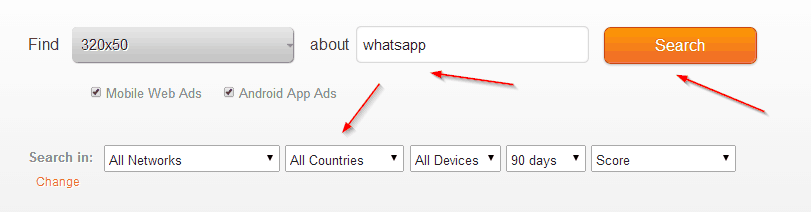
#3) Press Search
#4) Look for banners that relate to the offer - click a few, opening them in new tab (CTRL+Click on PC, not sure on Apple - maybe Command+Click?)
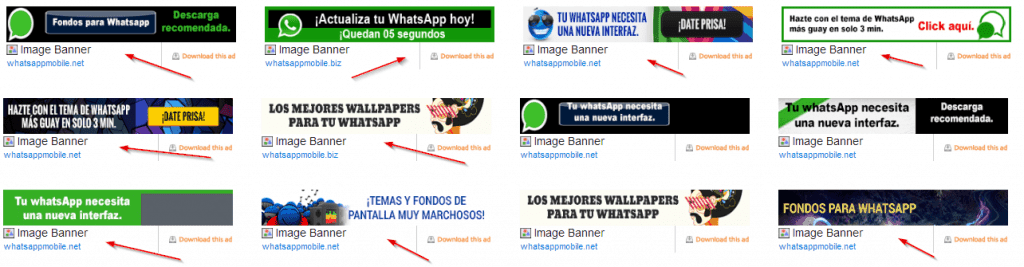
Sidenote: YAY Success! Finally we're getting somewhere with whatsapp. So keyword search method is working.
#5) After you opened a few banners in new tabs, on the left menu, click landing pages
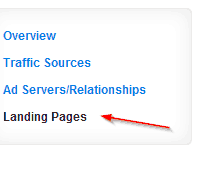
#6) Here we go, we found one whatsapp lander!

#7) Now copy the link from WRW to the clipboard (CTRL+C, CMD+C) and paste it into a new browser tab address bar and press enter, and bam you should see a lander!
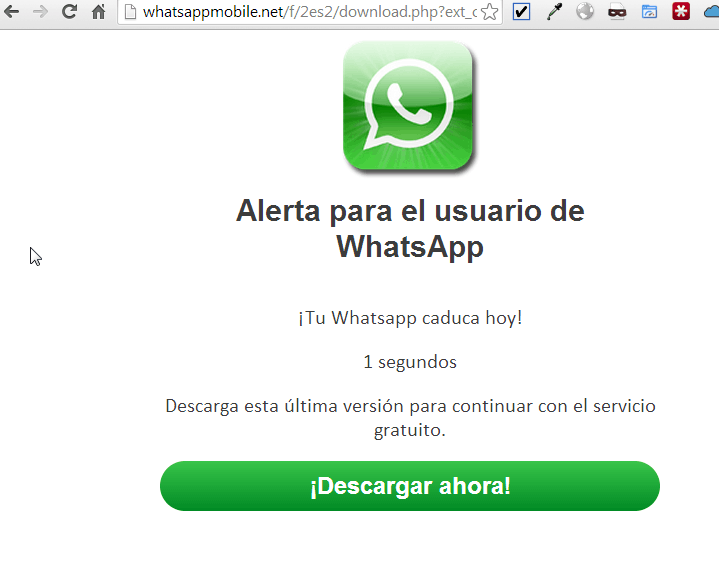
#8) We are not done yet, note the domain of the whatsapp lander we found -> whatsappmobile.net !! There might be some more landers here, let's check it out
#9) Go back to WRW, Click on By Advertiser and paste in the domain whatsappmobile.net and press search.
#10) Click the landing pages tab on the left, and HOLY CRAP - for this particular site there are over 114 entries (that means many landing pages for whatsapp baby!) Now we've made it.. we've SUCCEEDED in our landing page spying effort after such a long run.
NOTE1: This is just one site I found using the keyword search function > All geos in WRW. You can open multiple banners, check the banner host URL and look up each using wrw's by advertiser function.
NOTE2: I said it but I'll say it again, this method works for some, but not all offers - that is why I outlined every single way I use to find landers by taking you on a real life journey using whatsapp.
F) Exposing other affiliates trackers, learning which ones send the most volume for an offer, and finding their landers/creatives
Without getting into too much detail why anyone would want to do this ... this method can come in handy because it can lead you to many ideas on how to run a specific offer. To make this easy to understand, I am going to be showing you a scenario. Let's say we want to look up who the top trackers are sending traffic to the offer landing page which ishttp://m.pl.funfone.me/wap/9183/?af=457
Method #1) Similarweb - Top Referring Sites + WRW
#1) Go to www.similarweb.com
#2) Type in m.pl.funfone.me - press search

#3) Look for the Top Referring Sites
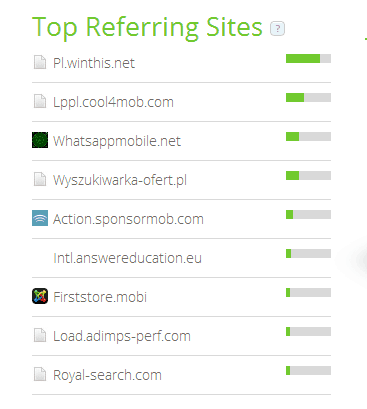
#4) Write down every single site in this list in your text editor of choice (for most of us Notepad will be just fine)
#5) Now while you hold CTRL (CMD on Apples) click on each of the sites to open them in a new tab.
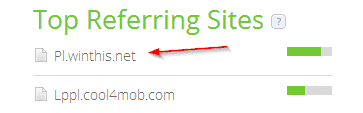
#6) Write down all the top referring sites you see for each site into your text editor as well. After you complete it you should have around 110 total sites written down.
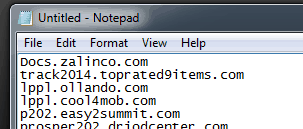
#7) Login to WhatRunsWhere and click on search by Advertiser - typing in one by one the domains from our similarweb top referring sites list we saved in notepad.


Do this for all of the ones on your list, checking banners and landing pages in the left tool bar on WRW. Not all sites will bring back results, but some will and in a big way. I was able to find landers for pop traffic this way I never thought of.
Golden nugget: I found a kick ass sweeps lander that had testimonials on it where chicks were holding iphones, it had an automatic javascript to show the todays date, it said they are part of the phone model rewards program, etc. And this lander doubled my CR - so it def pays to spy on your competitors!
Method #2) Using tracker footprints to find trackers!
This method is very advanced, and requires even more time. But time spent can bring huge returns. I will show you how to do it with prosper footprint /202-login.php.
#1) Head over to www.google.com
#2) In the top url type this: inurl:/202-login.php & click on search

#3) I ended up getting over 15 pages of results anduncover many trackers this way..
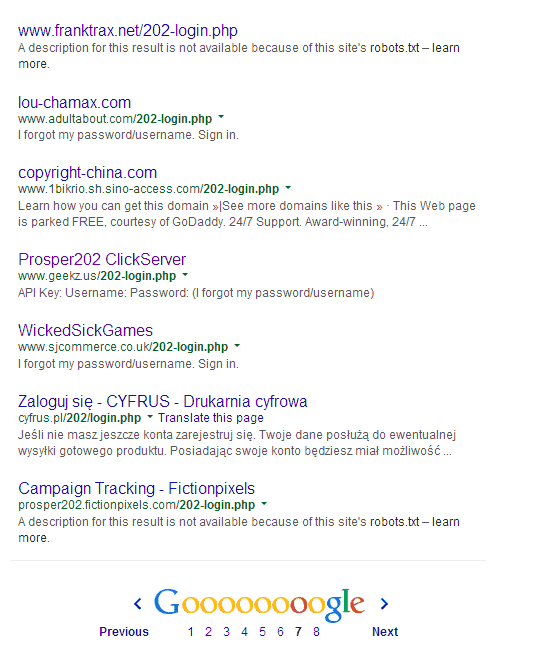
#4) Next I made a list of all the domains I found, and saved them in a text file.
#5) After that I went back to my very favorite WRW tool, and plugged each in one by one. Again a lot of work, but in the process uncovered some real gems that gave me some new ideas for both landers & banners.
G) Spying on your CPA Network and finding out if they are re-brokering the offer, or you are really going direct to the source
Why in the world would you want to spy on your CPA Network? The answer is simple, just because they might say they are #1, they are honest with you, this and that - at the end of the day their own interests are most important to them - so that means profits. Many networks might say we have the offer exclusive, and direct but in reality that isn't true. That is why a smart affiliate always does his/her homework and spies on the CPA Network to make sure they are pushing offer X as close to the advertiser as possible.
I am going to show you what a non-brokered offer looks like vs what a brokered offer looks like.
For this part of my tutorial we are going to be using Live HTTP Headers (get it here for Firefox, get it here for Chrome) and also HideMyAss Proxy [get it here]
Scenario #1 - What a NON-Brokered Offer Looks Like
#1) Start up your browser of choice - Chrome of Firefox

#2) Take the campaign link your CPA Network gave you (for this example I am usinghttp://mpdotrk.com/mt/w264v24474q233r244s20324/ which is a MUNDOMedia link) and copy it to clipboard.
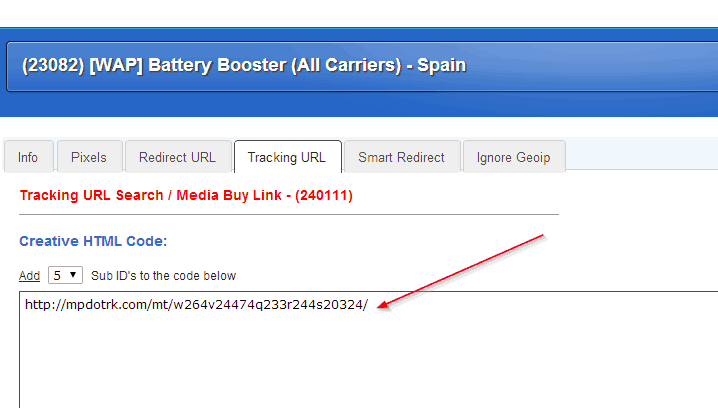
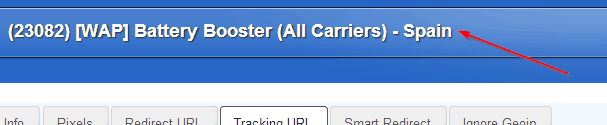
#3) Make note of what GEO the campaign accepts (you will need to disguise as if you are from this geo using HMA)
#4) Start up HMA and connect to the geo, wait till it gets an IP
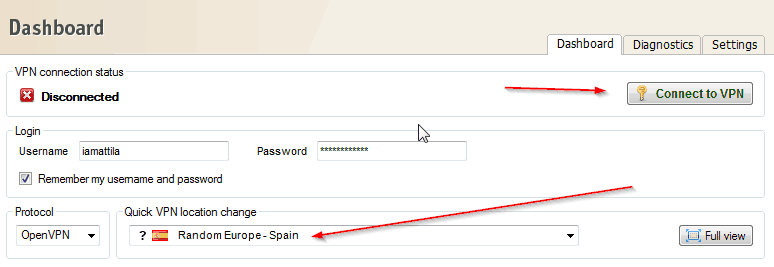
#5)Close all other instances of your web browser to make sure only 1 is running, and only 1 tab.
#6) Click the Live HTTP Headers icon in the toolbar to open it in a new tab
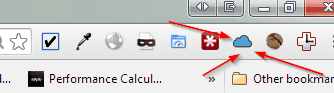
#7) In another tab, paste in the URL of the offer and press enter.

#8) Switch to the Live HTTP Headers tab and look at the data.
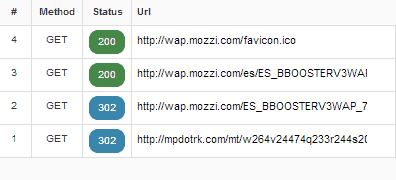
As you can see, if a visitor hits your campaign link that Mundo gave and is from Spain, they will be taken direct to the advertisers landing page. Which in this case is wap.mozzi.com. This is what a NON-Brokered offer looks like, this means Mundo runs this direct (which is what u always want)
Scenario #2 -What a Brokered Offer Looks Like
Mr Green @ STM setup a brokered offer over at F5 for me, so I can show you what it looks like on the HTTP Live Headers screen when an Offer is BROKERED.
#1) I closed all tablets/browser instances leaving just 2 tabs open.

#2) I cleared the previous results from the Live Http Headers Screen by pressing the CLEAR button as shown below:
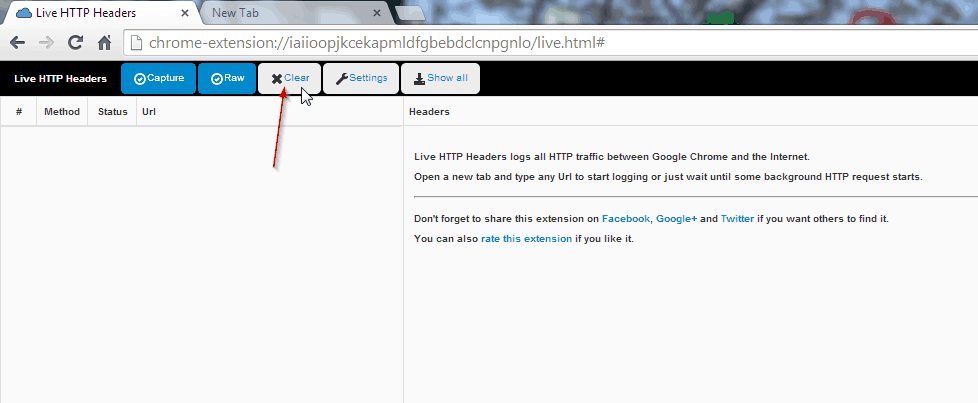
#3) I pasted the link I received into the new tab's address bar and press enter.
#4) After looking at the data screen this is what I saw.
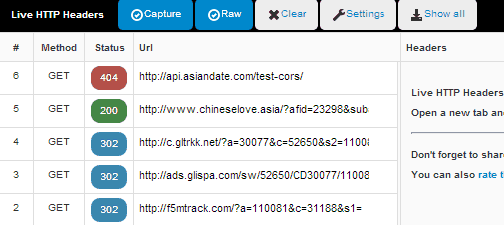
F5 is brokering the deal from Glispa. Glispa was sending it to gltrkk.net? WTF is gltrkk.net - is that the tracker owned by glispa, or another network?
Let's find out!
Easy Method to try First - Typegltrkk.net into your address bar and see what happens (this method actually confirmed glispa does in deed own this domain - so our search is over)
Method #2) For the hell of it What if Glispa Did NOT own that tracker domain? What if it was another CPA Network? How can we find out who it belongs to?
Here are some methods to try, but again; nothing comes with a guarantee.
Way1) Do a WHOIS lookup - go to www.geektools.com, type in the domain, and look for the company/contact details -- in this case the details were protected by whois guard so that's no good.
Way2) Reverse Look up the server address of gltrkk.net, then see what other sites are hosted on that server and work your way back using a reverse ip domain checker tool.
Way3) Look at the upstream/downstream sites for the domaingltrkk.net using similarweb.com and look for aff network names there.
Way4) Type the tracker URL into google.com and see what comes up.
This guide is focused around Android, because I personally hate iPhone (yes I owned one - so I gave it the benefit of the doubt and sold it after 3weeks and went back to Android) and because Android is the most popular OS in the world and iPhone usage is on a decline anyway. Regardless, much of the ways on android can be repeated on iPhone with the iphone software version.
NOTE: This guide is 100% unbiased, no one paid me a single cent to write this guide. Of course there are paid tools in this guide being mentioned because without them you just can't get from A to B. If you want to make $1000+/day you MUST invest in proper tools, these are the tools I use and recommend because they help me, and they will help you. I used my affiliate links for referrals when linking these tools, you can skip the links and go direct by typing them into the address bar if you feel I don't deserve the credit. Whatever you do, I thank you for reading this guide.
My god, the king has delivered
Pure gold. Thanks a lot for sharing!
Attila the Hun sick thread! This is a thesis and a half!
Thanks for sharing
Thanks for this! SimilarWeb+WRW is really powerful thing.
Re your last topic - instead of Live HTTP i'd prefer to track link in http://redirectdetective.com/ It is much more clear than a list of all redirects in Live HTTP.
 Originally Posted by mobiledao

unbelievable, never mind a gold nugget this is a gold Bar! thanks
Fucking. Awesome.
Superb guide. I've learned a LOT here.
Thanks!
I think my brain just exploded.
Attila, you should just add this to your outsourcing empire and just offer it as a service for us!
I will buy!
Great write up! There's a lot of good info here to go through.
Originally Posted by cmdeal
Great stuff man, as usual a huge bow!
Damn very nice! How would someone target carrier IP's though? Using hidemyass as far as i know you will be marked as wifi and wont be seeing all the really good ads that people target actual carrier IP's with.
Thanks, man.
OMFG!!

Epic post is epic.
Originally Posted by mobiledao
OMFG! Long Live the King! We love you!!!
Now, let's not waste The King's effort and get the shit done!
Originally Posted by iAmAttila
Originally Posted by cmdeal

Sick post mate!
Thanks for the guide IAmAttilla.
Quick question if I may.
Is it necessary to purchase an Android device if you have HMA and OperaEmulator/Genymotion?
Are there certain limitations to emulators?
I will buy a Galaxy if necessary but would rather spend the £300-£400 on testing if the emulators provide the same information.
^^On that note, would Android on Virtualbox work just as well?
(Yes, the tutorial on setting that up is coming.)
Originally Posted by rawklix
Wicked guide iAmAtilla. Thank you so much. Noob mind overflowing.
Let them creative juices flow haha!
awesome writeup, thanks!
not sure who all uses popclip for osx, but if you do here are a couple of extensions I made to search a highlighted url in google site search and similarweb. saves me a bit of time anyway!
Awesome! Learned alot!
Atilla, what a mega-writeup! I thought I knew how to spy..
The Real Bomb!!! 
also http://www.wheregoes.com/ is a good alternative to http://redirectdetective.com.
Precious demo of thought process, strategy and leverage on available resources. Applause.
@ iAmAtilla - Thx for this guide, awesome! A couple of ?'s for you. (Newbie alert, using Decisive, going with the Mobile Appetizer's strategy with my tools = iPhone, hidemyass, opera emulator & browserstack)
1. (How to work with what tools I have) If I don't have a DROID, is there any other strategies to spy on the in-app impressions without having the physical device? How about wifi vs. carrier seems only locals could get the carrier spying? Even with HMA you're still confined to coming in via wifi, no? (Perhaps there's another web-based tool, that allows you to dummy install an app, seems unlikely..) // btw - just caught one of your replies above so feel free to defer to that response if it still holds true that I should go out and buy the device..//
2. (Learning to use the Ad Planner) For this, I think the main use for it is to identify which are the top apps/sites to get a sense for where my offers will deliver and see what the competition is running, by then going through my emulator to spy on those respective sites/apps (for my iPhone).
*I'm seriously considering picking up a used Galaxy S3 on craiglists here in NYC (they appear to be around US $125 used)..
http://www.andyroid.net/
Don't bother with carrier emulation. Just use IP/header spoofing (http://stmforum.com/forum/showthread...ition-for-FREE!) in a desktop browser and if that doesn't work, don't dwell on it.
Just spent a couple hours reading and making notes on this. Awesome shizzle.
It seems WRW is essential.
This kind of post is what makes this place great!
Hi. I loved the guide. Thank you
I have HTC One M8. I have installed some apps but none of them showing ads except Google Ads.
Apps are randomly installed from Google App Store. Anyone would mind telling me what is wrong here?
Originally Posted by zeno
I'm a little late to the party but thanks so much for this info. WMW for the win
Posts like this make this forum so valuable! thnx a lot!
[QUOTE=iAmAttila;175846][b]G)
This guide is focused around Android, because I personally hate iPhone (yes I owned one - so I gave it the benefit of the doubt and sold it after 3weeks and went back to Android) and because Android is the most popular OS in the world and iPhone usage is on a decline anyway. Regardless, much of the ways on android can be repeated on iPhone with the iphone software version.
I have a Iphone... Do i have to buy a Android or can i use a "android software version" and how does that work?
Thanks so much! I LOVE THIS POST @iamattila
Key takeaways for me - get efficient at spying and save $$$
Great post!
Lol.
Never seen anything better than this!
Thank You!
This is sick dope mate ! just wow
Awesome guide!! I would pay half my membership fee just to read your post. Threads like this make me feel like I should be paying more to be here. I just have a few questions if you or anyone really could help me out I'd appreciate it!
At what point in your IM career would you recommend buying the tools recommended in your spying guide? Specifically WRW. I am currently taking notes and getting ready to start my first series of campaigns following the mobile cookbook. Would you say I would be losing more money in testing because of the data I don't have access to without those tools in your guide? It makes optimizing so efficient that I feel I would make the 300$ back quickly just from money and time saved, not even profits. Are they too complex of tools for a noobie in the AM world? Is there a cheaper alternative I could use? Thanks in advance when I do decide to buy them I definitely will from your affiliate links!
Brandon, this guide is 2 years old, so some of the tools or source mentioned are no longer alive (decisive) or not considered the top ones (WRW), most of the info is still very well usable thou.
As for spytools, I think most people here use Adplexity, they had a Black Friday special running, not sure if it's still valid thou : http://stmforum.com/forum/showthread...y+black+friday
Having a spytool at your disposal, if even for one month, will make your life way easier for sure. It's a massive time saver when it comes to doing market research and collecting some banners/LPs to start testing with. It's an investment I would strongly recommend to make. Especially in case you are considering to focus on mobile carrier traffic.
You can start by spying manually, in which case you will definitely need some VPN, hidemyass is a pretty good one, but it's not working on a few sources that have it's IPs blacklisted. Maybe try to search for a less known one.
Don't be afraid of using these tools as a newbie, they are actually pretty easy to use.
Thank you for pointing me in the right direction! I wasn't aware of Adplexity actually and its cheaper too. Absolutely seems to be a worthy investment to me. I'll learn so much quicker and so much time and money will be saved if I can efficiently track and test
SIck and epic post, I learned a lot here, thanks man.
adplexity is awesome, but I found free - http://affbank.com/ads-spy-tool
Thanks a lot for this. Very great guide. That $500 pro plan added to the wish list.
Home > Paid Traffic Sources > Mobile